4
4
Buttons
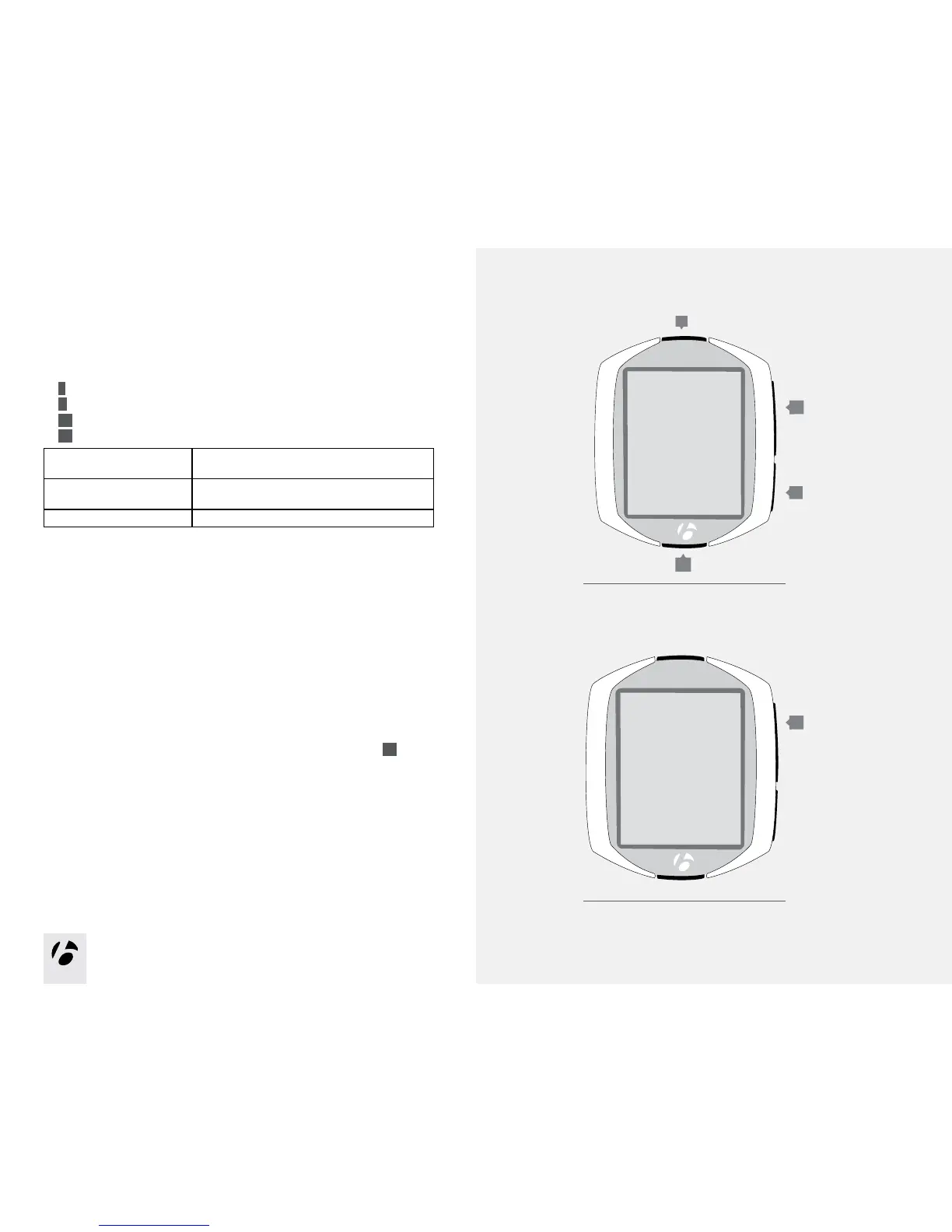
The NODE has four buttons (Figure 7). The actions for buttons are described in
the table below. For simplicity, these are the abbreviations of button names:
T
is Top
B
is Bottom
s1
is Side 1
s2
is Side 2
Browse
Press and repeat to switch through a list of
values or screen elements.
Hold
Press a button continuously for about
three seconds.
Press Push a button once, briefly.
Memory
The NODE has a Trip memory and a Total (accumulated) memory.
Trip data
•Cadence AVG and MAX
•Distance
•HeartRateAVG,MIN,andMAX;plusZones1through5
•PowerAVG,MIN,andMAX
•SpeedAVGandMAX
•Altitude(ALT),+,–,andGrade(%)AVGandMAX
Erasing trip data: Trip Restart
The Trip data can be erased (set to 0) before each ride (Figure 8): hold
s1
for
three seconds. Resetting the Trip memory does not affect the Total memory.
Accumulated data (Total memory)
•Total distance
•Totalaltitudegain
Erasing total memory: Reset
Youcansetallvaluesinthememoryto0(zero)anderaseallsettings.Seepage50.
Figure 7. Names of Buttons.
s1
s2
T
B
Figure 8. Erase Trip Data.
(3 seconds)
s1











 To Next Page