28
28MANAGE Mode
28
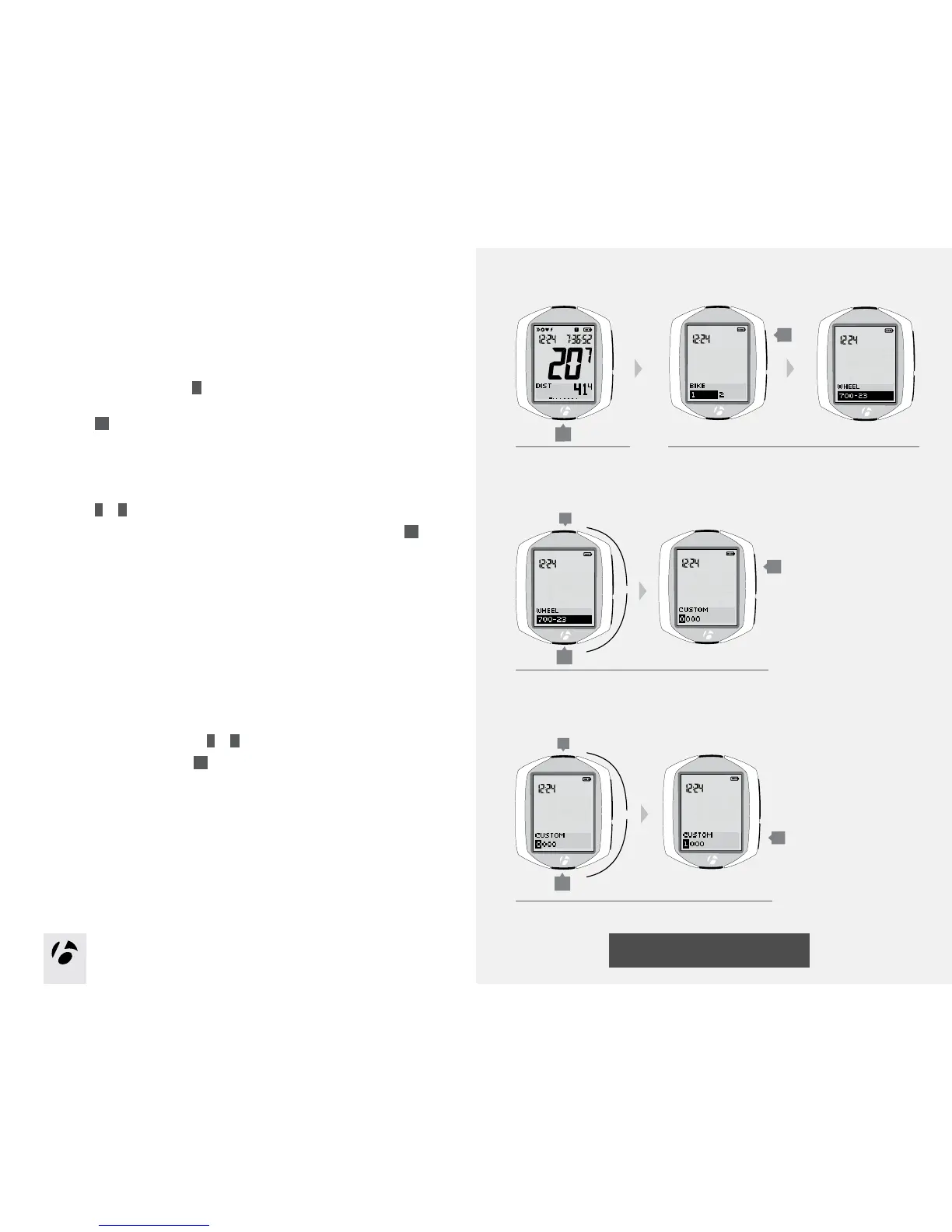
To setup the computer with a custom wheel size
If the NODE is currently showing WHEEL, start with Step 3.
1. Enter MANAGE mode. Hold
B
for three seconds.
The Manage mode starts with the Bike Selection display.
2. Browse
s1
to wheel size.
3. Browse
T
or
B
to Custom.
To save Custom choice and proceed to setting the custom value, press
s1
.
The display switches to Custom with the first digit highlighted.
4. To change the number, browse
T
or
B
.
To select the number, press
s2
.
After you select a number, the next digit is highlighted.
5. Repeat Step 4 for the other three digits.
1.
3.
B
(3 seconds)
T
B
2.
4 and 5.
T
B
or
or
s1
s1
s2











 To Next Page