37
37MANAGE Mode
37
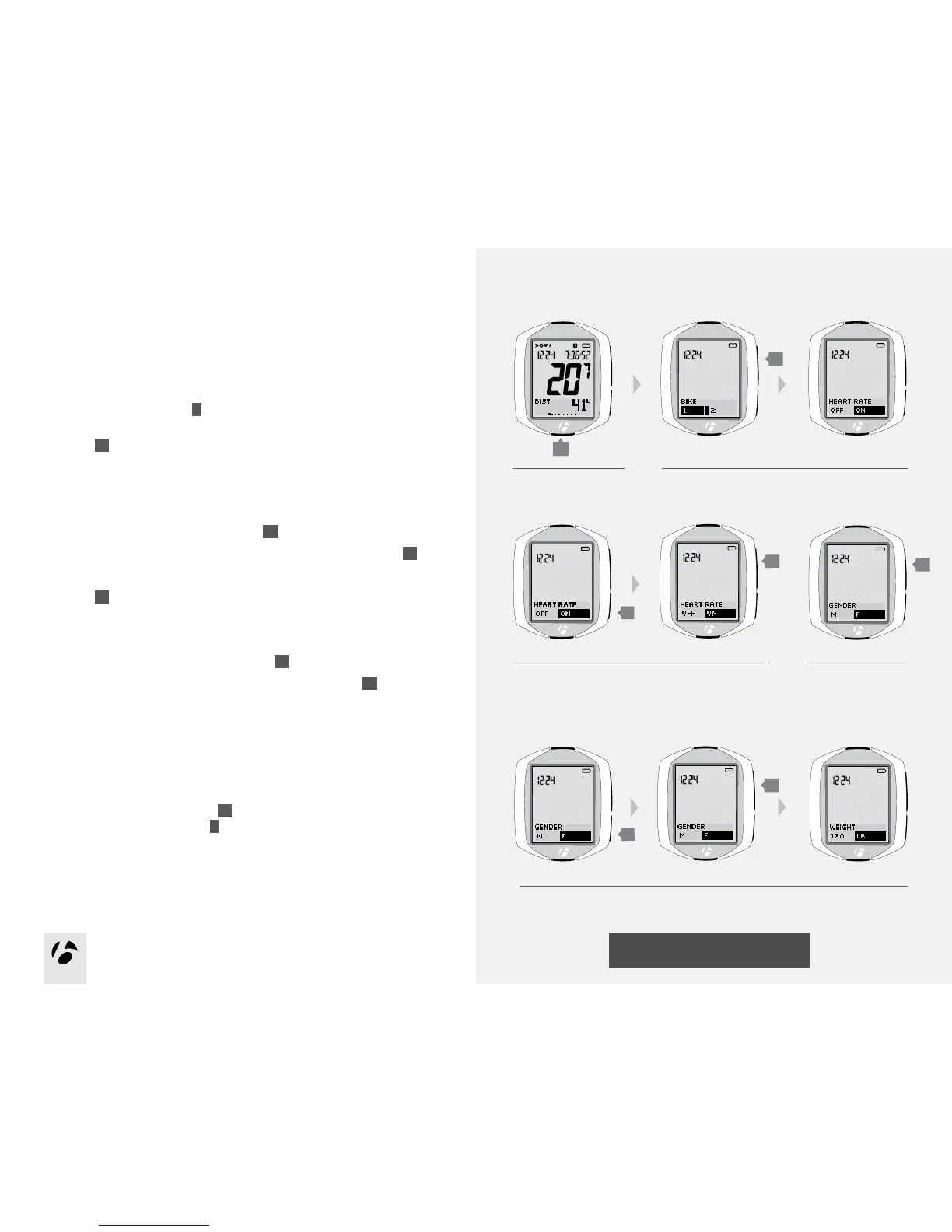
Setup gender
Gender is used in calculations of calorie output.
IftheNODEdisplayiscurrentlyshowingGender,startwithStep5.
1. Enter MANAGE mode. Hold
B
for three seconds.
The Manage mode starts with the Bike Selection display.
2. Browse
s1
to heart rate.
3. If needed, change Heart Rate to On. Press
s2
to change.
To save the your choice and proceed to the Set Gender function, press
s1
.
4. Browse
s 1
to gender.
5.Tochangethegender(chooseM or F), press
s2
.
To save your choice and proceed to the Weight function, press
s1
.
6.Chooseoneofthefollowing:
•FollowtheinstructionstomanageWeightonpage38.
•Toseeotherfunctions,browse
s1
.
•ToreturntoRIDEmode,hold
B
for three seconds.
1.
3.
B
(3 seconds)
2.
s2
4.
5.
s2
s1
s1
s1
s1











 To Next Page