46
46MANAGE Mode
46
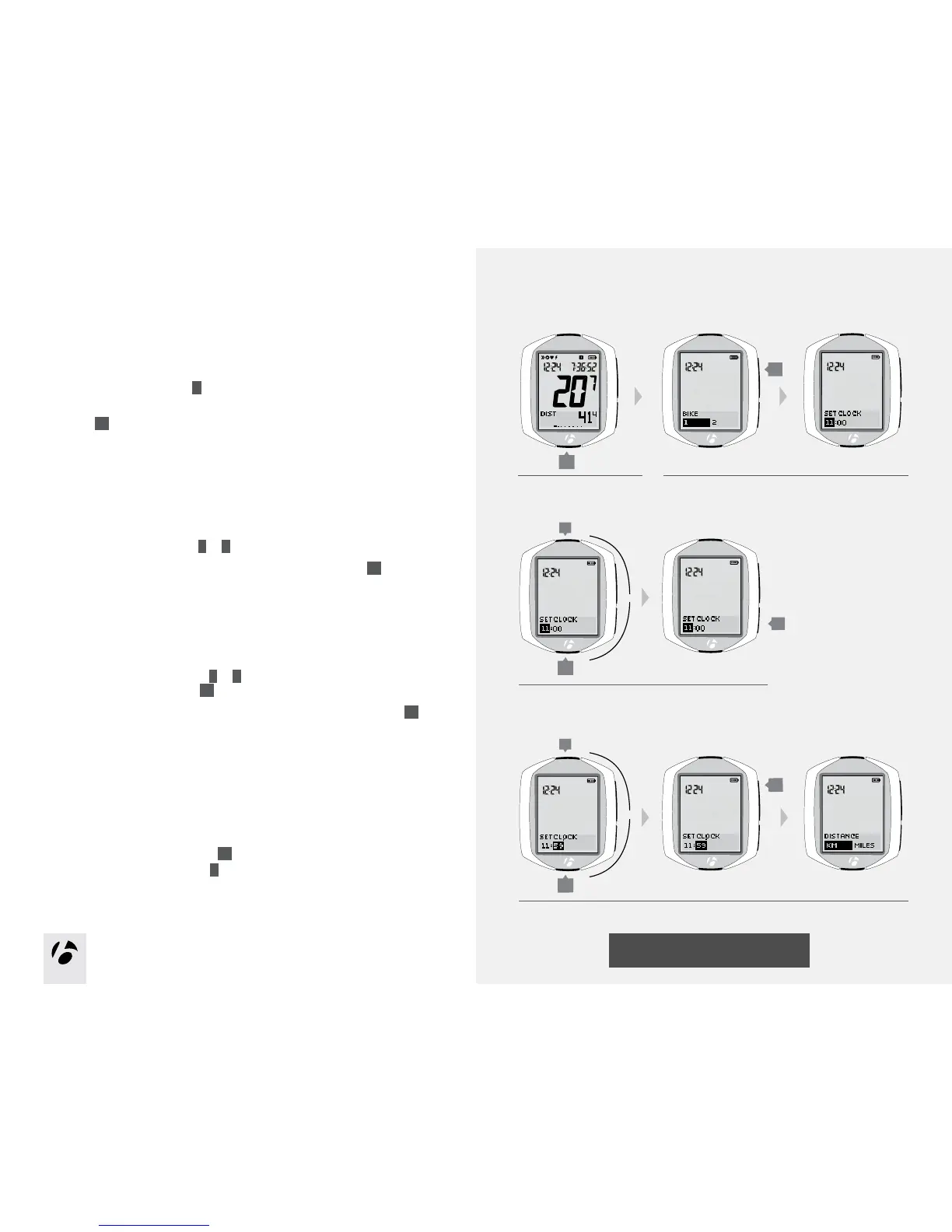
Setup Time
If the NODE display is currently showing Clock Type, start with Step 3.
1. Enter MANAGE mode. Hold
B
for three seconds.
The Manage mode starts with the Bike Selection display.
2. Browse
s1
to Set Clock.
The hours are highlighted.
3. To change the hours, browse
T
or
B
.
To set the hours and proceed to the set minutes function, press
s2
.
4. To change the minutes, browse
T
or
B
.
To return to set the hours, press
s2
.
To save the clock settings and proceed to the set Distance Units, press
s1
.
5. Choose one of the following:
•FollowtheinstructionstosetDistanceUnitsonpage47.
•Toseeotherfunctions,browse
s1
.
•ToreturntoRIDEmode,hold
B
for three seconds.
1.
3.
B
(3 seconds)
2.
T
B
4.
T
B
s1
s2
s1
or
or











 To Next Page