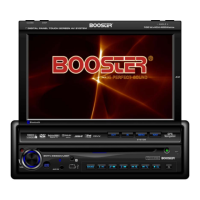
Need help?
Do you have a question about the Booster BDVM-8360UBT and is the answer not in the manual?
Detailed steps for detaching and reattaching the front panel of the unit.
Controls unit power ON/OFF and audio muting.
Adjusts volume level and confirms selections.
Stores radio stations using MEM and VOL buttons.
Selects stored radio stations using BAND and preset numbers.
Automatically searches for radio stations in TUNER mode.
Skips to the next song or track during playback.
Skips to the previous song or track during playback.
Speeds up playback within the current track.
Reverses playback within the current track.
Automatically stores radio stations or scans presets.
Selects radio frequency bands (FM1, FM2, FM3, AM).
Controls playback (play, pause, stop) for multimedia.
Toggles between audio sources like Radio, DISC, USB, etc.
Selects sound effect modes (FLAT, CLASSICS, POP, etc.).
Accesses settings menus for audio, picture, and expert options.
Connects and selects external audio/video input sources.
Connects and configures the subwoofer output.
Setup and function of the rear view camera input.
Automatic display switching for video sources like cameras.
Selects the audio source mode (Radio, DISC, USB, etc.).
Turns the unit ON or OFF.
Changes radio band or enables random playback.
Confirms selections or settings.
Navigates menus and selects items.
Selects stereo or mono reception for radio.
Enters program search or sets Bluetooth mode.
Scans presets or sets Bluetooth mode.
Controls track/chapter navigation and frequency tuning.
Toggles the loudness feature ON or OFF.
Displays or accesses media file information.
Stops playback or controls PBC function for VCD.
Selects tracks, numbers, or enters phone numbers.
Starts, pauses, or resumes media playback.
Temporarily silences audio output.
Accesses the main unit setup menu.
Selects subtitle language for DVD playback.
Enters the multimedia setup menu.
Changes the viewing angle for DVD playback.
Activates the intro playback function for tracks.
Increases the volume level.
Sets repeat sections or zooms video playback.
Selects audio options or initiates phonebook pairing.
Decreases the volume level.
Selects audio language or jumps to track/chapter.
Makes or accepts phone calls via Bluetooth.
Rejects incoming calls or ends active calls.
Configure TV system, auto play, video, password, and rating.
Select OSD, audio, subtitle, and disc menu languages.
Adjust audio key tone.
Adjust video brightness, contrast, hue, saturation, sharpness.
Configure dynamic range and dual mono audio output.
Steps to insert and recognize USB or SD/MMC cards.
Playing MP3/MP4/WMA files from USB flash drive.
Controls playback for multimedia files.
Stops playback of multimedia files.
Navigates and selects tracks from folders.
Switches between media types (MP3, Picture, MP4).
Folder navigation and track selection in MP3 mode.
Image navigation, rotation, and mirroring.
Folder navigation and track selection in MP4 mode.
Resets the device to factory default settings.
Steps to connect a Bluetooth device to the unit.
Automatic reconnection of previously paired phones.
Manages call functions like dialing and waiting.
Saves phone numbers for quick dialing.
Dials stored phone numbers.
Answers, ends, or rejects incoming calls via Bluetooth.
Switches calls between phone and car unit.
Accesses and manages call history (last, received, missed).
Manages phone contacts, including downloading from phone.
Plays music wirelessly from mobile phones via Bluetooth.
Controls media playback characteristics remotely via Bluetooth.
Details on frequency range, input and output levels.
Details on video input/output levels and impedance.
Details on video standard, resolution, brightness, backlight.
Details on operating temperature and humidity ranges.
 General
| Display Type | LCD |
|---|---|
| Screen Size | 7 inches |
| Bluetooth | Yes |
| USB Ports | 1 |
| Audio Output Power | 4 x 50W |
| Equalizer | Yes |
| SD Card Slot | Yes |
| AUX Input | Yes |
| Radio Tuner | FM/AM |
| Remote Control | Yes |
| Resolution | 800 x 480 |
| Video Playback | Yes |
| GPS | No |
| Rear Camera Input | Yes |
| Steering Wheel Control | Yes |
| Supported Formats (Audio) | MP3, WMA |

 To Next Page