Installation instructions
830 ES – 6 720 644 936 (2021/08)
46
4.14 Measuring gas pressure
Confirm gas pressure upon installation.
Connecting manometer
▶ Shut off gas supply at installer supplied shutoff valve for
this water heater.
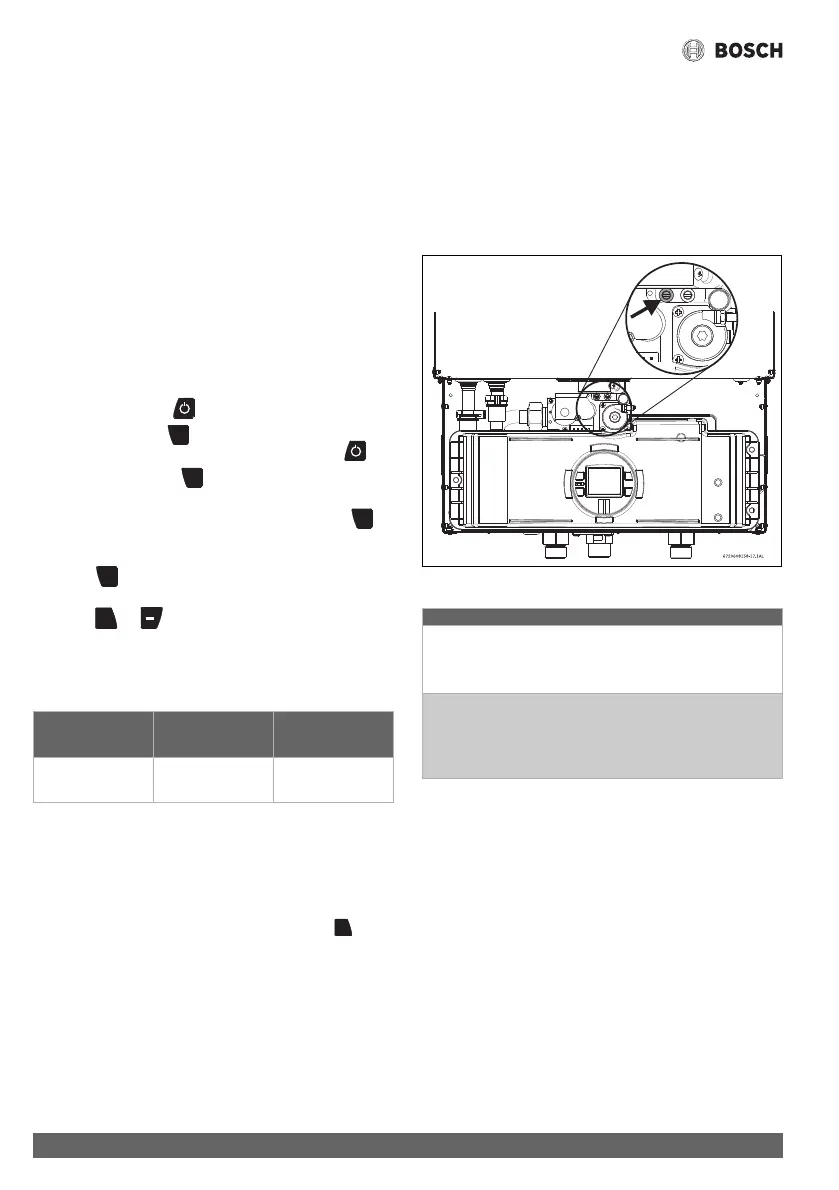
▶ Remove front cover and locate inlet gas pressure test port
(see fig. 38).
▶ Loosen screw inside left test point fitting (do not remove)
and connect manometer tube to test point.
Static Pressure Test
▶ Turn gas supply back on.
▶ Record static gas pressure reading in table 33.
Operating Pressure Test
▶ Push power button to shut the water heater off.
▶ Push and hold the button.
▶ Turn power back on by pushing the power button .
▶ Continue to hold the button until all symbols on the
screen light up and the temperature reads 188 °C.
▶ When display reads 188, immediately release the
button.
The display should now read P2.
▶ Press to enter P2 adjustment. The current setting will
appear on the display (factory default).
▶ Press or until P1 appears.
Note: While in this mode the appliance will run constantly at
maximum power and allow maximum water flow.
For inlet gas pressure adjustment consider the following table:
Table 32 Minimum inlet gas pressure under full operation
▶ Operate all other gas appliances (except heater) on same
gas piping system at maximum output.
▶ Turn on high volume of hot water flow (at least 6 gpm) and
burner will light. If heater display reverts to P2, open more
hot water fixtures to allow sufficient flow. Press until
P1 reappears on the display.
▶ Record lowest operating gas pressure reading in table 33.
Gas pressures lower than 3.5" W.C. for Natural Gas or 8" W.C.
for LPG will result in insufficient degree rise to the hot water
being used, reduced hot water volume, possible error code
faults and must be corrected. See Gas Connections,
chapter 4.9, page 37.
P1 fan speed:
Factory default: NG: 48, LP: 40
Lowering P1 fan speed reduces the maximum BTU input.
As a temporary measure if the gas pressure in P1 is below
specification, lower P1 fan speed incrementally until minimum
inlet gas pressure reaches specified range (table 32). After
upgrading gas line, reset appliance to P1 factory default setting
(NG: 48, LP: 40) or setting from chapter 4.3.8.
Fig. 38 Gas pressure test port (left tapping)
Table 33
Gas type NG LPG
p
in
3.5” WC 8” WC
Static Gas Pressure Reading (see chapter 4.14)
enter here: ___________________ Date: ___________
Operating Gas Pressure Reading (see chapter 4.14)
enter here: ___________________ Date: ___________




 To Next Page