Features en-us
9
Ice cube maker →
Page14
Ice storage container →
Page10
Frozen food container →
Page16
Screw foot
Variable door rack →
Page10
Door rack for large bottles
Note:Your appliance may differ from the diagrams with
regard to features and dimensions.
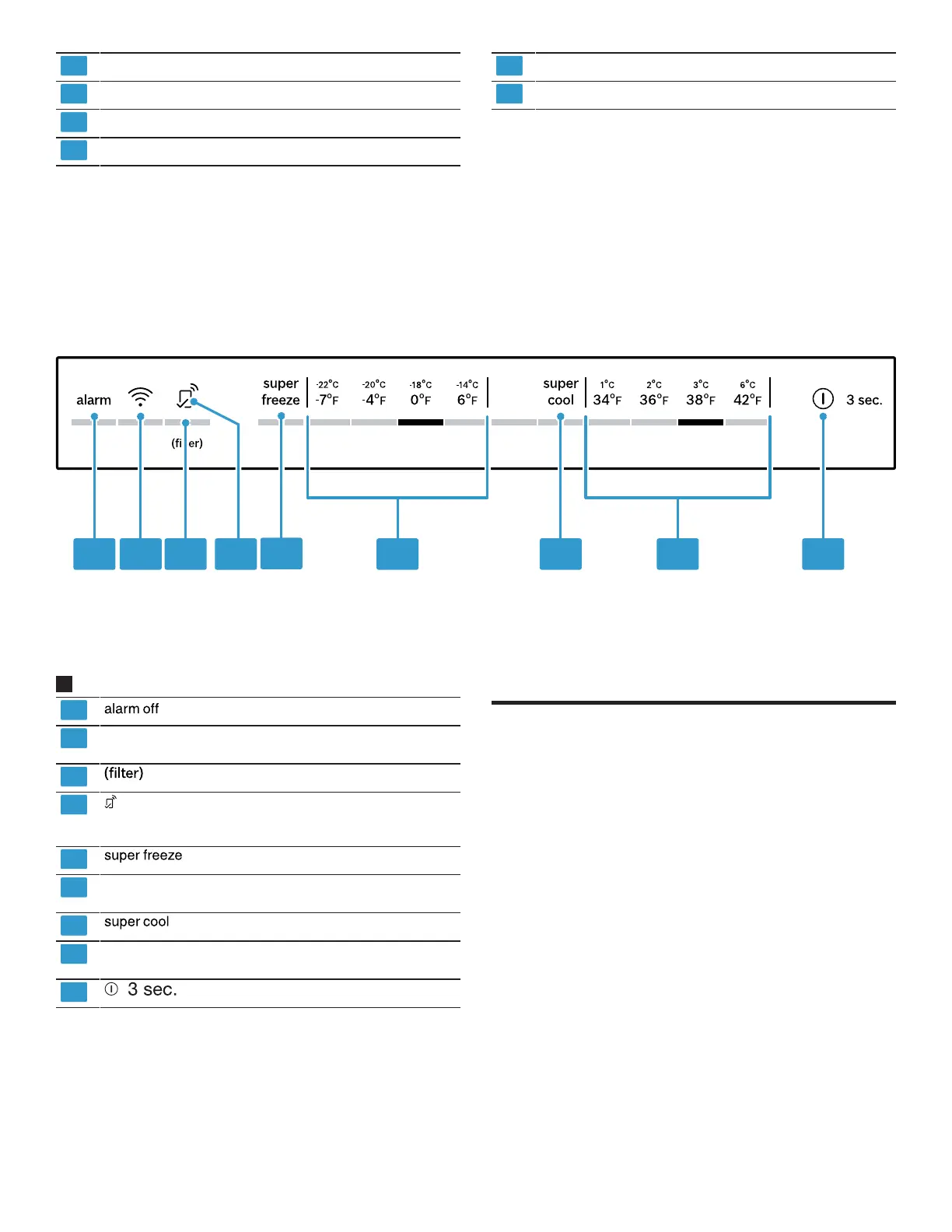
5.2 Control panel
You can use the control panel to configure all functions of your appliance and to obtain information about the operat-
ing status.
2
switches the warning signal off.
switches the connection to the WLAN home net-
work (Wi-Fi) on or off.
flashes when the filter needs to be replaced.
lights up if user-defined settings have been set
via the HomeConnect®app. You can find more
information in the HomeConnect®app.
switches Super freezing on or off.
Displays the set temperature for the freezer com-
partment in °F or °C.
switches Super cooling on or off.
Displays the set temperature for the refrigerator
compartment in °F or°C.
switches the appliance on or off.
Features
6 Features
Features
The features of your appliance depend on the model.
6.1 Shelf
To vary the shelf as required, you can remove the shelf
and re-insert it elsewhere.
→
"Removing the shelf", Page16
6.2 Storage container
The temperatures in the storage container are lower than
in the refrigerator compartment. Temperatures below
32°F (0°C) may occur occasionally.
In order to reach temperatures close to 32°F (0°C) in the
storage container, set the refrigerator compartment tem-
perature to 34°F (2°C). →
Page10
Use the lower temperatures in the storage container to
store highly perishable food, e.g. fish, meat and sausages.



 To Next Page