DS7060-AUS Reference Guide Copyright 2001 Detection Systems, Inc. Page 13
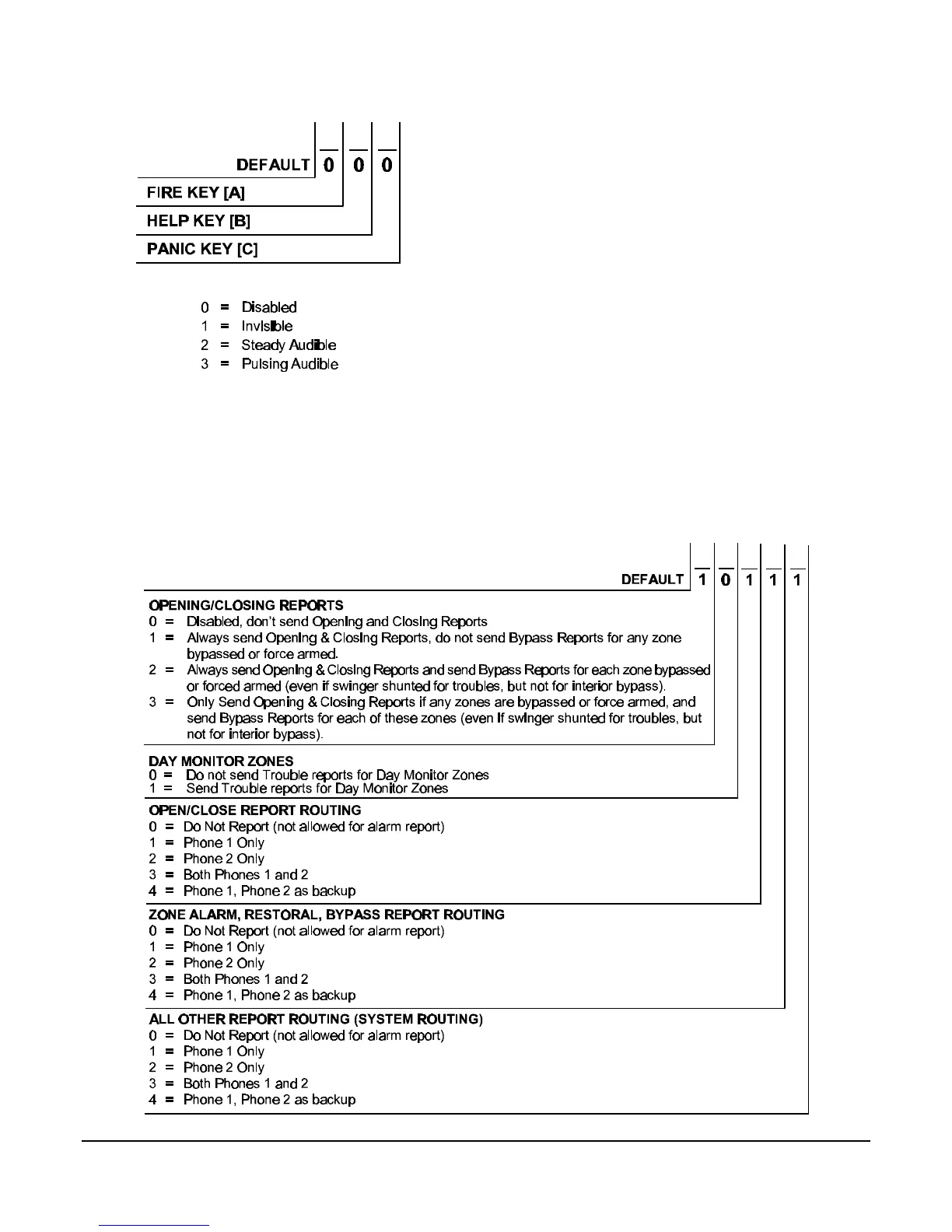
6.13 Address 19 - Special Keys
• Disabled: Special Key not programmed.
• Invisible: Special Key programming for no display of
alarm on the keypad or on outputs. Not to be used with
the Fire Key.
• Steady Audible: Special Key programming for steady
alarms on outputs and keypad sounders. Will turn on
steady unless alarms are already pulsing.
• Pulsing Audible: Special Key programming for
pulsing alarms on output and keypad sounders.
• Fire Key [A]: The emergency key at the bottom left of
the keypad entry area is the Fire Key. If programmed,
the key will activate a fire alarm when pressed for 2
seconds. May not be programmed as an invisible
alarm.
• Help Key [B]: The help key at the bottom center of the
keypad entry area is the Help Key. If programmed, the
key will activate a supplementary or an auxiliary type
alarm when pressed for 2 seconds.
• Panic Key [C]: The emergency key at the bottom right
of the keypad entry area is the Panic Key. If
programmed, the key will activate a panic alarm when
pressed for 2 seconds; nothing will display at the
keypad to indicate an alarm.
6.14 Address 20 - Report Control
Note: Closing Reports ( and subsequent Opening Reports) are only sent when the
system is fully armed. [PIN] + [ON] for Commercial Mode. [#] + [ON] for Residential Mode.



 To Next Page