Page 14 Copyright 2001 Detection Systems, Inc. DS7060-AUS Reference Guide
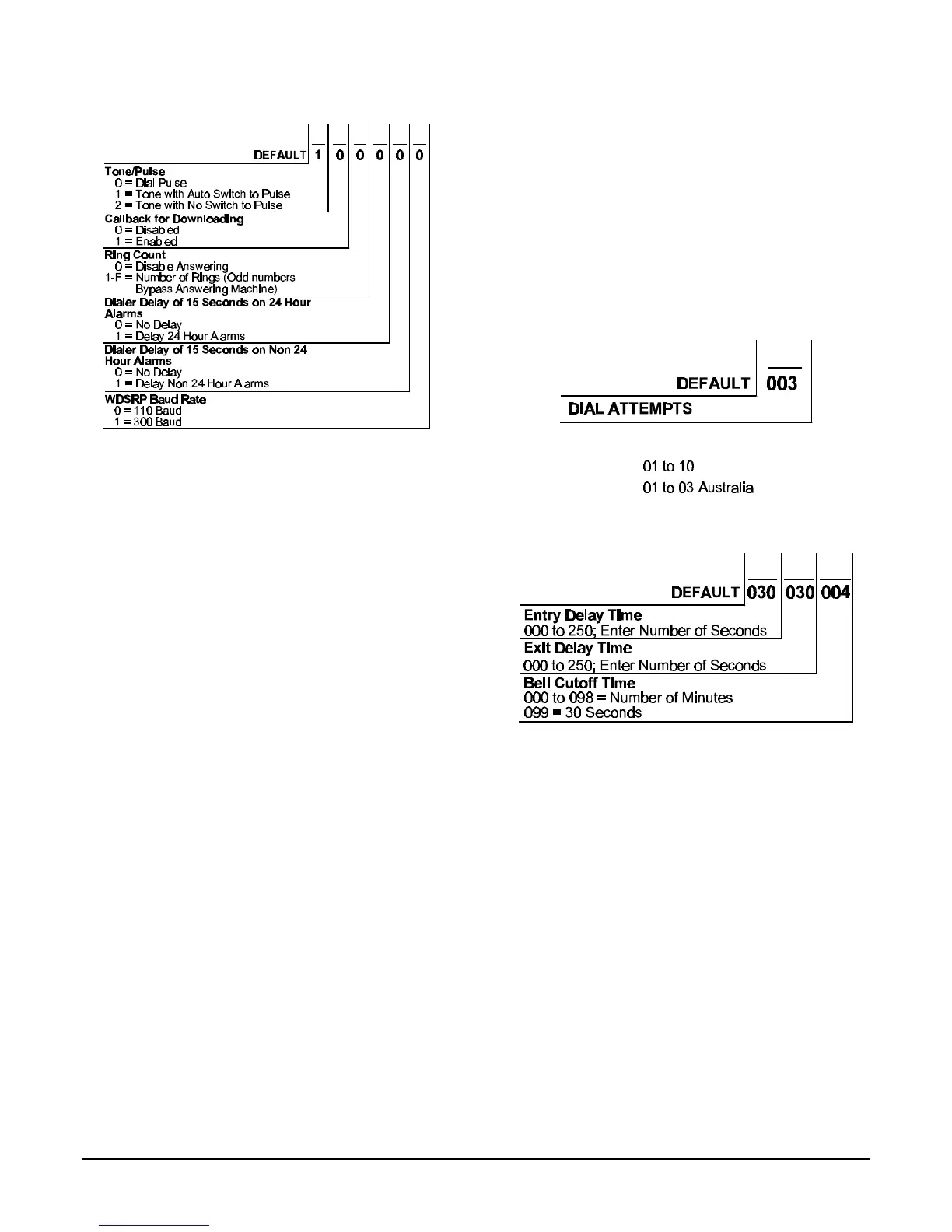
6.15 Address 21 - Phone Number Control
• Dial Pulse: If programmed, the panel will dial to
phone number 1, 2, or 3 using a pulse format.
• Dial Tone: If programmed, the panel will dial to phone
number 1, 2, or 3 using a tone format.
Note: When dialing through PBX systems, program
the phone control as tone dial only.
• Tone with Auto Switch to Pulse: If programmed, the
control panel will try to dial the first digit in tone dial
and check to see if the dial tone has been broken. If it
has not been broken, it will try to dial again using pulse
dial.
Note: Do not use this setting for PBX systems.
• Tone with No Switch to Pulse (required for PBX):
This setting will only use Tone dialing. Must be used if
the telephone system requires you to dial a number to
get an outside line.
• Callback for Downloading: When enabled, if an
attempt is made to connect to the panel for a remote
programming session the panel will hang up and
callback the number programmed for Phone 3,
Address 44 and 45.
• Ring Count: The control panel can be programmed to
answer the phone after a selected number of rings for
remote programming access.
• WDSRP Baud Rate: This selection determines the
baud rate that the panel will use to
• Answering Machine Bypass: This feature allows the
control panel to answer incoming calls when answering
machines are used. If the line rings, stops ringing, then
rings again within one minute, the panel will seize the
phone line on the first ring. To disable this feature,
program the control panel to answer on an even
number of rings.
• Dialer Delay: A Dialer Delay of 15 seconds can be
added when reporting burglar alarms, 24-hour burglar
alarms, and fire alarms. This delay will help to prevent
false alarm reports by giving the user 15 seconds to
disarm the system before a report is sent.
6.16 Address 22 - Dial Attempts
6.17 Address 23 - Time Delays



 To Next Page