This document describes the DVB-T2 Tuner Gen2, a device designed for receiving digital terrestrial television broadcasts in commercial vehicles. It provides detailed operating instructions for users to effectively manage and enjoy its features.
Function Description
The DVB-T2 Tuner Gen2 serves as a digital television receiver, specifically for DVB-T2 signals, in vehicles with a 12 V or 24 V electrical system. It allows users to access and watch available TV channels, listen to radio stations, and play media from connected USB storage devices. The device is preconfigured for use with coach infotainment systems but can be reconfigured for stand-alone operation or integration with other Bosch systems. It supports both HDMI and CVBS outputs, depending on its configuration, and includes analogue inputs (AV1, AV2) for external sources. The tuner is designed to ensure stable reception through its three DVB-T antennas. It also supports pay-TV channels when equipped with a suitable CI module and smart card.
Usage Features
The device is controlled primarily via a remote control, offering a comprehensive set of functions for navigation and media playback.
Basic Operation:
- Switching On/Off: The device powers on and off with the vehicle ignition. A stand-by button (1) on the remote control allows switching between normal operating mode and stand-by.
- Volume Adjustment: Volume can be increased or decreased using the dedicated buttons (7) on the remote control. A mute button (9) is also available to silence or restore the device's audio output.
- Media Source Selection: Users can select their desired media source (TV, Radio, AV1, AV2, HDMI, or connected USB storage device) through a dedicated source selection menu, accessed via button (3). Navigation within this menu is done using the P+/P- buttons (15) and confirmation with the OK button (6).
TV Mode:
- Channel Information: Pressing the 'i' button (11) displays information about the current channel for a few seconds. The display duration for this information can be adjusted in the system settings.
- Channel Navigation: The P+/P- buttons (15) allow users to switch between the next or previous channels.
- Channel Selection: Channels can be selected directly using the numeric keypad (12) for quick access to the first nine channels or two-digit memory presets. Alternatively, users can browse the channel list or a personalized "myList" (favourites list) by pressing the 'i' button (11) and then OK (6).
- Favourites List ("myList"): Users can create and manage a favourites list. Channels can be added to "myList" from the main channel list by selecting a channel, marking it with the OK button (6), and then pressing the blue button (8). Channels in "myList" can be deleted or their positions changed.
- Channel List Settings: The settings menu (16) allows for sorting channels alphabetically and filtering by DVB-T, DVB-T2, free-to-air, or pay-TV channels.
- Audio Language and Subtitles: For channels offering multiple audio languages or subtitles, these can be selected by pressing the 'i' button (11) to display channel information, then the green button (10) for subtitles or the yellow button (13) for audio languages, followed by P+/P- buttons (15) to choose the desired setting.
- TV Settings: Accessing the TV settings via button (16) allows for picture adjustments.
Radio Mode:
- Station Selection: Similar to TV mode, radio stations can be selected using the P+/P- buttons (15) to navigate the station list or "myList," or directly via the numeric keypad (12).
USB Mode:
- Connecting USB Devices: The device supports USB storage devices with FAT32 or NTFS file systems for media playback.
- Playing Media: After selecting the connected USB storage device as the source, users can choose to play video, photos, or audio files, or browse files directly.
- File Preview and Playback: A preview of marked files can be displayed by pressing the red button (14). Playback is initiated with the green button (10).
- Playback Controls: During video playback, users can fast-rewind (red button 14), pause/resume (green button 10), stop (yellow button 13), and fast-forward (blue button 8).
- Audio Language and Subtitles (Video): For video files, subtitles can be selected using button 1 (12) and audio languages using button 2 (12), followed by P+/P- buttons (15) to choose the setting.
- Picture Format Adjustment (Video): Button 3 (12) allows users to adjust the video picture display to fit the screen, with options like filling width, height, or the entire screen.
- Shuffle and Repeat Playback: In file browser and video list views, shuffle playback can be activated/deactivated with the yellow button (13), and repeat playback with the blue button (8).
- Slide Show: For photos, a slide show can be started with the green button (10). During a slide show, users can activate/deactivate shuffle (button 1), repeat (button 2), and adjust picture display duration (button 3).
System Settings:
- Accessing Settings: The system settings menu is accessed via button (16).
- On-Screen Menu Display Duration: The duration for which the on-screen menu and channel information are displayed can be set (5, 7, or 9 seconds) using the green button (10).
- Factory Default Settings: The device allows users to restore factory default settings, which will cause the device to switch off and restart automatically.
- Antenna Reception Performance Check: Users can check the signal strength and status of the three DVB-T antennas (green for normal, red for short circuit, grey for no connection).
Maintenance Features
- Software Update: The device supports software updates via a USB storage device. Users can download update files from the Bosch website, save them to a FAT32 or NTFS formatted USB stick, and then initiate the update process through the system settings menu. The update process consists of two parts: device firmware and TV tuner firmware.
- Pay-TV Reception: To enable pay-TV, users must install a suitable CI module and smart card into the dedicated CI slot.
- Disposal: The manual provides instructions for the proper disposal of end-of-life appliances, encouraging the use of available waste return and recycling systems rather than domestic refuse.

 Need help?
 General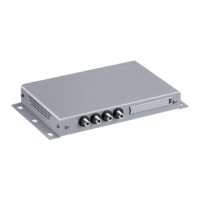

 To Next Page