EasyManua.ls Logo

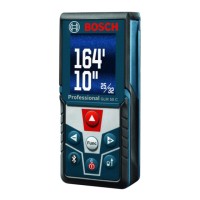
Bosch GLM400CL - User Manual

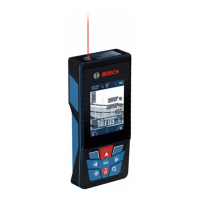
Bosch GLM400CL
45 pages
Print Icon
To Next Page IconTo Next Page
Loading...
IMPORTANT:
Read Before Using
IMPORTANT :
Lire avant usage
IMPORTANTE:
Leer antes de usar
For English Version
Operating/Safety Instructions
Consignes d’utilisation/de sécurité
Instrucciones de funcionamiento
y seguridad
GLM400CL
Call Toll Free for Consumer Information and Service Locations
Pour obtenir des informations et les adresses de nos centers de service
après-vente, appelez ce numéro gratuit
Llame gratis para obtener información para el consumidor y
ubicaciones de servicio
w ww . . co m
information@itm.com1.800.561.8187

Questions and Answers

  • T
    Timothy HortonAug 18, 2025
    What to do if calculated value is out of range on Bosch GLM400CL Measuring Instruments?
    • K
      Kelly GutierrezAug 18, 2025
      If your Bosch Measuring Instruments display shows a calculated value greater than 1 999 999 or smaller than –999 999in/in2/in3, divide the calculation into intermediate steps.
  • J
    Jennifer LunaAug 20, 2025
    How to recalibrate grade measurement on Bosch Measuring Instruments?
    • S
      Sara StoneAug 20, 2025
      To resolve issues with the calibration of the grade measurement on your Bosch Measuring Instruments, repeat the calibration following the instructions on the display and in the operating instructions.
  • J
    Jennifer GreenAug 22, 2025
    What to do if calibration surfaces are not aligned on Bosch Measuring Instruments?
    • W
      Wesley GentryAug 23, 2025
      If the surfaces used for calibration weren't accurately aligned (horizontal or vertical) when calibrating your Bosch Measuring Instruments, repeat the calibration on a horizontal or vertical surface. If needed, first check the surface with a level.
  • R
    robert99Aug 26, 2025
    What to do if Bosch GLM400CL were moved during calibration?
    • L
      Lisa KingAug 26, 2025
      If your Bosch Measuring Instruments were moved or tilted while pressing the button during calibration, repeat the calibration, ensuring you hold the measuring tool still while pressing the button.
  • S
    Sophia BallardAug 27, 2025
    How to fix addition/subtraction errors with Bosch GLM400CL Measuring Instruments?
    • D
      Daniel RobertsAug 28, 2025
      To fix the issue of adding/subtracting measured values with different units on your Bosch Measuring Instruments, only add or subtract measured values that have the same units of measure.
  • S
    Stacy WilliamsAug 30, 2025
    What to do if failure of the Bluetooth connection with Bosch Measuring Instruments?
    • E
      Eric ReyesAug 30, 2025
      If the Bluetooth connection for your Bosch Measuring Instruments fails, try the following: * Switch off and restart Bluetooth on both the measuring tool and your mobile device. * Ensure the application on your mobile device is functioning correctly. * Verify that Bluetooth is activated on both devices. * Check your mobile device for overload. * Reduce the distance between the measuring tool and your mobile device. * Remove any obstructions like reinforced concrete or metal doors. * Keep away from electromagnetic disturbances like WLAN transmitters.
  • A
    Andrea PaulSep 1, 2025
    How to clean misted laser beam outlet of Bosch GLM400CL Measuring Instruments?
    • J
      Jennifer JacobsSep 2, 2025
      If the laser beam outlet, reception lens, or camera of your Bosch Measuring Instruments is misted up (for example, due to a rapid temperature change), wipe these components dry with a soft cloth.
  • T
    Timothy MccannSep 4, 2025
    What to do if the battery is too low on Bosch GLM400CL?
    • Z
      zoliverSep 4, 2025
      If the battery of your Bosch Measuring Instruments is too low, charge it.
  • M
    Michael StewartSep 7, 2025
    What to do if target surface doesn't reflect correctly for Bosch GLM400CL?
    • P
      Paul HoffmanSep 7, 2025
      If the target surface of your Bosch Measuring Instruments does not reflect correctly (e.g., water, glass), cover the target surface.
  • C
    Christopher LeeSep 9, 2025
    How to clear covered laser beam output on Bosch GLM400CL Measuring Instruments?
    • M
      Mark GriffithSep 9, 2025
      If the laser beam output, reception lens, or camera on your Bosch Measuring Instruments is covered, clear the obstruction.

Summary

Safety and General Information

General Safety Guidelines

Explains safety symbols, general rules, electrical, and personal safety precautions.

Laser Tool Safety

Specific safety rules for operating the laser tool and avoiding eye injury.

Battery Charger Safety

Safety precautions for handling and using the battery charger.

Regulatory Notices

Provides Bluetooth, FCC, and ISED compliance information.

Intended Use

Defines the primary purposes and applications of the measuring tool.

Product Features and Specifications

Product Features and Display Elements

Details the physical components and on-screen indicators of the measuring tool.

Technical Data

Provides detailed specifications like measuring range, accuracy, and operating conditions.

Operation and Measurement

Initial Start-Up and Charging

Guides through initial startup, battery charging, and connecting via USB.

Basic Operation and Controls

Instructions for switching the tool on/off and basic measuring procedures.

Measurement Functions

Details various measurement modes like length, area, volume, and indirect measurements.

Gradient Measurement and Memory Functions

How to use digital spirit level, gradient measurement, and manage stored data.

Accuracy, Calibration, and Environmental Effects

Discusses factors affecting results, accuracy checks, calibration, and environmental influences.

Troubleshooting, Maintenance, and Warranty

Troubleshooting Common Issues

Provides solutions for common errors, measurement problems, and connectivity failures.

Maintenance and Service

Guidelines for cleaning, maintenance, professional repair, and environmental protection.

Limited Warranty Information

Outlines the warranty period, coverage, registration, and claim process.

Bosch GLM400CL Specifications

General IconGeneral
Accuracy±1.0 mm
DisplayColor display
Battery TypeLi-ion
Weight0.5 kg
BluetoothYes
Operating Temperature14° F / -10° C up to 122° F / 50° C
Level BubbleYes
Laser ClassClass 2
Laser Type635 nm, <1 mW
Protection ClassIP54
MemoryYes
Units of Measurem, ft, in
Storage Temperature-20°C to 70°C

Related product manuals