
 To Next Page
A
Amy RobertsonAug 17, 2025
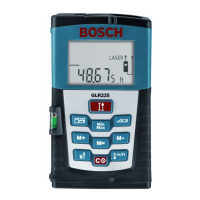
Why am I getting errors when adding/subtracting measurements on Bosch GLR225 Measuring Instruments?
- PPatricia VanceAug 17, 2025
Only add/subtract measurements of the same type.

Why am I getting errors when adding/subtracting measurements on Bosch GLR225 Measuring Instruments?
Only add/subtract measurements of the same type.
What to do if battery voltage is too low in Bosch GLR225?
If the battery voltage is too low, replace the batteries.
How to fix decreasing battery voltage in Bosch GLR225?
If the battery voltage is decreasing but measurement is still possible, replace the batteries.
What to do if the laser beam outlet or reception lens are covered on Bosch Measuring Instruments?
Make sure that the laser beam outlet or the reception lens are unobstructed.
What to do if there is an obstruction in the path of the laser beam for Bosch Measuring Instruments?
Ensure the laser point is completely on the target surface. Remove any obstructions in the path of the laser beam.
How to demist laser beam outlet or reception lens on Bosch GLR225?
If the laser beam outlet or the reception lens are misted up (e.g. due to a rapid temperature change), wipe them dry using a soft cloth.
What to do if target surface doesn't reflect correctly on Bosch GLR225 Measuring Instruments?
If the target surface does not reflect correctly (e.g., water, glass), cover off the target surface.
How to correct a wrong reference point set on Bosch Measuring Instruments?
Select the reference point that corresponds to the measurement.
What to do if the target surface reflects too intensely or ambient light is too bright for Bosch Measuring Instruments?
Work with the laser target plate 25 (optional accessory) if the target surface reflects too intensely (e.g., a mirror) or insufficiently (e.g., black fabric), or if the ambient light is too bright.
What to do if calculated area/volume is too large on Bosch GLR225?
If the calculated area or volume value is larger than 99990 ft2 or ft3, change the unit of measure to “m”.
Explains safe usage practices for the rangefinder.
Details critical procedures to avoid hazards during operation.
Covers precautions related to battery handling and safety.
Guidelines for recycling and responsible disposal.
Identifies and defines the rangefinder's components and display indicators.
Instructions for battery insertion and hand strap attachment.
How to power the rangefinder on/off and its auto-off function.
Step-by-step guide on how to perform measurements.
Explains how to choose the starting point for measurements.
How to change units and set continuous laser beam.
How to perform standard length measurements.
Steps for calculating area and volume.
How to find shortest and greatest distances.
Measuring distances indirectly using Pythagorean theorem.
Calculating the sum of multiple surface areas.
How to track continuous measurements and clear values.
Saving, adding, and subtracting measurements from memory.
How to view and clear stored memory contents.
General guidance on how to use the rangefinder.
Using tripod, extension pin, and vial level for measurements.
Addresses common problems and provides solutions.
Guidance on cleaning, repair, and environmentally friendly disposal.
Details the warranty terms and conditions for the product.
 General
| Accuracy | ± 1.5 mm |
|---|---|
| Display | LCD |
| Type | Laser Distance Measurer |
| Units of Measure | m, ft, in |
| Laser Type | 635 nm, <1 mW |
| Battery Type | AAA |
| Protection Class | IP54 |
| Power Supply | 2 x AAA batteries |
| Battery Life | Approx. 5000 measurements |
| Weight (without battery) | 100 g |
| Operating Temperature | 0°C to +40°C |
| Storage Temperature | -20 °C to 70 °C |
| Laser Class | Class 2 |