EasyManua.ls Logo

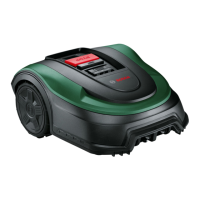
Bosch INDEGO 400 - User Manual

Bosch INDEGO 400
398 pages
Go to English
Print Icon
To Next Page IconTo Next Page
Loading...
Robert Bosch Power Tools GmbH
70538 Stuttgart
GERMANY
www.bosch-pt.com
F 016 L81 848 (2018.10) O / 398
de Originalbetriebsanleitung
en Original instructions
fr Notice originale
es Manual original
pt Manual original
it Istruzioni originali
nl Oorspronkelijke gebruiksaanwijzing
da Original brugsanvisning
sv Bruksanvisning i original
no Original driftsinstruks
fi Alkuperäiset ohjeet
el Πρωτότυπο οδηγιών χρήσης
tr Orijinal işletme talimatı
pl Instrukcja oryginalna
cs Původní návod k používání
sk Pôvodný návod na použitie
hu Eredeti használati utasítás
ru Оригинальное руководство по
эксплуатации
uk Оригінальна інструкція з
експлуатації
ro Instrucțiuni originale
bg Оригинална инструкция
sr Originalno uputstvo za rad
sl Izvirna navodila
hr Originalne upute za rad
et Algupärane kasutusjuhend
lv Instrukcijas oriģinālvalodā
lt Originali instrukcija
F 016 L81 848
Indego 350 | Indego 400

Table of Contents

Other manuals for Bosch INDEGO 400

Questions and Answers

  • T
    Timothy Davis Jr.Aug 19, 2025
    What to do if my Bosch INDEGO 400 Lawn Mower leaves areas uncut?
    • J
      John JacobsonAug 20, 2025
      If your Bosch Lawn Mower leaves areas uncut, there might be several reasons. First, allow the mower to run for three full cuts to cover the entire lawn. Also, the mowing time slot might not be long enough for the garden size, so increase it or use the Bosch auto calendar function. Other potential causes include a distance between wires that is too small (increase to at least 75cm), rough lawn conditions (select uneven ground in the menu or flatten the garden), grass that is too long (mow to at least 40mm and increase the cutting height), or slopes that are too steep (ensure slopes are 15 degrees or less). Avoid cutting in wet conditions. Remove objects or delimit them with perimeter wire, and follow the installation guide for metal constructions.
  • R
    Ryan OconnorAug 21, 2025
    What to do if my Bosch INDEGO 400 Lawn Mower leaves a ragged finish or poor cut?
    • C
      Charles EricksonAug 22, 2025
      If your Bosch Lawn Mower leaves a ragged finish, try increasing the height of cut. Also, allow the mower to run for 3 full cuts to cover the whole lawn. Other causes could be blunt cutting blades, so reverse or replace them, or clogging, so turn off the isolator switch and clear any debris, while wearing protective gloves.
  • D
    David WalkerAug 23, 2025
    What to do if the height of cut button is stuck on my Bosch INDEGO 400 Lawn Mower?
    • A
      Aaron GallegosAug 23, 2025
      If the height of cut button is stuck on your Bosch Lawn Mower, turn the isolator switch off first, then check underneath the mower and clear out any clogging while wearing protective gloves.
  • P
    Paul BradleyAug 27, 2025
    Why is my Bosch Lawn Mower making excessive vibrations or noise?
    • A
      Amy LozanoAug 27, 2025
      Excessive vibrations or noise from your Bosch Lawn Mower can be due to a loose blade nut/bolt. Tighten the blade nut/bolt to a torque of 2.5 Nm. Alternatively, the cutting blade might be damaged, in which case you should replace it.
  • R
    rclarkAug 29, 2025
    What to do if Bosch INDEGO 400 is not docking?
    • C
      Clarence JonesAug 30, 2025
      If your Bosch Lawn Mower is not docking, ensure the perimeter wire is properly set up around the dock, following the instructions in the installation guide. Also, keep the perimeter wire away from sources of interference by at least 1 meter. You may also need to change the perimeter wire ID in the menu.
  • T
    Thomas BurtonAug 31, 2025
    What to do if my Bosch Lawn Mower gets stuck in the garden?
    • A
      Alex NortonAug 31, 2025
      If your Bosch Lawn Mower gets stuck in the garden, avoid setting it to cut in wet grass conditions. Additionally, remove any objects or obstacles from inside the garden, or mark them with perimeter wire.
  • D
    Dalton ZamoraSep 2, 2025
    Why does the LED on my Bosch Lawn Mower docking station flash?
    • A
      Alan BakerSep 2, 2025
      The LED on the docking station of your Bosch Lawn Mower might be flashing because the perimeter wire is broken, too long, or too short. Check that the perimeter wire is not broken and is between 20 and 250 meters in length. Then, switch the power supply off and on. Another cause could be that the wire is not connected and the mower is not in the docking station. Follow the instructions in the Installation guide to install the mower.
  • B
    Brandon NguyenSep 5, 2025
    Why is my Bosch INDEGO 400 not charging?
    • P
      pcarsonSep 5, 2025
      If your Bosch Lawn Mower is not charging, the battery may be too hot or cold. Allow the mower to cool or warm, or move the dock to a shaded area. The mower runs when the battery's internal temperature is between 5°C and 45°C. Also, make sure the docking station is switched on or contact your Bosch service center.
  • J
    John SmithSep 6, 2025
    How to prevent my Bosch Lawn Mower from cutting flowers or running over obstacles?
    • R
      rowealexanderSep 6, 2025
      To prevent your Bosch Lawn Mower from cutting flowers or running over obstacles, mark any objects or obstacles below 5 cm using perimeter wire, leaving 30cm from the object, or remove the objects/obstacles.
  • S
    smithrobinSep 8, 2025
    Why doesn't my Bosch INDEGO 400 Lawn Mower always go straight between areas?
    • C
      charles08Sep 9, 2025
      There is no corrective action needed if your Bosch Lawn Mower does not always go in a straight line when traveling between areas.

Summary

Disposal

Explanation of Symbols on the Machine

Safety Notes

General safety warnings and instructions for operating the Indego robotic mower.

Operation

Maintenance

Winter Storage

USB Interface

Battery Hazards

Safety Warnings for Docking Station and Power Supply

Symbols

Intended Use

Technical Data

Noise and Vibration Information

Explanation of Figures

Installation

Mowing

Sensors

Battery Charging

Menu Navigation

Troubleshooting

Online Support

After-sales Service and Application Service

Bosch INDEGO 400 Specifications

General IconGeneral
TypeRobotic lawn mower
Cutting width190 mm
Grass catcher-
Product colorBlack, Green
Cutting systemRotary blades
Built-in displayYes
Number of blades3
Maximum lawn area400 m²
Recommended lawn area20 m²
Maximum cutting height50 mm
Minimum cutting height30 mm
Grass collecting volume- L
Suitable for slope up to27 %
International Protection (IP) codeIPX4
Power sourceBattery
Charging time0.75 h
Battery voltage18 V
Battery capacity2.5 Ah
Weight and Dimensions IconWeight and Dimensions
Weight7500 g

Related product manuals