40
|
Operating instructions
|
OBD 1100
|
en
579682 REV A | 03.2017 Bosch Automotive Service Solutions
MIL to illuminate when the
engine is running.
• MIL ON indicates that the
Malfunction Indicator Lamp
should be ON.
• MIL OFF indicates that the
Malfunction Indicator Lamp
should be OFF.
I / M Monitors (Emissions)
Inspection / Maintenance
Monitors provide a snapshot
of the Emission System opera-
tions by indicating that the
I / M Monitors are Ready or Not
Ready. For an I / M Monitor to
be Ready, the vehicle must have
completed a drive cycle (been
driven long enough under proper
conditions to have completed a
drive cycle). A Monitor must be
listed as Ready to pass an emis-
sions test. If an I / M Monitor is
Not Ready, it is because a drive
cycle has not completed.
The Tool will indicate Ready
(ok), Not Ready (inc), or Not
Applicable (n/a) for each I / M
Monitor. The Tool supports the
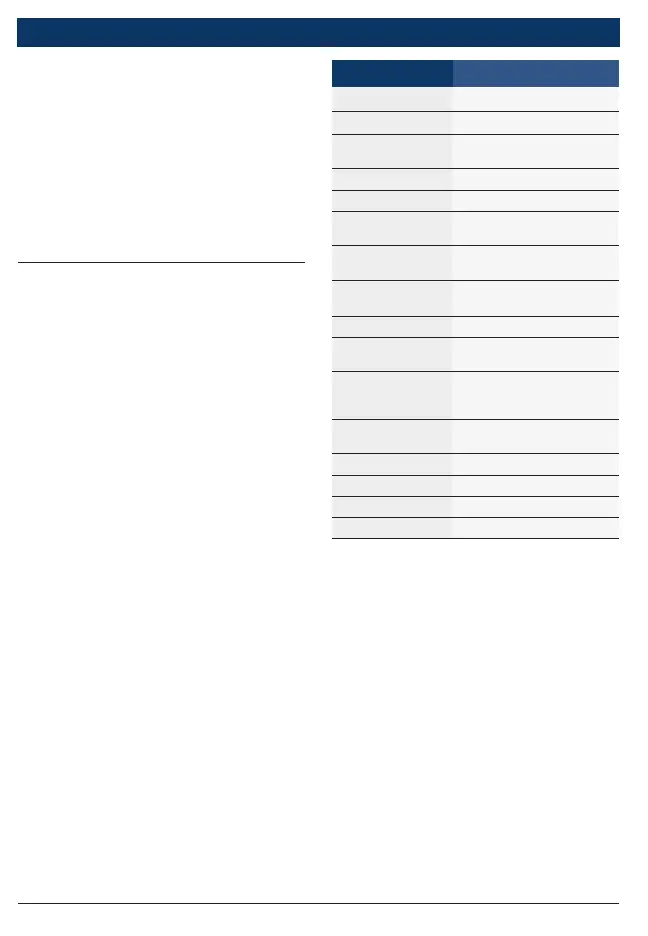
following I / M Monitors:
Monitor Expanded Name
Monit Falha Igni Misfire Monitor
Monit. Sist Comb Fuel System Monitor
Comp. Compo-
nente
Comprehensive Compo-
nents Monitor
Monit. Catalis. Catalyst Monitor
Htd Catalyst Heated Catalyst Monitor
Monit Sist Evap
Evaporative System Mon-
itor
Sist. De Ar Sec.
Secondary Air System
Monitor
Monit A/C Refrig
Air Conditioning Refriger-
ant Monitor
Monit. Sens Oxig Oxygen Sensor Monitor
Aquec Sens Oxig
Oxygen Sensor Heater
Monitor
Moni Sis EGR/VVT
Exhaust Gas Recircula-
tion or Variable Valve Tim-
ing Monitor
NMHC Cat Mon
Non-Methane Hydrocar-
bon Catalyst
Monit Tratam NOx Nitrogen Oxide Treatment
Mon Impuls Pres Boost Pressure Monitor
Sens Exaust Gas Exhaust Gas Sensor
Mon Filtro PM Particulate Matter Filter
This is a complete list of I / M
Monitors supported by the Tool.
The number of Monitors read
by the Tool from your vehicle
may vary. A diesel vehicle, for
example, does not have an
Oxygen Sensor Monitor. As a
result, there will be no Oxygen
Sensor Monitor status for a die-
sel vehicle.
Two types of I / M Monitors
tests are:



 To Next Page