Copyright
This document is the intellectual
property of Bosch Security Systems,
Inc. and is protected by copyright. All
rights reserved.
Trademarks
All hardware and software product
names used in this document are likely
to be registered trademarks and must
be treated accordingly.
Bosch Security Systems, Inc. product
manufacturing dates
Use the serial number located on the
product label and refer to the Bosch
Security Systems, Inc. website at
http://www.boschsecurity.com/
datecodes/.
Certifications
Pressing both the arm and disarm
buttons in unison for at least 1 sec
transmits a panic alarm. This feature is
intended to be used indoors only.
Keyfobs have been evaluated for ANSI/
SIA CP01-2010 installations for use
with the B Series and GV4 Series
control panels. Refer to the B5512/
B4512/B3512 Owner’s Manual,
or D9412GV4/D7412GV4 Owner’s
Manual for more information.
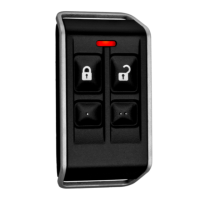
The RADION keyfobs are personal transmitters designed for arming (lock icon) and
disarming (unlock icon) the security system remotely. The RADION keyfob comes in two
versions, a two-button keyfob, and a four-button keyfob.
Callout ― Description
1 ― Arm button
2 ― LED
3 ― Disarm button
4 ― Programmable button (RFKF-FBS-A only)
5 ― Programmable button (RFKF-FBS-A only)
Keyfob overview
RFKF-TBS-A
To arm the system, simply press and
hold the arm button for at least one
sec. To disarm the system, simply press
and hold the disarm button for at least
one sec. The red LED lights up after
pressing either button for at least 1 sec
indicating that the arm or disarm
signal
has been transmitted to the panel.
Overview
RFKF-FBS-A
You can configure the two programma-
ble buttons at the control panel for ad-
ditional control functionality. Program-
mable buttons are not to be enabled for
UL Installations. Operation of the arm,
disarm buttons, and panic alarm feature
is identical to the operation of the
RFKF-TBS-A buttons.
Pressing both the arm and disarm
buttons in unison for at least 1 sec
transmits a panic alarm. This feature is
intended to be used indoors only.
To arm the system, simply press and
hold the arm button for at least one
sec. To disarm the system, simply press
and hold the disarm button for at least
one sec. The red LED lights up after
pressing either button for at least 1 sec
indicating that the arm or disarm signal
has been transmitted to the panel.
Arm/disarm confirmation
Confirmation of the arming/disarming
sequence is dependant on the support-
ing control panel programming. Verify
your control panel documentation for
detailed information regarding Remote
Warning.
When enabled, the Remote Warning pa-
rameter pulses the alarm bell once (2-
sec ON, then OFF) when the assigned
area is remotely armed, and twice
(2-sec ON, 2-sec OFF, 2-sec ON, then
2-sec OFF) when the area is remotely
disarmed. This parameter also applies
to keyswitch arming and disarming.
NOTICE!
For UL Installations, RADION RFKF keyfobs must be set to “zero” for Forced
Arm Bypass in RPS.

 Need help?
 General




 To Next Page