This document describes the Bosch Remote Controller for Split Type Ductless Air Conditioner / Heat Pump, providing detailed information on its functions, technical specifications, usage, and maintenance.
Function Description
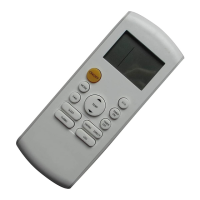
The Bosch Remote Controller is designed to operate Bosch Split-Type Ductless Air Conditioners and Heat Pumps. It allows users to control various aspects of the air conditioning unit, including power, operating mode, temperature settings, fan speed, and timer functions. The remote controller transmits signals to the indoor unit to execute commands, providing a convenient way to manage the indoor climate.
The remote controller supports several operating modes:
- AUTO Mode: The air conditioner automatically selects Cooling, Fan, or Heating mode based on the difference between the ambient room temperature and the set temperature. In this mode, the fan speed is automatically controlled and cannot be manually adjusted.
- COOL Mode: Provides cooling operation.
- DRY Mode (Dehumidifying): Reduces humidity in the room. In this mode, the fan speed is automatically controlled and cannot be manually adjusted.
- HEAT Mode: Provides heating operation.
- FAN Mode: Circulates air without heating or cooling. In this mode, the setting temperature is not displayed, and room temperature control is not available.
Key functions accessible via the remote controller include:
- ON/OFF: Turns the air conditioner on or off.
- MODE: Cycles through AUTO, COOL, DRY, HEAT, and FAN modes.
- TEMP (Temperature Control): Adjusts the desired indoor temperature. The UP button increases the temperature setting in 1°F increments (limited to 86°F), while the DOWN button decreases it in 1°F increments (limited to 62°F). Holding both UP and DOWN buttons for 3 seconds alternates the temperature display between °C and °F scales. Temperature control is not available in FAN mode.
- FAN: Selects the fan speed (Auto, Low, Med, High). This function is not available in AUTO or DRY modes.
- SLEEP: Activates/disables the SLEEP function, which maintains a comfortable temperature while saving energy. This function is available in COOL, HEAT, or AUTO modes only. Pressing MODE, FAN SPEED, or ON/OFF buttons will cancel SLEEP mode.
- TURBO: Activates/disables the TURBO function, allowing the unit to reach the preset temperature in cooling or heating operation as quickly as possible. The fan runs at a speed above HIGH.
- SELF CLEAN: Activates/disables the SELF CLEAN function, which automatically cleans and dries the evaporator and blower fan.
- SILENCE/FP (Freeze Protection): Activates/disables the SILENCE function, which reduces noise by operating the compressor at a low frequency and the indoor unit fan at a very low setting. Holding the button for more than 2 seconds activates/disables the FP (Freeze Protection) function. FP can only be activated during heating operation (mode set to HEAT) and sets the unit to operate at 46°F. Pressing ON/OFF, SLEEP, FP, MODE, FAN SPEED, UP, or DOWN buttons cancels the FP function.
- TIMER ON: Initiates the auto-on time sequence. Each press increases the auto-timed setting in 30-minute increments. Once the setting reaches 10.0 hours, each press increases the setting in 60-minute increments. The auto-on time can be adjusted up to 24 hours. Setting the time to 0.0 cancels the program.
- TIMER OFF: Initiates the auto-off time sequence. Similar to TIMER ON, each press increases the auto-timed setting in 30-minute increments, then 60-minute increments after 10.0 hours, up to 24 hours. Setting the time to 0.0 cancels the program.
- SWING: Activates/disables the horizontal louver auto SWING feature, which rotates the louver up and down to distribute air continuously.
- DIRECT: Changes the louver angle to set the desired up/down airflow direction. Each press changes the louver angle by 6°.
- FOLLOW ME: Activates/disables the FOLLOW ME feature. The remote controller displays the actual temperature at its location and acts as the thermostat. It sends a signal to the air conditioner every 3 minutes. The feature is canceled if no signal is received for 7 minutes.
- LED: Activates/disables the indoor unit screen display, turning it on or off.
Important Technical Specifications
- Model / Part Number: RG57A6 / 7738005548
- Rated Voltage: 3.0V (Alkaline AAA ×2)
- Transmission Distance: Up to 25 ft (approximately 7.6 meters)
- Environment: Operates within a temperature range of 23°F to 140°F (-5°C to 60°C)
- Temperature Setting Range: 62°F to 86°F (17°C to 30°C) in COOL, HEAT, and AUTO modes.
- Timer Setting Range: 0.5 to 24 hours, in 0.5-hour increments up to 10 hours, then 1-hour increments up to 24 hours.
Usage Features
The remote controller features an LCD display that shows various indicators:
- ON/OFF: Indicates if the remote controller is on or off.
- AUTO SET TEMP. ECO: Displays the current mode (AUTO, COOL, DRY, HEAT, FAN), set temperature, room temperature, or time.
- FAN: Shows the selected fan speed (Low, Medium, High, or Auto).
- Battery Display: Indicates low battery detection.
- Data Transmission Indicator: Appears when data is transmitted from the remote controller.
- TIMER ON/OFF: Indicates when a timer is set.
- SLEEP: Appears when the SLEEP function is active.
- FOLLOW ME: Appears when the FOLLOW ME function is active.
Location of the Remote Controller:
The remote controller should be used within approximately 25 feet of the appliance, pointing it towards the receiver on the indoor unit. A beep confirms reception of new information.
- Caution: Curtains, doors, or other materials blocking the signal can prevent the air conditioner from operating.
- Caution: Do not expose the remote controller to direct sunlight or heat, as this can affect its proper functioning, especially the infrared signal receiver.
- Caution: Handle with care; do not drop it or place heavy objects on it.
Remote Controller Holder (Optional):
The remote controller can be mounted on a wall or pillar using an optional holder.
- Before installation, ensure the air conditioner receives the signal properly from the desired location.
- Install the holder with two screws.
- To insert or remove the remote controller, slide it up or down in the holder.
Maintenance Features
Replacing Batteries:
Batteries need replacement when:
- The receiving beep is not emitted when a signal is transmitted.
- The display indicator fades away.
The remote controller is powered by two AAA alkaline dry batteries, housed in the back rear part under a cover.
- Remove the cover from the rear part of the remote controller.
- Remove the old batteries and insert new ones, ensuring the (+) and (-) ends are correctly aligned.
- Re-install the cover.
Important Notes on Battery Replacement:
- Caution: Do not mix old and new batteries or batteries of different types.
- Caution: If the remote controller will not be used for 2 months or longer, remove the batteries to prevent leakage.
- Caution: Dispose of batteries properly, following local and national codes or requirements.
- Note: When batteries are removed, all settings and timers on the remote controller are erased. These must be reset after inserting new batteries.

 Need help?
 General



 To Next Page