Need help?
Do you have a question about the Bosch ASI09DW40 and is the answer not in the manual?
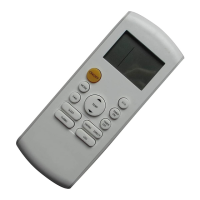
Specifies the optimal distance and direction for effective remote operation.
Guides on replacing remote batteries, including necessary precautions.
Turns the air conditioner unit on and off.
Selects the operating mode: Auto, Cool, Dry, Heat, or Fan.
Controls the automatic horizontal louvre swing feature.
Adjusts the vertical airflow direction by changing louvre angle.
Activates or deactivates the sleep function for enhanced comfort.
Initiates TURBO mode for rapid temperature control or SELF CLEAN.
Resets all settings to their initial default values.
Increases temperature settings or timer duration.
Decreases temperature settings or timer duration.
Activates the SILENCE function or the FP (fresh air) function.
Selects fan speed among Auto, Low, Medium, and High.
Sets the automatic start time for the air conditioner.
Sets the automatic stop time for the air conditioner.
Controls the remote's LED display or activates the FOLLOW ME function.
Locks or unlocks all buttons on the remote controller.
Lights up when the remote sends a signal to the indoor unit.
Shows the currently selected operating mode (e.g., Cool, Fan).
Displays set temperature or active timer settings.
Indicates the currently selected fan speed level.
Shows the power status of the air conditioner.
Indicates when the remote controller's buttons are locked.
Appears when the FOLLOW ME function is activated.
Shows when the unit is operating in sleep mode.
Indicates when the SILENCE function is activated.
Instructions for operating the unit in automatic mode.
Steps for using Cooling, Heating, or Fan operational modes.
Instructions for operating the unit in Dehumidifying (Dry) mode.
How to use SWING and DIRECT buttons to control airflow direction.
Guides on setting Auto-on and Auto-off timers for operation scheduling.
How to activate and utilize the SLEEP function for energy efficiency.
Details on controlling the LED display and using the FOLLOW ME feature.
Instructions for activating TURBO mode or the SELF CLEAN function.
 General
| Brand | Bosch |
|---|---|
| Model | ASI09DW40 |
| Category | Remote Control |
| Language | English |


 To Next Page