9 10
Dehumidifying operation
Ensure the unit is plugged in and power is
available. The OPERATION indicator on the
display panel of the indoor unit starts flashing.
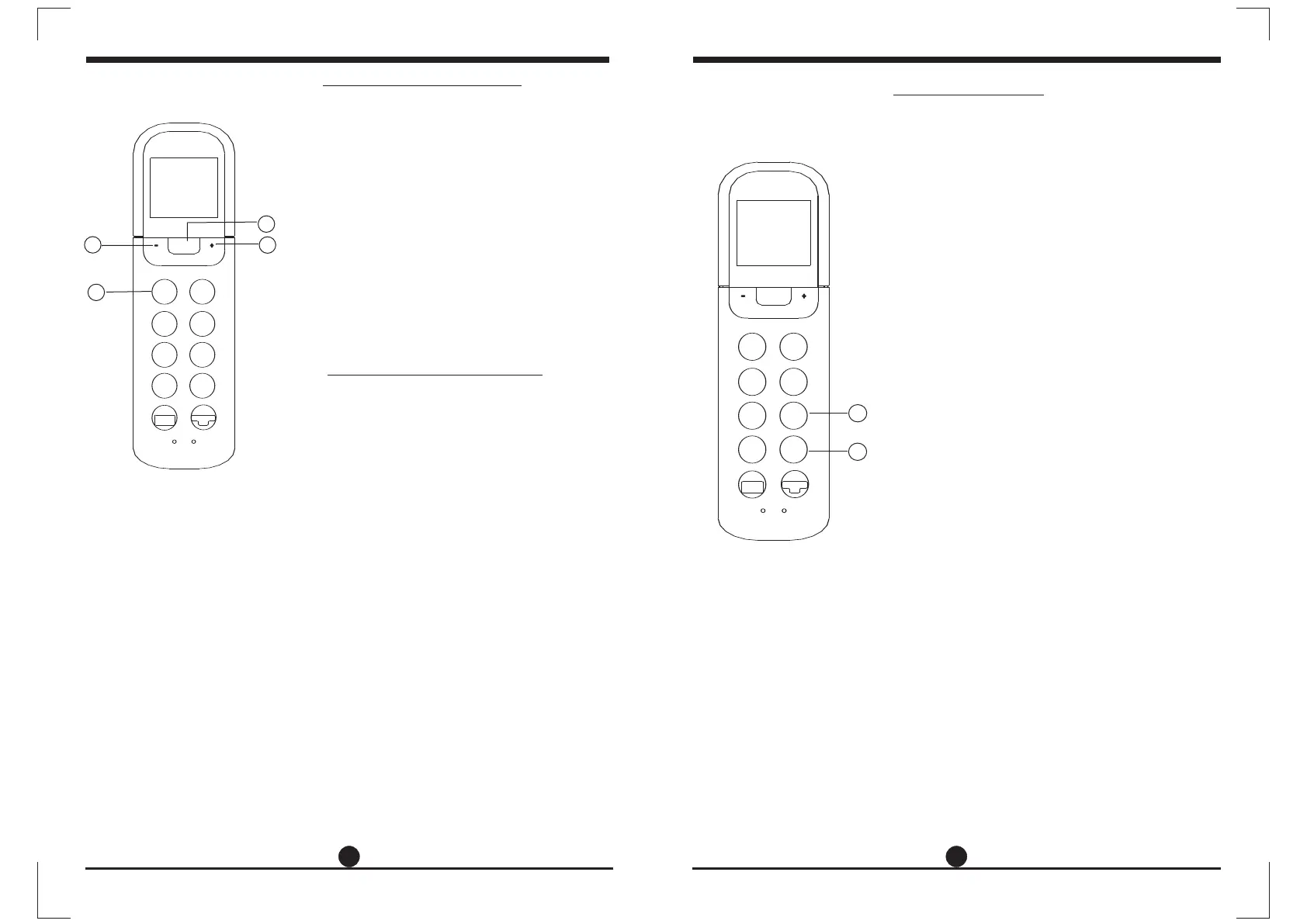
1. Press the MODE button to select DRY mode.
2. Press the UP/DOWN buttons to set the
desired temperature. The temperature
O O
can be set within a range of 17 C~ 30 C
O
in 1 C increments.
3. Press the ON/OFF button to start the air
conditioner.
In the Dehumidifying mode, you can not switch the
fan speed. It has already been automatically controlled.
NOTE
Adjusting air flow direction
3
1
2
2
Timer operation
Press the TIMER ON button can set the auto-on
time of the unit. Press the TIMER OFF button
can set the auto-off time of the unit.
1. Press the TIMER ON button. The remote
controller shows TIMER ON, the last Auto-on
setting time and the signal "h" will be shown on
the LCD display area. Now it is ready to reset
the Auto-on time to START the operation.
2. Push the TIMER ON button again to set desired
Auto-on time. Each time you press the button,
the time increases by half an hour between 0
and 10 hours and by one hour between 10 and
24 hours.
3. After setting the TIMER ON ,there will be a one
second delay before the remote controller
transmits the signal to the air conditioner. Then,
after approximately another 2 seconds, the
signal "h" will disappear and the set temperature
will re-appear on the LCD display window.
To set the Auto-on time.
To set the Auto-off time.
1. Press the TIMER OFF button. The remote
controller shows TIMER OFF, the last Auto-off
setting time and the signal "h" will be shown on
the LCD display area. Now it is ready to reset
the Auto-off time to stop the operation.
2. Push the TIMER OFF button again to set
desired Auto-off time. Each time you press the
button, the time increases by half an hour
between 0 and 10 hours and by one hour
between 10 and 24 hours.
3. After setting the TIMER OFF ,there will be a
one second delay before the remote controller
transmits the signal to the air conditioner. Then,
after approximately another 2 seconds, the
signal "h" will disappear and the set temperature
will re-appear on the LCD display window.
1
2
TURBO
SELF
CLEAN
SLEEP
SLEEP
SILENCE
FP
TIMER
ON
TIMER
OFF
LOCK
RESET
LED
FOLLOW
ME
FAN
SPEED
SWING
MODE
TEMP
ON/OF F
DIRECT
TURBO
SELF
CLEAN
SILENCE
FP
TIMER
ON
TIMER
OFF
LOCK
RESET
LED
FOLLOW
ME
FAN
SPEED
SWING
MODE
TEMP
ON/OFF
DIRECT
Use the SWING and DIRECT button to adjust
the desired airflow direction.
1. When push the DIRECT button, the horizontal
louver changes 6 degree in angle for each
push.
2. When push the SWING button, the louver
will swing up and down automatically.
NOTE: When the louver swing or move to a
position which would affect the cooling
or heating effect of the air conditioner,
it would automatically change the
swing/moving direction.



 To Next Page