EasyManua.ls Logo

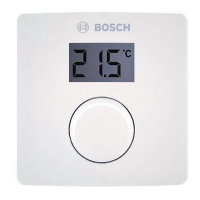
Bosch Twist - User Manual

Bosch Twist
12 pages
Print Icon
To Next Page IconTo Next Page
Loading...
Twist
Quick start guide
LES GET
STARTED
EN
Question and Answer IconNeed help?

Do you have a question about the Bosch Twist and is the answer not in the manual?

Summary

Lets Get Started

Install the Smart Home Controller

Guide to installing the Bosch Smart Home Controller via the app.

Launch the Smart Home App

Instructions to launch the app and add a new device.

Scan the QR Code

Prompt to scan the product's QR code for setup.

Follow App Installation Guide

The app will guide through the remaining installation steps.

Device Operation

Pressing Controls

Explains how to use press actions on the device for selection and activation.

Rotating Controls

Describes how to use rotation when the device is mounted in its wall holder.

Technical Data

Open Source Software

Safety Instructions

Battery and Product Care

Guidelines on battery removal, charging, product modification, and intended use.

Environmental and Mounting Precautions

Advice on avoiding dust, moisture, and careful wall mounting.

Pacemaker and Remote Operation Safety

Warnings for pacemaker users and remote control reliability.

Maintenance and Care

Environmental Protection and Disposal

Declaration of Conformity

Service and Support

Summary

Lets Get Started

Install the Smart Home Controller

Guide to installing the Bosch Smart Home Controller via the app.

Launch the Smart Home App

Instructions to launch the app and add a new device.

Scan the QR Code

Prompt to scan the product's QR code for setup.

Follow App Installation Guide

The app will guide through the remaining installation steps.

Device Operation

Pressing Controls

Explains how to use press actions on the device for selection and activation.

Rotating Controls

Describes how to use rotation when the device is mounted in its wall holder.

Technical Data

Open Source Software

Safety Instructions

Battery and Product Care

Guidelines on battery removal, charging, product modification, and intended use.

Environmental and Mounting Precautions

Advice on avoiding dust, moisture, and careful wall mounting.

Pacemaker and Remote Operation Safety

Warnings for pacemaker users and remote control reliability.

Maintenance and Care

Environmental Protection and Disposal

Declaration of Conformity

Service and Support

Bosch Twist Specifications

General IconGeneral
Operating frequency868.3 MHz
Number of devices supported4
Operating temperature (T-T)5 - 35 °C
Operating relative humidity (H-H)30 - 90 %
ZigBeeYes
Ethernet LAN-
Connectivity technologyWireless
Control typeTouch
CertificationSRD
Product colorWhite
International Protection (IP) codeIP20
Battery life2 year(s)
Input voltage1.5 V
Package depth52.75 mm
Package width92 mm
Package height181.5 mm
Package weight252 g
Weight and Dimensions IconWeight and Dimensions
Depth19.4 mm
Height83.4 mm
Weight122 g

Related product manuals