EasyManua.ls Logo

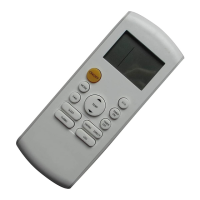
Bosch ARC R-1 IR - User Manual

Bosch ARC R-1 IR
16 pages
Print Icon
To Next Page IconTo Next Page
Loading...
Safety Precautions | 1
Installation Manual X XXX XXX (XXXX/XX)
AIR CONDITIONER
REMOTE CONTROLLER MANUAL
6
720 866 393 (2019/11) GB
Thank you very much for purchasing our air conditioner.
Please read this owner's manual carefully before using your air conditioner.
Question and Answer IconNeed help?

Do you have a question about the Bosch ARC R-1 IR and is the answer not in the manual?

Summary

Remote Controller Specifications

Remote Control Button Operations

ON;OFF Button

Turns the air conditioner ON and OFF.

MODE Button

Selects the operating mode (Auto, Cool, Dry, Heat, Fan).

FAN Button

Adjusts the fan speed in four steps: Auto, Low, Med, High.

SLEEP Button

Activates or deactivates the sleep function for comfort and energy saving.

TURBO Button

Activates or deactivates the Turbo function for rapid operation.

LCD Display Indicators

Mode Display Indicators

Shows the current operating mode (Auto, Cool, Dry, Heat, Fan).

Fan Speed Indication

Illustrates different fan speed levels (Low, Medium, High, Auto).

Basic Operations

Auto Operation

Guides on how to use the Auto mode for cooling, heating, or fan operation.

Cooling, Heating, and Fan Operation

Explains how to operate the unit in Cool, Heat, or Fan modes.

Specialized Operations

Dehumidifying Operation

Details the steps for using the Dehumidifying mode.

Adjusting Air Flow Direction

Instructions on adjusting vertical and horizontal louvre movement.

Timer Functions

Timer Operation

Explains how to set Auto-on and Auto-off timer functions.

Remote Controller Handling and Location

Location of the Remote Controller

Guidelines for optimal placement and usage distance of the remote controller.

Using the Remote Controller Holder

Instructions for installing and using the supplied remote controller holder.

Remote Controller Maintenance

Replacing Batteries

Steps for replacing exhausted batteries in the remote controller.

Summary

Remote Controller Specifications

Remote Control Button Operations

ON;OFF Button

Turns the air conditioner ON and OFF.

MODE Button

Selects the operating mode (Auto, Cool, Dry, Heat, Fan).

FAN Button

Adjusts the fan speed in four steps: Auto, Low, Med, High.

SLEEP Button

Activates or deactivates the sleep function for comfort and energy saving.

TURBO Button

Activates or deactivates the Turbo function for rapid operation.

LCD Display Indicators

Mode Display Indicators

Shows the current operating mode (Auto, Cool, Dry, Heat, Fan).

Fan Speed Indication

Illustrates different fan speed levels (Low, Medium, High, Auto).

Basic Operations

Auto Operation

Guides on how to use the Auto mode for cooling, heating, or fan operation.

Cooling, Heating, and Fan Operation

Explains how to operate the unit in Cool, Heat, or Fan modes.

Specialized Operations

Dehumidifying Operation

Details the steps for using the Dehumidifying mode.

Adjusting Air Flow Direction

Instructions on adjusting vertical and horizontal louvre movement.

Timer Functions

Timer Operation

Explains how to set Auto-on and Auto-off timer functions.

Remote Controller Handling and Location

Location of the Remote Controller

Guidelines for optimal placement and usage distance of the remote controller.

Using the Remote Controller Holder

Instructions for installing and using the supplied remote controller holder.

Remote Controller Maintenance

Replacing Batteries

Steps for replacing exhausted batteries in the remote controller.

Bosch ARC R-1 IR Specifications

General IconGeneral
BrandBosch
ModelARC R-1 IR
CategoryRemote Control
Power Source2 x AAA batteries
DisplayNo

Related product manuals