de Set up and connect
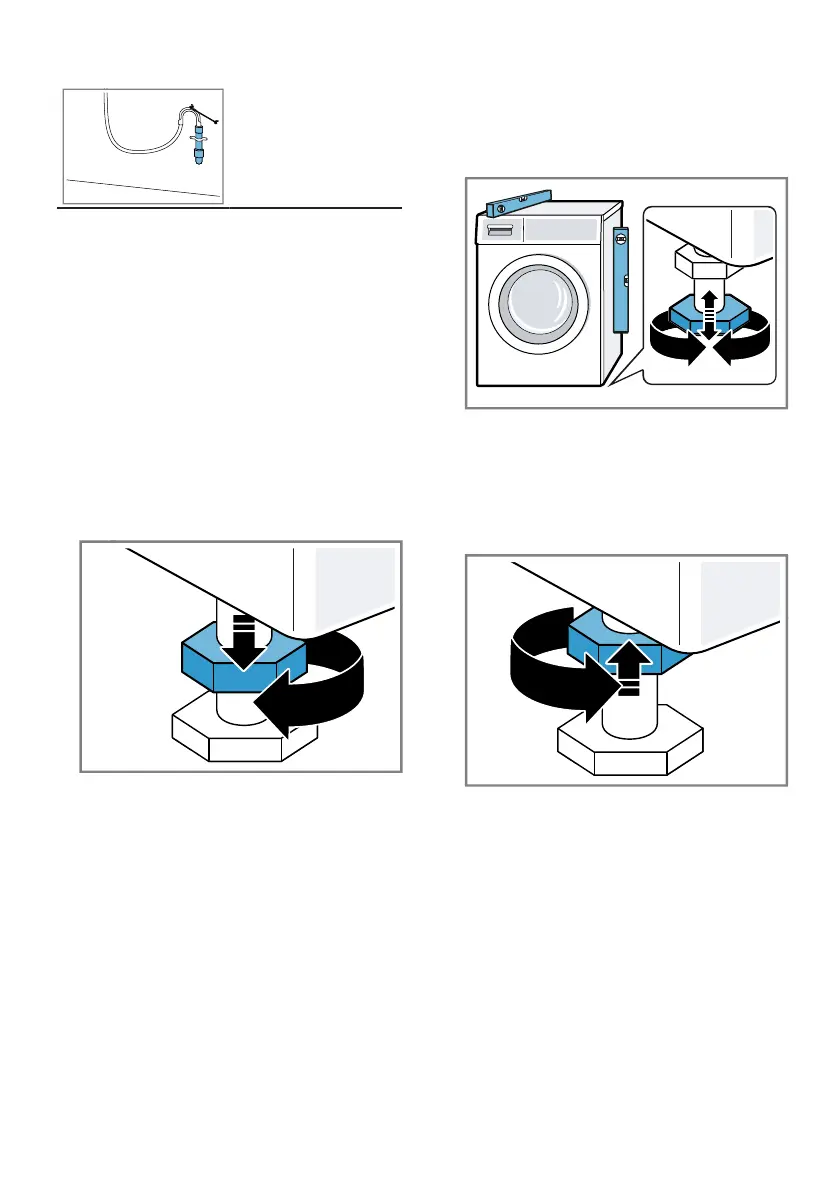
2. To align the device, turn the
device feet. Check the alignment
with a spirit level.
4.6 Align the device
To reduce noise and vibrations and to
prevent the device from wandering,
align the device correctly.
Note: Note the information on
security
→
page 4
and avoid damage to property.
the →
Page 11,
to use your device
safely.
All device feet must be firmly on
the floor.
1. Loosen the lock nuts clockwise
with a 17 mm spanner.
3. Tighten the lock nuts hand-tight
against the housing with an SW17
wrench.
Hold the device base firmly and
do not adjust the height.
4.7 Connect the device
electrically
Note: Note the information on
security
→
page 4
and avoid damage to property.
the →
Page 11,
to use your device
safely.
18th



 To Next Page