27
Operation Requirements
Your E-Lyte eBike system can only be activated when the following
requirements are met:
– A sufciently charged battery is inserted (see battery operating
instructions).
– The speed sensor is connected (see drive unit operating instructions).
Operating unit power supply (System Controller)
If a sufciently charged eBike battery is inserted into the bike and the
eBike system is switched on, then the operating unit battery is powered
and charged by the eBike battery. Please contact your bicycle retailer if
the operating unit battery is defective.
Operating unit power supply (Mini Remote)
The Mini Remote operating unit is supplied with voltage by a CR1620 coin
cell.
Switching the eBike system on/off
To switch on the eBike system, briey press the on/off button (12). After
the starting animation, the state of charge of the battery is displayed in
colour with the battery charge indicator (13) and the set assistance level
with the (10) display. The eBike is ready to ride.
The display brightness is controlled by the ambient light sensor (11).
Therefore, do not cover the ambient light sensor (11). The drive is
activated as soon as you start pedalling (except at assistance level OFF).
The motor output depends on the settings of the assistance level. As
soon as you stop pedalling when in normal operation, or as soon as you
have reached a speed of 25km/h (15.5mph), the eBike drive switches off
the assistance. The drive is automatically reactivated as soon you start
pedalling again and the speed is below 25km/h.
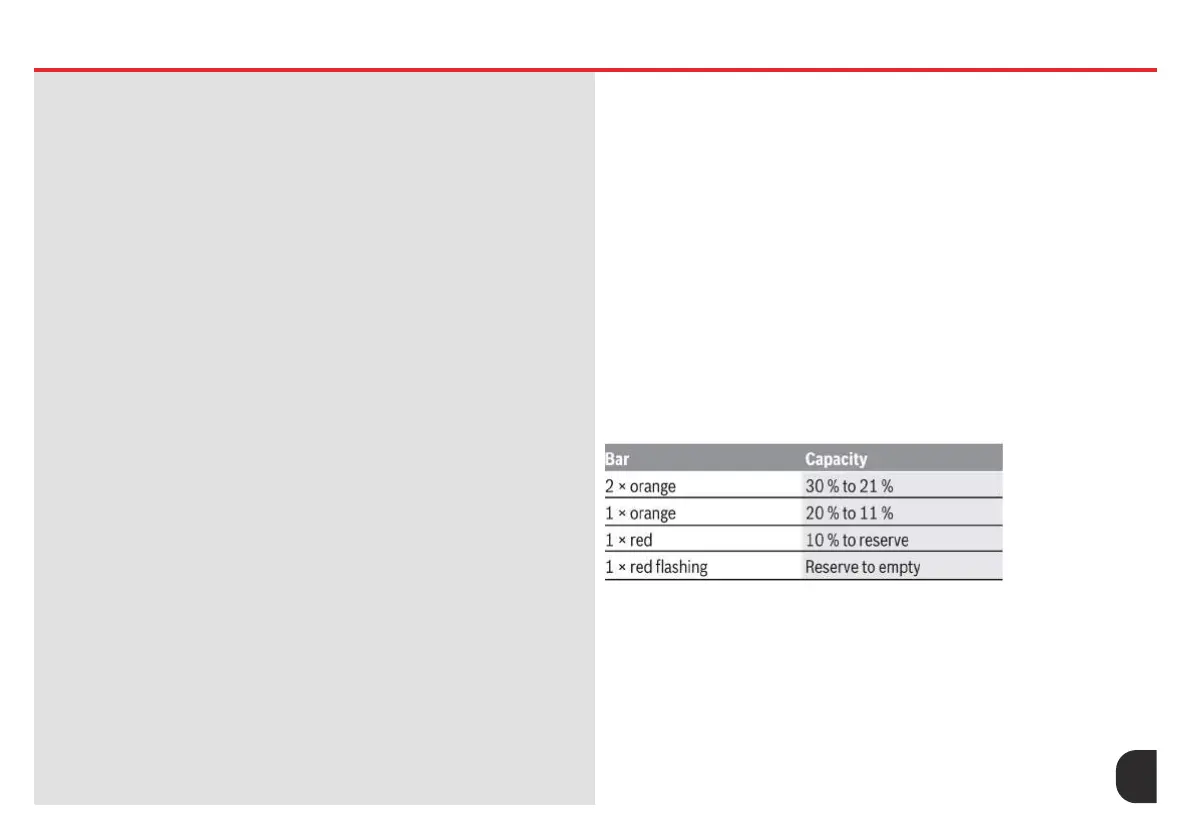
Battery charge indicator
The battery charge indicator (13) displays the eBike battery’s state of
charge. The state of charge of the eBike battery can also be checked on
the LEDs of the battery itself. In the LED Charge Display (13), each ice-
blue bar represents 20% capacity and each white bar represents 10%
capacity. The topmost bar shows the maximum capacity.
Example: Four ice-blue bars and one white bar are displayed. The state
of charge is between 81% and 90%. If capacity is low, both of the lower
displays change colour:
05 SYSTEM CONTROL 5.2 Start Up On/Off
If the eBike battery is being charged, the topmost
bar on the battery charge indicator (13) ashes.
To switch off the eBike system, press the on/off button (12) briey
(<3 s). The battery charge indicator (13) and the assistance
level LED (10) go out. If no power is drawn from the eBike drive
for about 10 minutes (e.g. because the eBike is not moving) and
no button is pressed on the on-board computer or the control
unit of the eBike, the eBike system will switch off automatically.










 To Next Page