Installation Guide
English 17
Front and Rear Panels
pro.Bose.com
PowerShare PS604A/PS404A
The PS604A is a 4-channel installed amplifier that allows its total 600 watts to be shared asymmetrically across all four
outputs. The PS404A is a 4-channel installed amplifier that allows its total 400 watts to be shared asymmetrically across
all four outputs. Independently control the output level, EQ, and low-impedance/high-impedance (Low-Z/Hi-Z) settings
for each output. Each amplifier supports built-in loudspeaker EQs for the FreeSpace DS 16, DS 40, DS 100, FS3B, Panaray
402 and 802 Series IV, MA12EX, and RoomMatch Utility RMU105 and RMU108, as well as a Flat setting for FS3 systems. For
applications that require more customization, access the advanced digital loudspeaker processing features using the free
web-downloadable PowerShare Editor software. Both amplifiers also support up to four gangable CC-1 ControlCenter zone
controllers for remote volume control using CAT 5 cables.
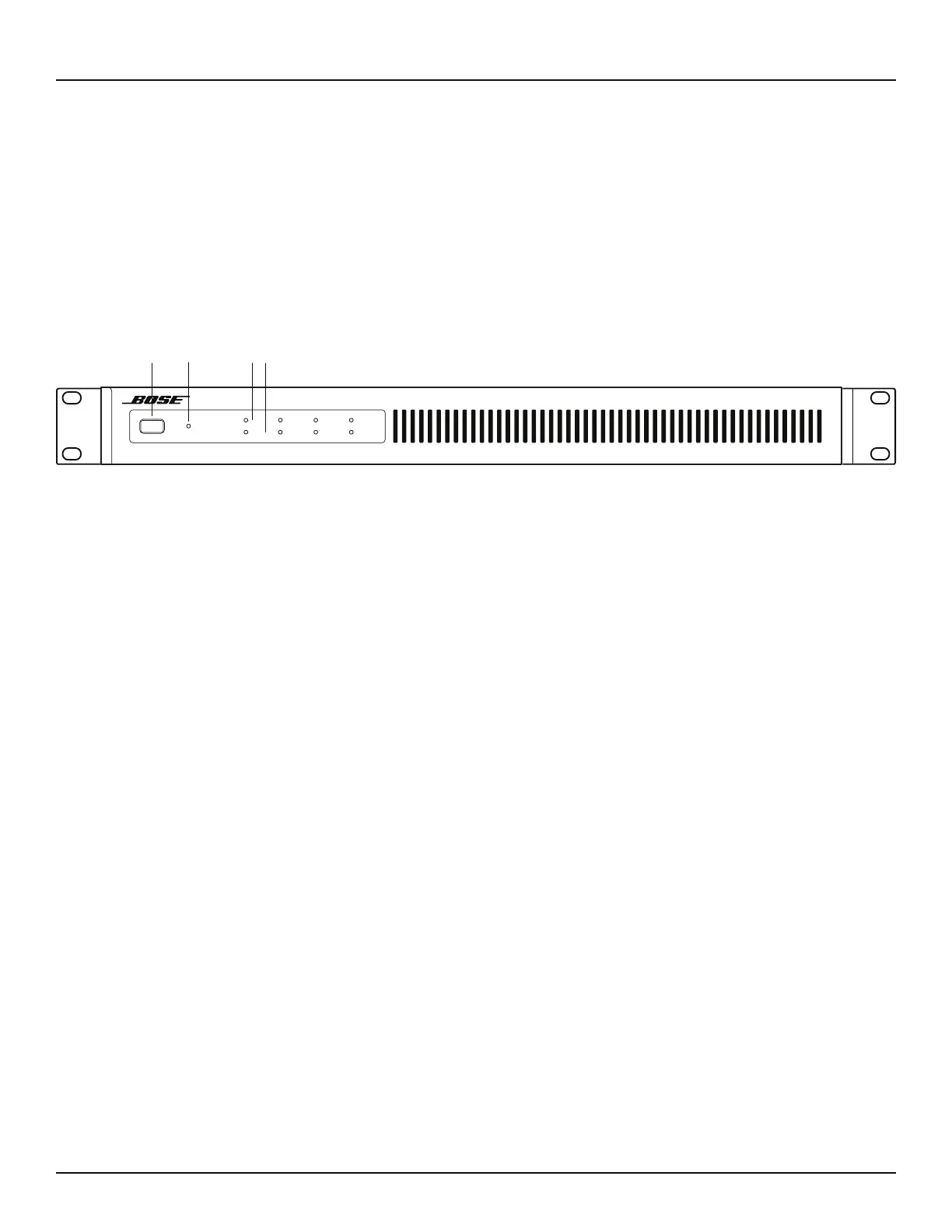
PS604A/PS404A Front Panel
. POWER Switch - ON/OFF AC power.
3 POWER LED - Solid green LED indicates the unit is ON. Blinking green LED indicates the unit is in lower-power mode.
Solid amber LED indicates an over-temperature fault. A solid red LED indicates a power supply fault.
$ INPUT 1, 2, 3, 4 SIGNAL LED - Each LED operates independently.
• If the SENSITIVITY DIP switch is set to 4 dBu, then the LED is green from -40 dBu to 9 dBu, with a typical input of
4dBu. LED is amber from 9 dBu to 12 dBu. LED goes red, indicating input clipping, over 12 dBu.
• If the SENSITIVITY DIP switch is set to 12 dBu, then the LED is green from -40 dBu to 17 dBu, with a typical input of
12 dBu. LED is amber from 17 dBu to 20 dBu. LED goes red, indicating input clipping, over 20 dBu.
All LEDs display solid red if a power supply fault is detected.
/ OUTPUT 1, 2, 3, 4 LIMIT LED - Each LED operates independently.
• LED is amber when the amplifier is limiting the corresponding output due to exceeding the specified loudspeaker
Vpeak or Vrms limits.
If the sum of the amplifier outputs exceeds 600 watts (PS604A), or 400 watts (PS404A), then the amplifier will limit
all outputs equally, and all LEDs will show limiting simultaneously. This is because the amplifier is also measuring and
limiting total output power, in addition to individual channel output power. Both amplifiers are capable of delivering
200 watts of average power continuously.
• Each OUTPUT LIMIT LED will display solid red if there is an extra high frequency (EHF) fault on the corresponding
output. LED 1 & 2 will display solid red when the outputs are muted due to an amplifier one fault. LED 3 & 4 will
display solid red when the outputs are muted due to an amplifier two fault.
• All four LEDs will display solid red when all outputs are muted due to an amplifier fault, or if there is a power supply
fault.
• All four LEDs will blink red when all outputs are muted from the rear panel mute connector.
Figure 2. PowerShare PS604A amplifier front panel
Adaptable Power Amplier
LIMIT
SIGNAL
12 3 4
PowerShare
PS604A
POWER
.
$ /
3



 To Next Page