18 English
Installation Guide
Front and Rear Panels
pro.Bose.com
1
9
0
28
37
4
5
6
1
9
0
28
37
4
5
6
1
9
0
28
37
4
5
6
1
9
0
28
37
4
5
6
1
9
0
28
37
4
5
6
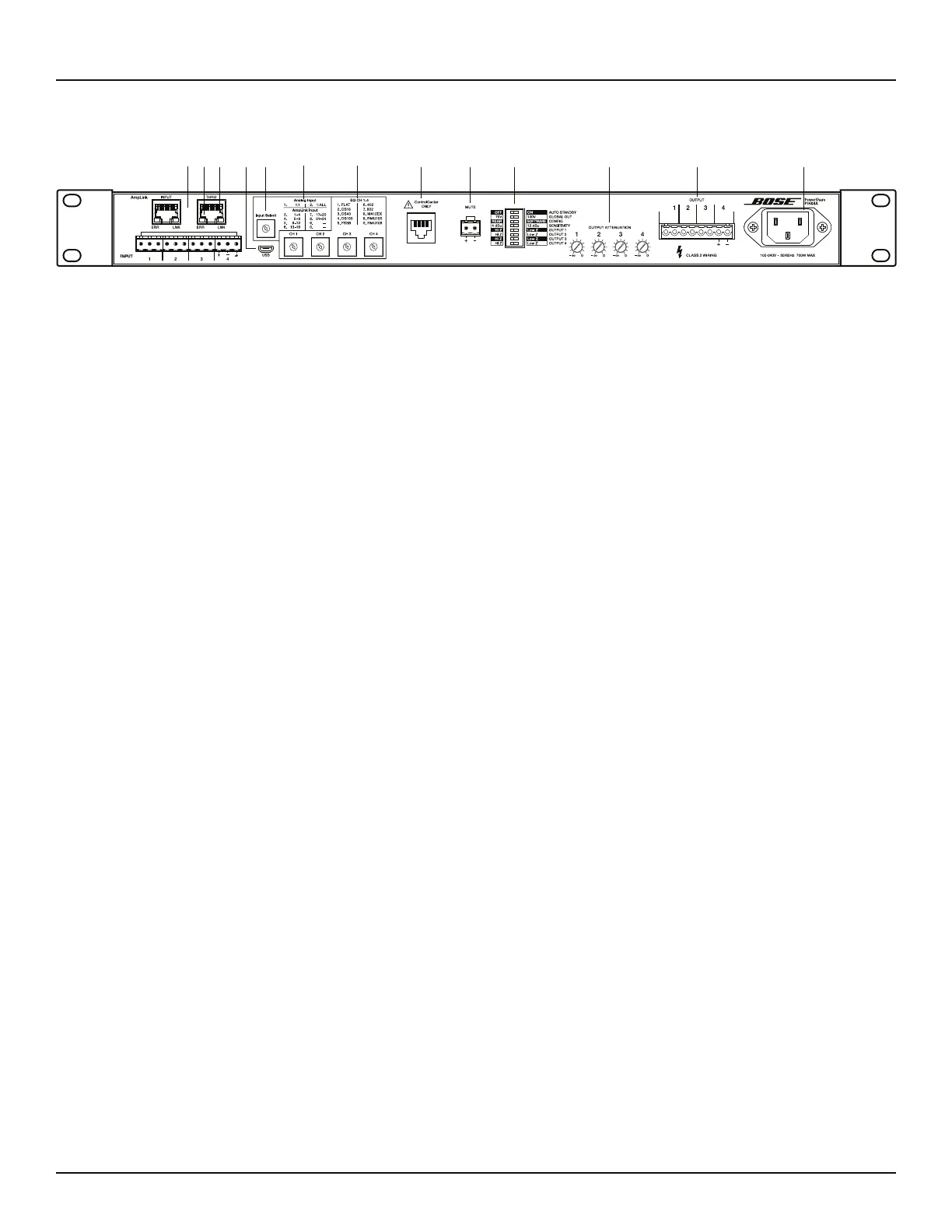
Figure 3. PowerShare PS604A amplifier rear panel
. AmpLink – INPUT RJ-45 connector that receives up to 24 digital channels from a Bose AmpLink product. The amp also supports a
THRU path for daisy-chaining all 24 digital audio channels to other Bose AmpLink products. Do not connect either of these RJ-45s to a
network.
3AmpLink ERR LED – Solid yellow indicates muted audio from the mute connector. Blinking yellow indicates an error, which will also
mute the audio.
$ AmpLink LNK LED – Solid green indicates normal operation.
/ MICRO-USB – Connect the amplifier to a PC using a USB connection. This allows you to use the PC-based PowerShare Editor software
to configure the advanced features of the amplifier. The CONFIG DIP switch must be set to SOFTWARE to configure the amplifier using
the PowerShare Editor software. See the Software Interface section for more details.
1 INPUT SELECT – Dial selects if analog or AmpLink audio inputs are used. The default state is analog 1:1.
4 ANALOG INPUTS – Balanced 12-pin Euroblock line-level input connector.
2 CHANNEL 1, 2, 3, 4 EQ – Each dial provides loudspeaker equalization presets per channel: DS 16, DS 40, DS 100, FS3B, 402, 802,
MA12EX, RMU105, and RMU108. Use the Flat setting for FS3 Systems, or for loudspeakers that are not Bose or that do not require EQ.
When EQ is selected, the crossover and Vpeak and Vrms limiters for that loudspeaker are automatically loaded. Use the PowerShare
Editor software to adjust any of these parameters - see the Software Interface section for more details. In Hi-Z output mode, a 50 Hz
high-pass filter (HPF) is automatically added to the Hi-Z selected outputs. The loudspeaker EQ is applied after the 50 Hz HPF.
( CONTROLCENTER – RJ-45 input connector for Bose® CC-1 ControlCenter zone controllers or CV41 4-to-1 Converter only. Do not use this
input to connect to a network.
, MUTE – Contact closure connection where a short across the mute connector will mute all outputs. This is the Normally Open (NO)
default state. The mute polarity can be inverted to Normally Closed (NC), where an open across the mute connector will mute all
outputs, using the PowerShare Editor software. See the Software Interface section for more details.
" DIP Switches – A bank of switches used to set the amplifier configuration. All switches set to the left position is the standard
configuration.
• AUTO STANDBY – If enabled (ON), the amplifier goes into lower-power mode after twenty minutes without an input signal. If in lower-
power mode and an audio signal is detected, the amplifier will automatically wake and amplify audio within 1 second. The default
position is OFF.
• GLOBAL OUT – Sets the output capability to 70V or 100V for all outputs that have their OUTPUT DIP switch set to Hi-Z. In 70V mode,
a 100 Vpeak limiter is automatically loaded. In 100V mode, a 141 Vpeak limiter is automatically loaded. These are maximum values that
can be lowered using the PowerShare Editor software if necessary. See the Software Interface section for more details.
• CONFIG – In REAR mode, only the rear panel EQ settings are required to configure the amplifier. In SOFTWARE mode, the
PowerShare Editor software configures the amplifier, and the rear panel EQ switches are ignored. The rest of the DIP switch settings
are always independent of the PowerShare Editor software settings, as the software does not interface with any other DIP switches.
See the Software Interface section for more details.
• SENSITIVITY – Select 4 dBu or 12 dBu as the amplifier sensitivity for the line-level inputs.
• OUTPUT 1 – Select 70/100V high impedance output (Hi-Z) or 4-8 low impedance output (Low-Z) for OUTPUT 1.
• OUTPUT 2 – Select 70/100V high impedance output (Hi-Z) or 4-8 low impedance output (Low-Z) for OUTPUT 2.
• OUTPUT 3 – Select 70/100V high impedance output (Hi-Z) or 4-8 low impedance output (Low-Z) for OUTPUT 3.
• OUTPUT 4 – Select 70/100V high impedance output (Hi-Z) or 4-8 low impedance output (Low-Z) for OUTPUT 4.
0 OUTPUT ATTENUATION 1, 2, 3, 4 – Output attenuators for each output. Turn the attenuators clockwise to decrease attenuation, and
counter-clockwise to increase attenuation. Fully clockwise is 0 dB attenuation; fully counter-clockwise is mute. If CC-1 zone controller(s)
are used, then the CC-1 becomes the master volume control(s). The position of each attenuator will determine the CC-1 zone controller
range for that output. Set each attenuator to 0 dB attenuation to allow each CC-1 zone controller to have full attenuation range. If the
CC-1 is disconnected from the amplifier, then the output attenuator becomes the active setting.
# OUTPUT – Inverted 8-pin Euroblock connectors for loudspeaker connections. Each channel can deliver up to 600 watts (PS604A) or
400 watts (PS404A) regardless of load into 4 , 8 , 70V, or 100V. Outputs are not bridgeable.
% AC INLET – Removing the AC cord when the amplifier is on is equivalent to powering down using the front panel power switch, and is
an acceptable power-down method.
PS604A/PS404A Rear Panel
. 2
4
$ (13 / ," 0 # %



 To Next Page