EasyManua.ls Logo

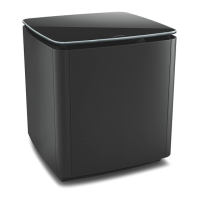
Bose Acoustimass - User Manual

Bose Acoustimass
24 pages
Print Icon
To Next Page IconTo Next Page
Loading...
Owners Guide
Guía del usuario
Notice d’utilisation
ACOUSTIMASS
®
WIRELESS BASS MODULE

Other manuals for Bose Acoustimass

Questions and Answers

  • A
    Anthony Dixon Jr.Jul 29, 2025
    What to do if there is no sound from my Bose Home Cinema speakers?
    • D
      Dennis HutchinsonJul 29, 2025
      If you're not getting any sound from your Bose Home Cinema speakers, first check all the speaker connections and ensure the Powered Acoustimass module is turned on. When using digital sound, verify that a coaxial or optical cable connects the digital output of the DVD player to the digital input on your receiver. Ensure the correct audio source is selected, such as DVD audio on both your receiver and player. Also, disconnect any headphones and increase the volume. Finally, make sure the Powered Acoustimass module is plugged in and switched on.
  • L
    Lacey JenkinsAug 3, 2025
    Why is there no surround sound on my Bose Home Cinema speakers?
    • G
      Gina LarsonAug 3, 2025
      If you're not getting any surround sound from your Bose Home Cinema speakers, make sure your receiver is processing a signal from a surround-sound source like a Hi-Fi VCR, stereo TV, laserdisc, or DVD player. If you're using Dolby Pro-Logic mode, ensure surround sound is enabled. For digital programming, check that the settings are correct on the receiver. Also, verify that the source material (DVD, laser disc, or broadcast programming) is Dolby Digital encoded.
  • B
    Brooke MillerAug 8, 2025
    How to adjust bass on Bose Home Cinema speakers?
    • G
      gomezcoltonAug 8, 2025
      To adjust the bass level on your Bose Home Cinema system, move the Powered Acoustimass module. Position it closer to a wall or corner to increase the bass response, or move it farther away to decrease it. Additionally, you can fine-tune the bass by adjusting the LFE level control.
  • M
    Michael MyersAug 13, 2025
    How to fix a Bose Home Cinema system that does not function at all?
    • L
      Lisa ThompsonAug 13, 2025
      If your Bose Home Cinema system isn't working at all, start by confirming that both the receiver and the Powered Acoustimass module are properly plugged into a functioning AC wall outlet and that both are powered on. Then, make sure you've selected an appropriate source on the receiver, such as video, CD, DVD, or tuner.
  • N
    Nicole RobinsonAug 17, 2025
    What to do if Bose Home Cinema speakers sound distorted?
    • G
      Gary DanielsAug 18, 2025
      If the sound from your Bose Home Cinema speakers is distorted, first inspect the speaker wire for any signs of damage. If the wires are in good condition, try reducing the volume of any external components connected to the receiver.
  • M
    Maurice WeaverAug 23, 2025
    How to restore sound from cube arrays of Bose Acoustimass?
    • D
      Dr. Samantha BurkeAug 23, 2025
      To restore sound to the cube arrays of your Bose Home Cinema speakers, make sure the Powered Acoustimass module is plugged in and turned on.

Summary

Important Safety Instructions

Warnings and Cautions

Key warnings and cautions for product operation and safety.

Regulatory Information

Management Regulation for Low-power Radio-frequency Devices

Regulations concerning low-power radio-frequency device operation.

Whats in the Carton

Placement Guidelines

Avoid Wireless Interference

Tips to prevent wireless interference with the bass module.

Setup

Connect to Power

Steps for connecting the bass module to a power source.

Pair with the Soundbar

Instructions for wirelessly pairing the bass module with the soundbar.

Check for Sound

Procedure to verify audio output from the bass module.

About ADAPTIQ Audio Calibration

Explanation of the ADAPTIQ audio calibration process.

Run ADAPTIQ Audio Calibration

Step-by-step guide to perform the ADAPTIQ audio calibration.

Using the Bass Module

Adjust the Bass Setting

How to modify the bass level using the remote control or app.

Reset the Bass Setting

Procedure to restore bass settings to factory defaults.

Status Indicator

System Status Indicator

Explanation of the LED indicator lights and their meanings.

Care and Maintenance

Clean the Bass Module

Instructions for cleaning the exterior of the bass module.

Replacement Parts and Accessories

Information on ordering spare parts and accessories.

Limited Warranty

Details about the product's limited warranty coverage.

Troubleshooting

Common Solutions

General troubleshooting steps for common issues.

Intermittent or No Audio

Troubleshooting steps for audio dropouts or no sound.

Poor or Distorted Sound

Solutions for audio quality issues like distortion.

Bass is Too Heavy or Low

Tips for adjusting bass levels that are too strong or weak.

Unable to Complete ADAPTIQ Audio Calibration

How to resolve errors during ADAPTIQ calibration.

Reset the Connection to the Soundbar

Steps to reset the wireless pairing between module and soundbar.

Reset the Bass Module

Instructions for performing a factory reset on the bass module.

Connect Using an Audio Cable

Alternative method to connect module to soundbar via cable.

Bose Acoustimass Specifications

General IconGeneral
ConnectivityWired
Satellite Speaker DimensionsVaries by model
Subwoofer DimensionsVaries by model
Satellite Speaker WeightVaries by model
Subwoofer WeightVaries by model
Frequency ResponseVaries by model
ImpedanceVaries by model
Power HandlingVaries by model
Connector TypeVaries by model
ColorBlack
Configuration5.1
Satellite SpeakersYes
SubwooferYes

Videos

How to install a Bose Acoustimass TO A SONY RECEIVER

Related product manuals