EasyManua.ls Logo

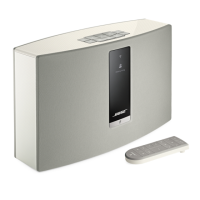
Bose SoundTouch20 Wi-Fi S - User Manual

Bose SoundTouch20 Wi-Fi S
26 pages
Print Icon
To Next Page IconTo Next Page
Loading...
SoundTouch
30/20
Wi-Fi
®
music systems
Owner’s Guide

Questions and Answers

  • S
    Sherri LarsonJul 26, 2025
    How to fix Bose SoundTouch20 Wi-Fi S Speakers that cannot complete network setup?
    • J
      John CrosbyJul 26, 2025
      If you cannot complete the network setup for your Bose Speakers, here are some things to try: * Double-check that you have entered the correct network name and password. * Verify that your network service is available and that both the system and your computer are on the same network. * Try moving the system closer to the wireless router or access point. * Stop any other audio or video streaming applications. * As a last resort, close the app, disconnect all cables, and restart the setup process from the beginning.
  • D
    Dr. Felicia BergerAug 5, 2025
    What to do if Bose Speakers have intermittent or no audio?
    • M
      Michael CrawfordAug 5, 2025
      If you are experiencing intermittent or no audio with your Bose Speakers, there are several potential solutions: * Move the system away from potential sources of interference, such as microwaves or cordless phones. * Stop any other audio or video streaming applications that may be running. * Make sure that the system is powered on and connected to the same network as your computer. * Move the system or the audio source closer to your wireless router or access point. * Check that the system volume is not muted or set too low. * Try unplugging the power cord and reconnecting it after one minute.
  • M
    millerlarryAug 15, 2025
    Why can't I hear AirPlay stream on my Bose Speakers?
    • M
      mschmidtAug 16, 2025
      If you cannot hear an AirPlay stream on your Bose Speakers, ensure that the system and the AirPlay device are connected to the same network. Also, make sure the AirPlay device is playing and its volume is turned up. Verify that the system is selected in the AirPlay menu of your device. Finally, move the AirPlay device away from potential interference and closer to the wireless router or access point.

Summary

Safety Information

Setting up the System

Unpacking the SoundTouch System

Instructions for carefully unpacking and checking the contents of the system.

Adding System to Wi-Fi Network

Steps to connect the SoundTouch system to your home Wi-Fi network.

Installing the SoundTouch App

Guide to downloading and installing the necessary SoundTouch application.

Connecting System to Home Wi-Fi Network

Detailed instructions for establishing the system's connection to the Wi-Fi network.

Using the System

Powering On the System

How to turn the SoundTouch system on and off using controls.

System Control Buttons Overview

Description of buttons on the system and remote for controlling functions.

Controlling the System using the App

Using the SoundTouch App for Control

How to use the SoundTouch app to manage and control the system.

Downloading Mobile SoundTouch App

Instructions for downloading the SoundTouch app on iOS and Android devices.

Personalizing your Presets

Setting a Preset

Step-by-step guide on how to set a new preset on the system.

Advanced Features

Performing a Factory Reset

How to reset the system to its original factory settings.

Care and Maintenance

Troubleshooting Common Issues

Solutions for common problems encountered with the system.

Bose SoundTouch20 Wi-Fi S Specifications

General IconGeneral
BrandBose
CategorySpeakers
Wireless TechnologyWi-Fi, Bluetooth
Multi-Room AudioYes
Power SourceAC Power
App ControlYes
Voice ControlNo
Presets6
ColorBlack, White
TypeWireless Speaker
Dimensions7.4" H x 12.4" W x 4.1" D
Weight7 lbs
Speaker TypeWireless
Sound TechnologyProprietary Waveguide Technology

Related product manuals