EasyManua.ls Logo

Bose SoundTrue - User Manual

Bose SoundTrue
22 pages
Print Icon
To Next Page IconTo Next Page
Loading...
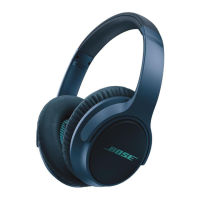
Bose
®
SoundTrue™
ON-EAR HEADPHONES
2ZQHUV*XLGHŇ*XtDGHOXVXDULRŇ1RWLFHG¶XWLOLVDWLRQ

Other manuals for Bose SoundTrue

Questions and Answers

  • B
    Billy BarnesSep 12, 2025
    How to fix muffled sound from Bose SoundTrue Headphone?
    • T
      taylorrobinSep 12, 2025
      If the sound from your Bose Headphone earpiece is muffled, clear any debris or wax build-up from the ear tips and headphone nozzles. Make sure the headphone cable is securely connected to the 3.5 mm headphone connector on the device. If the problem persists, try another compatible device.
  • P
    Phillip AllenAug 25, 2025
    Why is my Bose Headphone microphone not picking up sound?
    • B
      Barbara RobinsonAug 25, 2025
      If the microphone on your Bose Headphone isn't picking up sound, ensure that the headphone plug is securely connected to the headphone jack. Also, check that the microphone is not being blocked or covered.
  • I
    Isaiah BrownAug 25, 2025
    What to do if I hear audio in only one earcup of my Bose SoundTrue?
    • C
      caitlinallisonAug 26, 2025
      If you're only hearing audio in one earcup of your Bose Headphone, make sure both ends of the audio cable are firmly connected. If the problem persists, try another audio device.
  • S
    Shannon WilliamsSep 23, 2025
    What to do if I have distorted bass on my Bose SoundTrue Headphone?
    • M
      Michelle SandersSep 23, 2025
      Make sure both ear cushions are firmly secured.
  • L
    lindaandrewsSep 12, 2025
    Why does my Bose SoundTrue have excessive bass?
    • A
      Anna MorganSep 12, 2025
      If your Bose Headphone has excessive bass, turn off any audio enhancement features on the audio source.
  • B
    Brian HansenSep 16, 2025
    Why is my iPhone/iPod/iPad not responding to the Bose headphone remote?
    • E
      erossSep 16, 2025
      Full controls may not be available for some iPhone, iPod, or iPad models when using the Bose headphone remote.
  • S
    Shannon HahnSep 5, 2025
    Why is the microphone on my Bose headphone not picking up sound?
    • V
      Victoria HunterSep 5, 2025
      If the microphone on your Bose headphone is not picking up sound, make sure that the headphone plug is securely connected to the headphone jack. Additionally, ensure the microphone is not being blocked or covered.
  • C
    Cassie RussellSep 6, 2025
    How to fix Bose SoundTrue Headphone with audio in only one earcup?
    • D
      Danielle HicksSep 6, 2025
      If you're experiencing audio in only one earcup of your Bose headphone, make sure both ends of the audio cable are firmly connected. If the issue persists, try another audio device to isolate the problem.
  • B
    Barry ShafferSep 18, 2025
    What to do if my Bose SoundTrue has distorted bass?
    • A
      Adam YoungSep 18, 2025
      If you are experiencing distorted bass with your Bose headphone, make sure both ear cushions are firmly secured.
  • K
    Kevin LewisAug 30, 2025
    What to do if my Bose Headphone has no audio or the audio is intermittent?
    • C
      Craig WilliamsAug 30, 2025
      If you're experiencing no audio or intermittent audio with your Bose Headphone, make sure the headphone cable is securely connected to the 3.5 mm headphone connector on your device. If the problem continues, try using another audio device to see if the issue is with the original device.

Summary

Bose SoundTrue ON-EAR HEADPHONES

Safety

Warnings

Critical safety warnings to prevent injury or damage.

Cautions

Precautions for proper and safe usage.

Limited Warranty

Warranty Registration

Details on how to register your product for warranty service.

Introduction

Welcome

Expresses gratitude and introduces the headphones.

Components

Identifies key parts of the headphones with a diagram.

Using the headphones

Wearing the headphones

Guidance on fitting and adjusting the headphones comfortably.

Connecting to your iPhone, iPod, or iPad

Instructions for connecting the headphones to Apple devices.

Headphone controls

Explains the inline remote and microphone functions.

Basic functions

Details on fundamental operations like volume and call handling.

Media playback functions

How to control music playback, skip tracks, and fast-forward.

Folding earcups

Describes how the earcups rotate for portability.

Storing the headphones

Provides instructions on how to store the headphones properly.

Replacing earcup cushions

Step-by-step guide for replacing ear cushions.

Troubleshooting

Solutions for common issues like no audio or microphone problems.

Cleaning the headphones

Advice on how to clean the exterior of the headphones.

Replacement parts and accessories

Information on ordering spare parts and accessories.

Important Safety Instructions

For use with

Bose SoundTrue Specifications

General IconGeneral
Cable length1.676 m
Headset typeBinaural
Product typeHeadset
Wearing styleHead-band
Carrying caseYes
Number of products included1 pc(s)
Connectivity technologyWired
Ear couplingSupraaural
Weight and Dimensions IconWeight and Dimensions
Depth51 mm
Width152 mm
Height191 mm
Weight140 g

Related product manuals