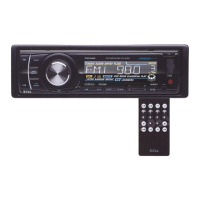
using
Remote
Control..•
CD
POWER Use
to
turn Receiver ON
or
OFF.
® TUNE/SEEK
(~
and
m)
Press to skip ahead or back one station
in
tuning range
of
the radio band. Press
and hold
to
seek the next station up
or
down the radio band.
®
EQ
(Preset Equalizer Curves)
Press repeatedly
to
cycle through four
modes: FLAT, ROCK, POP
or
CLASSIC.
o MUTE Press this button
to
silence the 9
audio. Press again to restore the previous
audio volume level.
® VOLUME - / VOLUME + Use
to
increase or decrease volume level.
® LOC (Local/Distant select)
In
some
areas, reception
of
an
FM
station may
be weak. Changing the reception mode
to
LOC by pressing this button allows
the receiver to skip the weaker signals.
Press again to return to DISTANT mode.
o SELECT Press this button
to
cycle
12l------1
through the various sound parameters
which are available for adjustment:
@
VOLUME> BASS> TREBLE> BALANCE
> FADER>
EO
RADIO>
USB>
SD
CARD>
AUX
IN
> iPod > BLUE (Bluetooth)
Please note:
iPod Mode can only
be
selected
if
an
iPod is present in the dock.
~
BAND .
Press briefly, repeatedly
to
cycle
between the five radio bands:
FM1
> FM2 > FM3 >
AM1
> AM2
@ SOURCE (Input select, same as
MODE
on
head unit)
Press briefly, repeatedly
to
cycle
between the six audio input modes:
MO/ST
In
some areas, reception
of
an
FM
station may be weak. Changing the
reception mode
to
MONO by pressing
this button may improve the reception.
Press again
to
return to
STEREO
mode.
®
®
RADIO PRESETS
1-6
After you have programmed the presets
via the front panel, you can use buttons
1-6
to
select the preset stations.
® AMS (Automatic Music Scan)
This is a quick and convenient way
to
set up presets
in
your radio. If you press
AMS, the radio will scan up each radio
band and assign presets
to
the
strongest stations it finds. Please note
that
if
you
do
this, all
your
previous
presets
will be lost.
® LOUDNESS
Press
to
increase the level
of
bass
output. Press and hold again
to
turn off
the Loudness function.
755061 User's Manual - page 7



 To Next Page
 Loading...