
 Need help?
Do you have a question about the Boss Audio Systems BRT17SLR and is the answer not in the manual?
Key safety guidelines for using the sound bar, including volume, hazardous situations, and adjustments.
Warnings and guidelines for professional installation, accessory use, and battery disconnection.
Details the sound bar's components, including input jacks, USB, power plug, buttons, and display.
Step-by-step guide for attaching the sound bar to an ATV or UTV using clamps and hardware.
Lists common issues like no power, no sound, connectivity problems, and provides solutions.
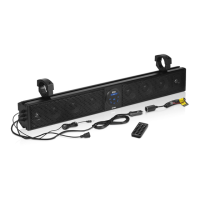
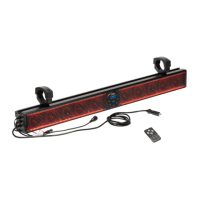
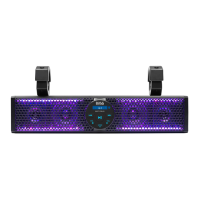
The BRT17SLR is a Bluetooth-enabled 17-inch amplified sound bar designed for installation in ATVs (All-Terrain Vehicles) or UTVs (Utility Vehicles). It allows users to stream audio wirelessly from mobile devices via Bluetooth, play music from external devices through a USB port or 3.5mm AUX jack, and output audio to an external amplifier or powered speakers via RCA outputs. The sound bar also features built-in LED lights with multicolor illumination options, which can be controlled using the supplied remote control. It is shockproof and water-resistant, operating on a 12V DC vehicle power supply.
The primary function of the BRT17SLR is to provide an amplified audio experience in off-road vehicles. Its Bluetooth connectivity enables seamless wireless audio streaming from smartphones or other Bluetooth-enabled devices. The sound bar supports MP3 and WMA audio files when connected via USB, and the USB port can also provide 1A current for charging mobile devices. For wired connections, a 3.5mm AUX input allows for playback from MP3 players or other audio sources. The integrated Class A/B amplifier ensures robust sound output, while the RCA outputs offer flexibility for expanding the audio system with additional amplifiers or powered speakers. The multicolor LED lights enhance the aesthetic appeal and can be customized to various illumination modes, speeds, and colors, including a "SYN" mode that flashes lights to the rhythm of the music.
The BRT17SLR offers multiple ways to power on and off, either by pressing and holding the power button on the sound bar itself or using the remote control. The LED lights can be toggled on or off with a brief press of the power button on the remote.
Upon powering on, the sound bar automatically enters Bluetooth mode, indicated by "bt" flashing on the display. If not in Bluetooth mode, users can press the "MODE" button to select it. To pair, users enable Bluetooth on their mobile device, select "Boss Audio BRT17SLR" from the available devices, and enter "0000" if prompted for a password. Once paired, "bt" on the display stops flashing and remains lit. The sound bar will automatically reconnect to the last paired device when both are turned on. To connect a second mobile device, the current Bluetooth connection must be disconnected by holding down the play/pause button for two seconds, then repeating the pairing process.
When a 3.5mm audio cable is connected to the AUX input, the sound bar automatically switches to AUX mode, displaying "AUX." If not, the "MODE" button can be pressed to select it. Audio playback is then controlled directly from the connected audio device.
Connecting a USB flash drive to the USB port automatically switches the sound bar to USB mode, displaying "USB" briefly. If not, the "MODE" button can be pressed to select it. Music playback from MP3 and WMA files stored on the USB drive begins automatically.
The remote control provides comprehensive control over both music playback and LED lights:
Mounting the sound bar requires an assistant due to its weight. Only the supplied accessories should be used for mounting to avoid voiding the warranty. The process involves attaching a sliding block to the lower part of a clamp, inserting it into the sliding channel on the sound bar, and securing it with a hex wrench. Rubber pads are used for secure clamping and abrasion prevention. The upper clamp is then tightened to the lower clamp using a hex wrench, with spring washers to ensure stable tightening against vibration. Regular checks of mounting conditions are recommended before each vehicle ride.
Two power connection options are available:
The sound bar can output audio to an external amplifier or powered speakers through its RCA output sockets, using an audio cable with RCA plugs.
If the power LED indicator on the vehicle cigarette lighter plug does not light up, it indicates a blown fuse inside the plug. To replace it, turn the front end assembly of the cigarette lighter plug counterclockwise to access the fuse. Replace the blown fuse with a 10A AGC fuse (not included), then reassemble the front end.
The manual provides a troubleshooting guide for common issues:
At the end of its life, the product should not be disposed of with normal household waste but should be taken to an official collection point for recycling to help preserve the environment.
 General
| Type | Soundbar |
|---|---|
| Frequency Response | 45 Hz - 25 kHz |
| Impedance | 4 Ohms |
| Amplified | Yes |
| Channels | 2 |
| Bluetooth | Yes |
| Auxiliary Input | Yes |
| USB | No |
| Weatherproof | Yes |
| Speaker Type | Full Range |




 To Next Page