22
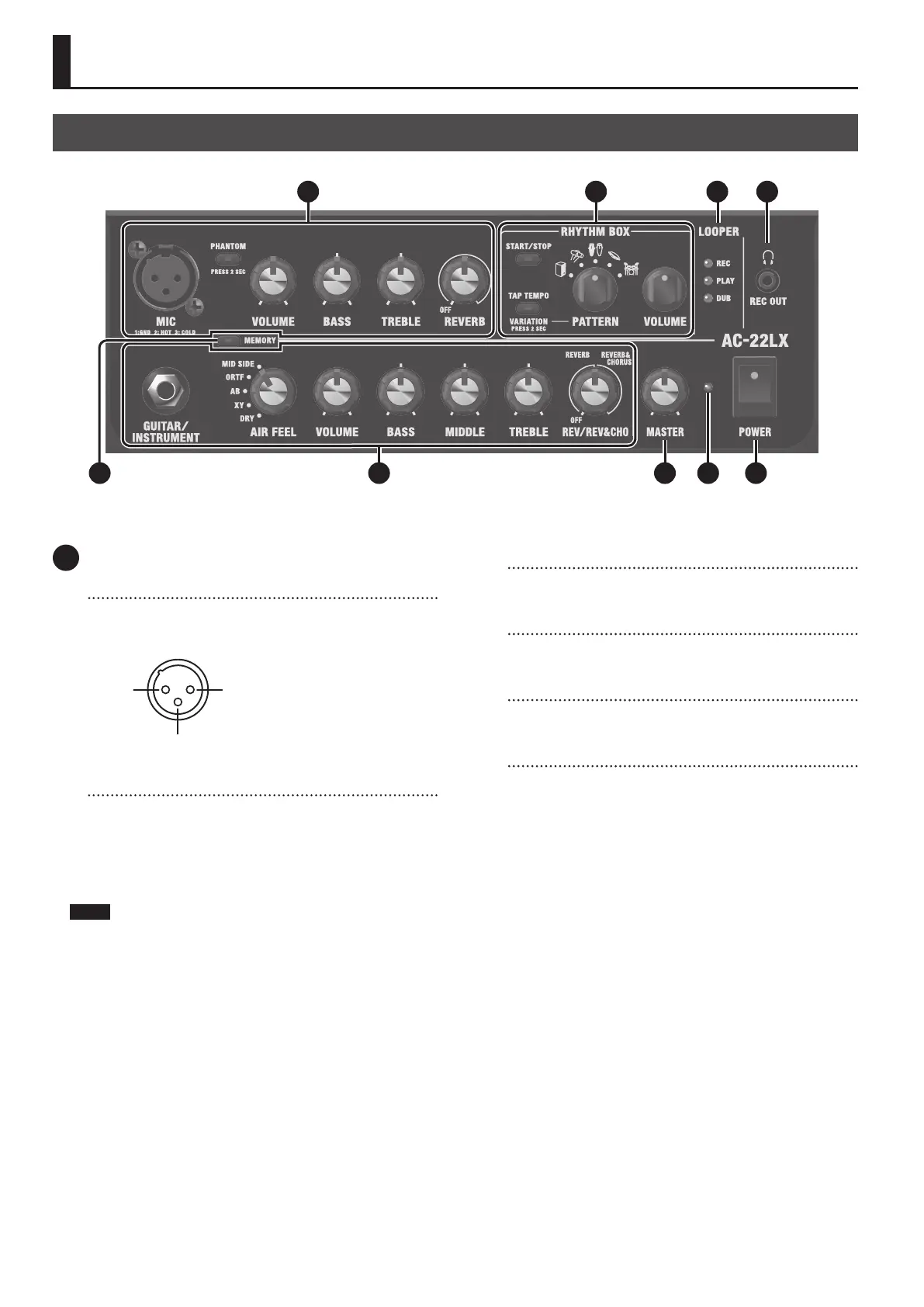
Panel Descriptions
1 MIC CHANNEL
MIC jack
Connect your microphones and related devices here.
* Pin assignment of MIC connector/jack
1: GND2: HOT
3: COLD
※ 入力端子の場合
1: GND 2: HOT
3: COLD
※ 出力端子の場合
TIP: HOT
RING: COLD
SLEEVE: GND
[PHANTOM] button
Switches phantom power on/o.
Long-press the [PHANTOM] button to switch between ON/OFF.
When connecting a mic that requires phantom power (such as a
condenser mic), set this to “ON”.
Make sure this is set to “OFF” when you connect a mic that doesn’t
require phantom power.
NOTE
¹ When connecting a mic that requires phantom power, connect
the mic and operate this device in the following order.
1. Long-press the [PHANTOM] button to turn it o.
2. Connect the microphone.
3. Long-press the [PHANTOM] button to turn it on.
¹ Supplying phantom power to a mic that doesn’t require it may
cause the device to malfunction.
Make sure to switch the button OFF before you connect the mic.
¹ To protect the circuitry of this unit, the sound from the Mic
channel is muted for a period of time after you switch the
[PHANTOM] button ON or OFF.
¹ You may hear a noise if you unplug or plug a connector into this
jack while phantom power is turned on.
¹ If the condenser mic’s volume is too loud, use the attenuator
(PAD) on the mic to adjust the volume. Refer to the owner’s
manual of your condenser mic for details.
You can use the dedicated app for the AC-22LX to operate the
AC-22LX’s preamp PAD.
[VOLUME] knob
Adjusts the volume before equalization and eects are applied to
the mic and related devices.
[BASS] knob
Adjusts the low-end volume of the mic and related devices
connected to the MIC connector.
[TREBLE] knob
Adjusts the high-end volume of the mic and related devices
connected to the MIC connector.
[REVERB] knob
The knob position adjusts the depth of the mic channel reverb.
When this is o, reverb eect is not applied.
Top Panel
31 4 5
2
7 8 96




 To Next Page