7
Before Performing with the AD-5
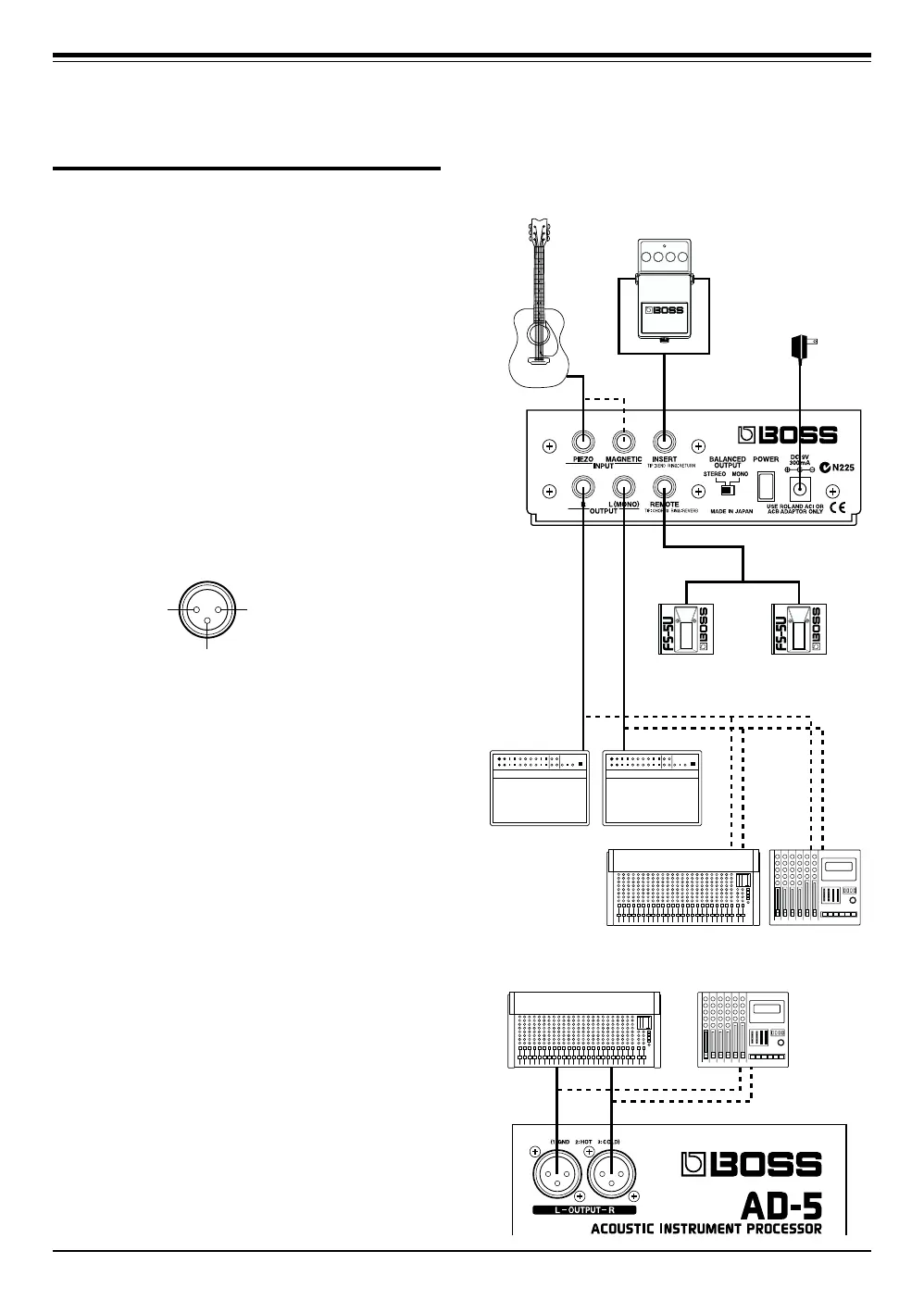
MTRMixer
Guitar Amplifier
(Chorus Remote)
Footswitch
(FS-5U: Optional)
(Reverb Remote)
Footswitch
(FS-5U: Optional)
(White)(Red)
Cord
(Roland PCS-31:
Optional)
Cord
(Roland PCS-31:
Optional)
AC Adaptor
(Including)
(White)(Red)
Electric
Acoustic Guitar
External
Effects Device
MTRMixer
Connections
After connecting the AD-5 to your guitar and am-
plifier as shown below, connect the AC adaptor
that is included with the unit.
* To prevent malfunction and/or damage to speakers or other
devices, always turn down the volume, and turn off the power
on all devices before making any connections.
* Turn on the power on all connected equipment before you
turn up the volume on your amplifier.
* To output in monaural via the 1/4" phone outputs, connect
the cable to the OUTPUT L (MONO) jack.
* To output monaurally via the balanced outputs, switch the
BALANCED OUTPUT switch to MONO.
* The pin assignment for the XLR connectors is as shown
below. Before making any connections, make sure that this
pin assignment is compatible with that of all your other
devices.
121: GND
2: HOT
3: COLD
3



 To Next Page