EasyManua.ls Logo

Boss AW-2 - Page 2

Boss AW-2
6 pages
Print Icon
To Next Page IconTo Next Page
To Previous Page IconTo Previous Page
Loading...
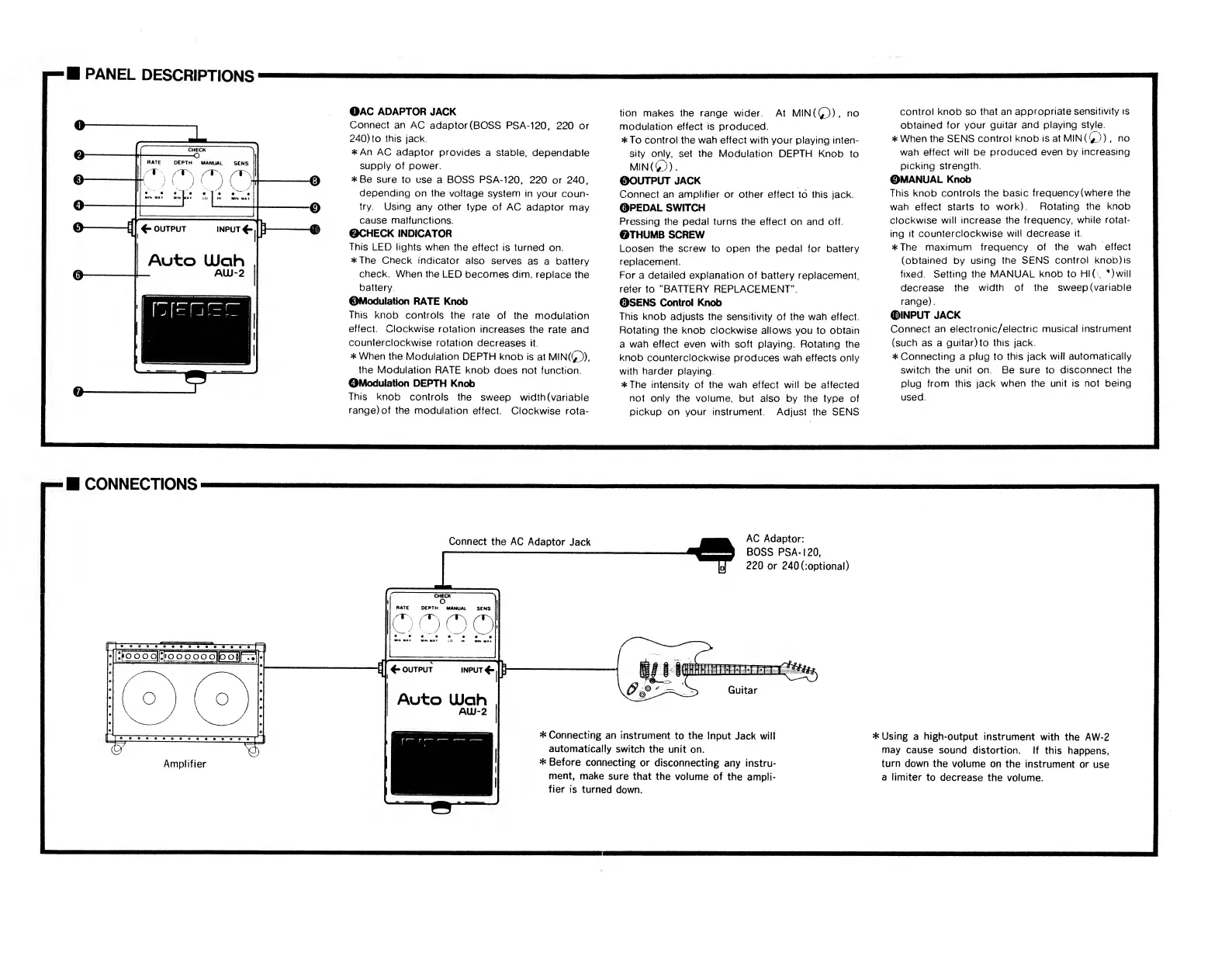
PANEL
DESCRIPTIONS
OAC
ADAPTOR
JACK
Connect
an
AC
adaptor
(BOSS
PSA-120,
220
or
240)
to
this
jack.
An
AC
adaptor
provides
a
stable,
dependable
supply
of
power.
Be
sure
to
use
a
BOSS
PSA-120,
220
or
240,
depending
on
the
voltage
system
in
your
coun¬
try.
Using
any
other
type
of
AC
adaptor
may
cause
malfunctions.
©CHECK
INDICATOR
This
LED
lights
when
the
effect
is
turned
on.
The
Check
indicator
also
serves
as
a
battery
check.
When
the
LED
becomes
dim,
replace
the
battery.
©Modulation
RATE
Knob
This
knob
controls
the
rate
of
the
modulation
effect.
Clockwise
rotation
increases
the
rate
and
counterclockwise
rotation
decreases
it.
When
the
Modulation
DEPTH
knob
is
at
MIN(0),
the
Modulation
RATE
knob
does
not
function.
OModulation
DEPTH
Knob
This
knob
controls
the
sweep
width
(variable
range)
of
the
modulation
effect.
Clockwise
rota¬
tion
makes
the
range
wider.
At
MIN(0),
no
modulation
effect
is
produced.
To
control
the
wah
effect
with
your
playing
inten¬
sity
only,
set
the
Modulation
DEPTH
Knob
to
MIN(0).
©OUTPUT
JACK
Connect
an
amplifier
or
other
effect
to
this
jack.
©PEDAL
SWITCH
Pressing
the
pedal
turns
the
effect
on
and
off.
©THUMB
SCREW
Loosen
the
screw
to
open
the
pedal
for
battery
replacement.
For
a
detailed
explanation
of
battery
replacement,
refer
to
"BATTERY
REPLACEMENT".
©SENS
Control
Knob
This
knob
adjusts
the
sensitivity
of
the
wah
effect.
Rotating
the
knob
clockwise
allows
you
to
obtain
a
wah
effect
even
with
soft
playing.
Rotating
the
knob
counterclockwise
produces
wah
effects
only
with
harder
playing.
The
intensity
of
the
wah
effect
will
be
affected
not
only
the
volume,
but
also
by
the
type
of
pickup
on
your
instrument.
Adjust
the
SENS
control
knob
so
that
an
appropriate
sensitivity
is
obtained
for
your
guitar
and
playing
style.
When
the
SENS
control
knob
is
at
MIN
(0),
no
wah
effect
will
be
produced
even
by
increasing
picking
strength.
©MANUAL
Knob
This
knob
controls
the
basic
frequency
(where
the
wah
effect
starts
to
work).
Rotating
the
knob
clockwise
will
increase
the
frequency,
while
rotat¬
ing
it
counterclockwise
will
decrease
it.
The
maximum
frequency
of
the
wah
effect
(obtained
by
using
the
SENS
control
knob)
is
fixed.
Setting
the
MANUAL
knob
to
HI
(.
^)will
decrease
the
width
of
the
sweep
(variable
range).
©INPUT
JACK
Connect
an
electronic/electric
musical
instrument
(such
as
a
guitar)to
this
jack.
Connecting
a
plug
to
this
jack
will
automatically
switch
the
unit
on.
Be
sure
to
disconnect
the
plug
from
this
jack
when
the
unit
is
not
being
used.
r-H
CONNECTIONS
Connect
the
AC
Adaptor
Jack
AC
Adaptor:
BOSS
PSA-120,
220
or
240(:optional)
Connecting
an
instrument
to
the
Input
Jack
will
automatically
switch
the
unit
on.
Before
connecting
or
disconnecting
any
instru¬
ment,
make
sure
that
the
volume
of
the
ampli¬
fier
is
turned
down.
Using
a
high-output
instrument
with
the
AW-2
may
cause
sound
distortion.
If
this
happens,
turn
down
the
volume
on
the
instrument
or
use
a
limiter
to
decrease
the
volume.

Related product manuals