65
Writing your finished song to a CD (Audio CD Write)
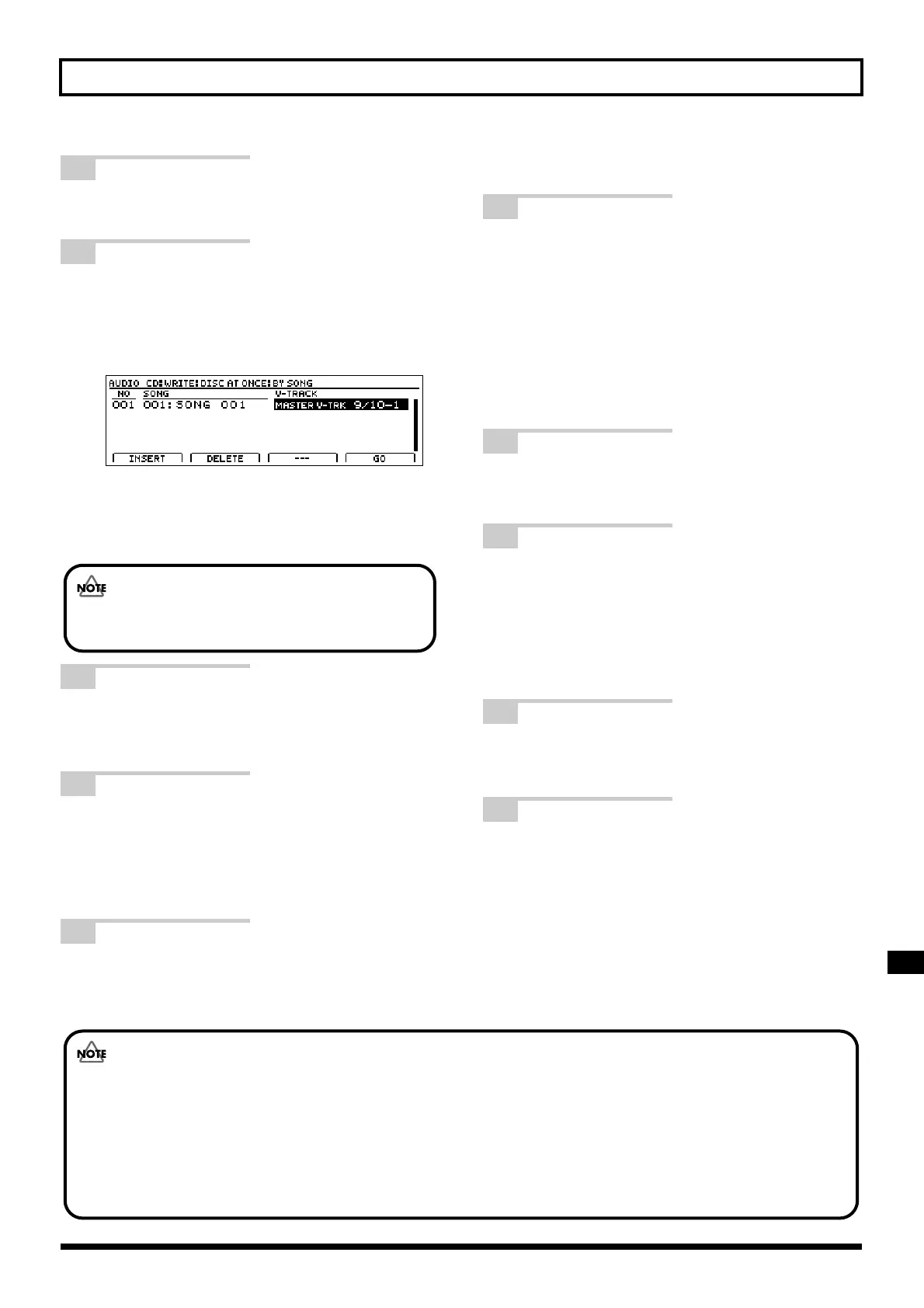
7 Use the TIME/VALUE dial to select the
song that you want to write.
8 Move the cursor to the right to display
the screen, and then use the TIME/
VALUE dial to set the V-Track that you
want to write.
fig.07-66d
At this time, “MASTER V-TRK” will be indicated for
the V-Track that was most recently used for mastering
(i.e., the final mastering track). This can be used as a
guide for setting the correct V-Track.
9 To cancel selection of a song, press [F2]
(DELETE).
The selection will be canceled.
10
To insert a song just before a song that
has already been selected, move the
cursor to the position you want to insert,
and then press [F1] (INSERT).
A new song will be inserted.
11
Repeat Steps 6 through 10 to select all
of the songs you want to write, and
then press [F4] (GO).
The Write Speed screen will appear.
12
Use the TIME/VALUE dial to set the
write speed.
Alternatively, if you want to use the write speed that
is currently displayed, proceed to Step 13.
Write Speed:
x2 (352 kbps) Writes twice as fast.
x4 (704 kbps) Writes four times as fast.
x8 (1408 kbps) Writes eight times as fast.
13
Press [ENTER/YES].
The message “Write Sure?” will appear.
14
Press [ENTER/YES].
The message “Now Writing...” will appear and writing
to the audio CD will begin. When this process has been
completed, the finalization will start automatically.
When the message “Complete!” appears, it indicates that
writing has been fully completed.
15
Press [EXIT/NO] several times to return
to the top screen.
16
Press the CD-R/RW drive’s EJECT
button to eject the disc.
This completes the writing process.
For details regarding listening to the audio CD that
you have just created, refer to “Listening to your
audio CD (Audio CD Play)” (p. 70).
It may take a period of several seconds before the disc
is actually ejected.
Only stereo tracks can be selected for writing, and you
will not be able to select mono tracks at this time.
• The range of available write speeds can sometimes be limited by the type of media being used. In such a case, the BR-
1600CD will allow you to select only the supported speeds.
• If you are using CD-R or CD-RW discs intended for high-speed writing, the frequency of write errors may increase if
the x2 or x4 speed is selected. It is recommended that you use the x8 speed for high-speed discs.
• Although you may think that the x8 speed setting creates CD-R/RWs in half the time of the x4 setting, a slightly
longer time will be required in practice. The data recorded in the BR-1600CD’s audio track is converted into CD format
during the writing process, and this accounts for the extra time requirement.



 To Next Page