14
Using the HOLD (Overdubbing) Function
With the HOLD function, you can record up to
5.2 seconds of your performance, and then
have that content played back repeatedly. You
can also layer this as you perform something
else, then record these together (overdub).
You can keep the recorded content playing
continuously as backing and produce other
special effects.
1.
Select HOLD
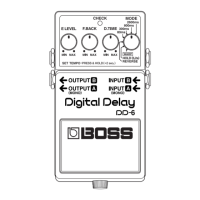
Set the MODE switch to HOLD
(the
CHECK indicator goes out)
.
2.
Begin recording
Recording starts when you press the ped-
al switch. Hold down the pedal switch for
the duration of the recording
(the CHECK
indicator flashes)
.
3.
When recording is finished, playback starts
Release the pedal switch to stop record-
ing. Playback of the recorded content be-
gins simultaneously
(the CHECK indicator
remains lit)
.
* The maximum recording time is 5.2 seconds. If
the pedal switch is held down for more than 5.2
seconds, the recording stops automatically, and
the recorded content is then played back.
* An oscillating sound may be audible with
extremely short recording times.
4.
Overdubbing
When layering recordings, repeat Steps 2 and 3.
5.
Adjust the volume
Adjust the volume of the playback sound
with the E.LEVEL knob.
6.
Finish playback
Press the pedal switch to stop the play-
back
(the CHECK indicator goes out)
.
* When playback is stopped, the recorded content is erased.
* The recorded content is erased when the mode is
switched, or when the power is turned off.
DD-6_e.book 14 ページ 2006年7月25日 火曜日 午後3時37分











 To Next Page