7
Useful Functions
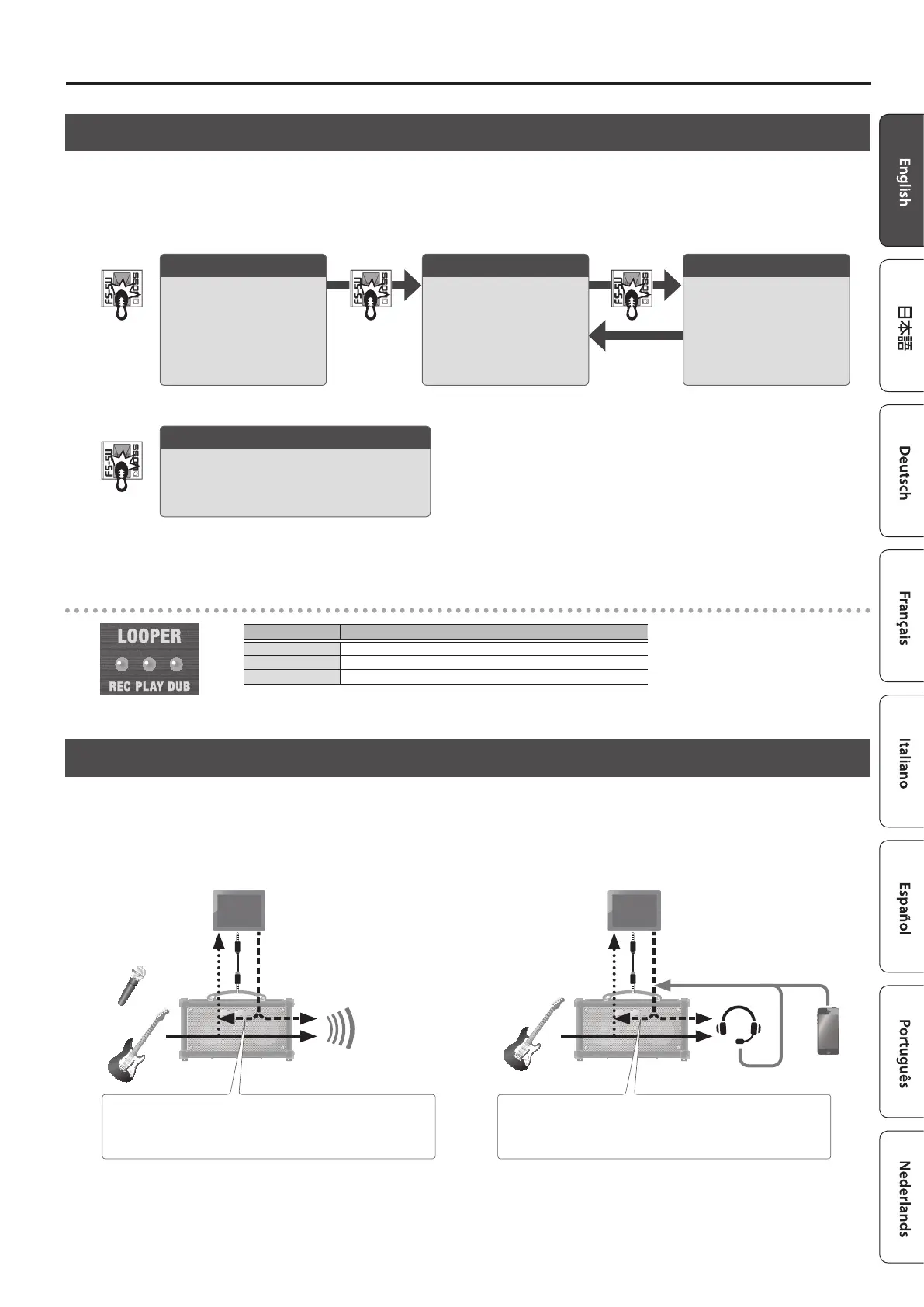
Using the Looper
You can use the looper by connecting a footswitch (FS-5U, FS-6, FS-7; sold separately) to the FOOT SW jack.
You can record up to 90 seconds (in mono) and play back the recorded section over and over. You can also layer additional performances with the recording
as it plays back (overdubbing). This lets you create real-time backing performances on the y.
* The factory default setting is set to a maximum of 45 seconds (stereo). With the dedicated software (p. 4) or mobile device app (p. 9), you can select up to
a maximum of 90 seconds (mono).
Stop/clear
If you press the footswitch (connected via the
ring) twice in one second, the looper stops.
Hold for two seconds or longer to clear the
phrase.
Recording
Recording starts.
Press the footswitch
(connected via the ring) to
switch to playback, at the
point where you want to
loop.
Loop playback
The loop plays back.
Pressing the footswitch
(connected via the ring)
switches to overdubbing.
Overdubbing
Record additional layers
while the loop plays back.
Press the footswitch
(connected via the ring) to
switch to playback.
* Once you reach the maximum available recording time, the unit automatically switches to playback mode.
* Anything you record is lost once you turn o the power.
LOOPER indicators
Indicator Explanation
REC Lights up during recording
PLAY Lights up during playback, and blinks when stopped
DUB Lights up while overdubbing
Using This Unit with Other Mobile Devices (i-CUBE LINK)
With the “i-CUBE LINK” feature, you can connect your mobile device with the included mini cable (4-pole) and play back audio from that device, at the same
time that the sound inputted into this unit is sent to the mobile device.
Use this to play back or record the sound inputted into this unit on your mobile device by means of an app, or to livestream your performance.
Mobile device app
Audio input
Audio from mobile device
or
Turn the [LOOPBACK] switch on to send the input sound from the
i-CUBE LINK/AUX IN jack back to your mobile device.
Mobile device app
Audio input
Audio from mobile device
Turn the [LOOPBACK] switch on to play back or record the sound
from your headset mic or Bluetooth audio using a mobile device.
When using the built-in speakers When using a headset mic or Bluetooth audio
Bluetooth audio
Headset mic audio
For details on i-CUBE LINK and on mobile device apps that can use i-CUBE LINK, visit the BOSS website.
https://www.boss.info/



 To Next Page