3
If you need to change the setting from AUDIO to STORAGE, a dialog
appears—press ENTER, restart your BR-80, and skip to Step 8 below.
7 If USB Mode’s already set to STORAGE, press EXIT three times.
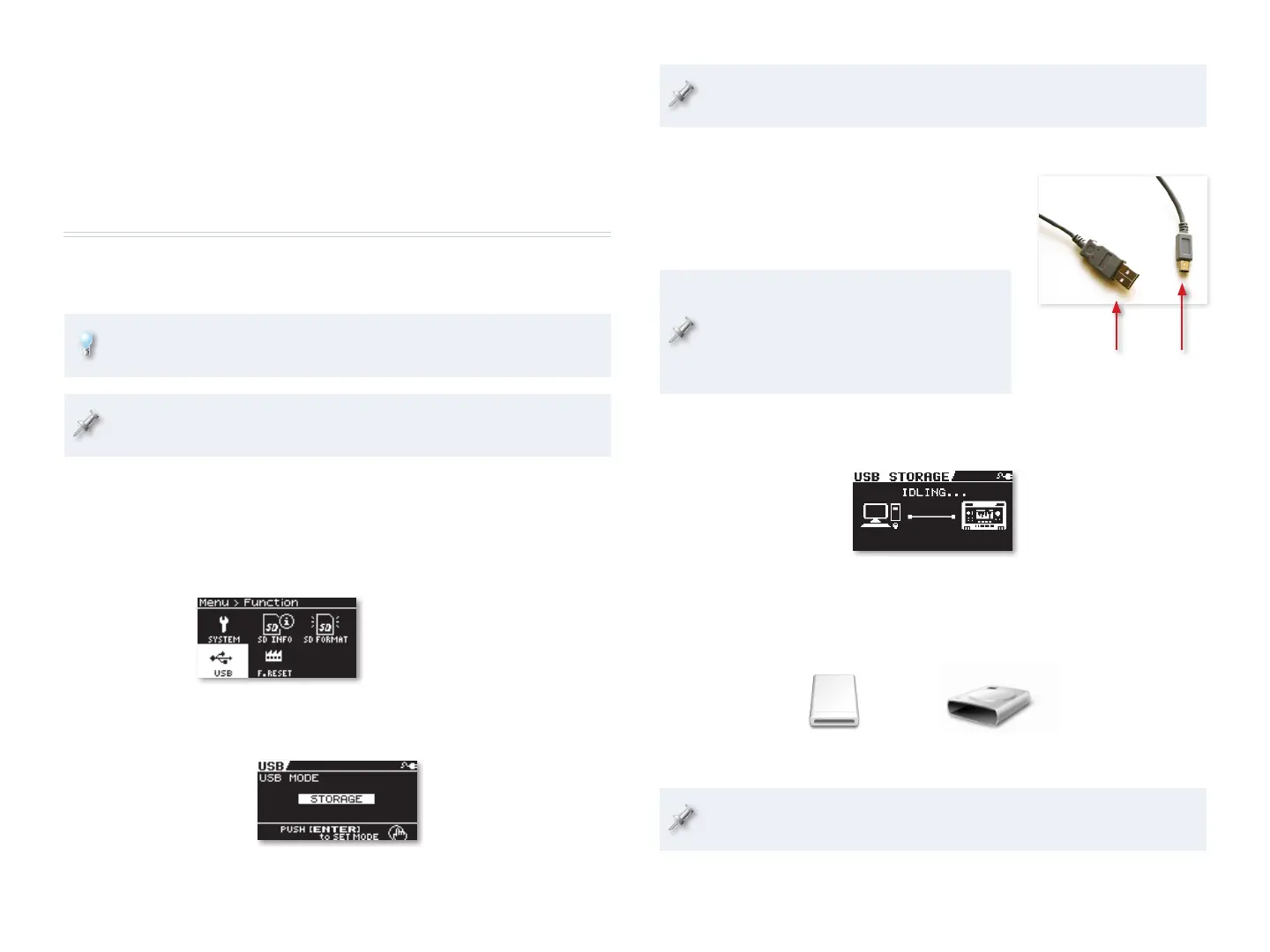
8 Connect the mini-B end of the USB
cable to the BR-80’s left side panel’s
USB jack, and the other end to an
unused USB port on your computer.
When you connect the BR-80 to your
computer via USB, you’ll typically get the
best results using USB jacks on the back
of a desktop computer or on the side of
a laptop. We recommend not using a hub.
The BR-80’s display shows “ACCESSING...” and then “IDLING...” as it
handshakes with the computer, and then waits for you.
The BR-80’s SD card appears as a removable drive on your computer.
If you’re on a Mac, it’ll be on your desktop. If you’re using Windows,
it’ll appear as one of your computer’s drives.
BR-80
EBAND
BR-80 EBAND (E:)
In OSX: In Windows:
On Windows, you’ll need to wait a few moments as Windows installs
the necessary drivers for the BR-80 to become available.
A mini-B
An Audio Interface Plus Effects
An added bonus with the BR-80 is its BOSS effect processor. You can record
your mics and instruments in your DAW without effects, or “dry,” or you can
take advantage of the BR-80’s effects, easily adding them to your sounds on
the way in to the computer. We’ll discuss how to do this later.
Connecting the BR-80 to Your Computer
We’ll start by connecting the BR-80 to the computer so it can get to the
driver software on the BR-80’s factory SD card.
If you prefer to download the latest software, you can connect the
BR-80 to your computer later. We’ll tell you where to find it later on.
The BR-80 ships with the USB A/mini-B cable you’ll need for connecting
it to your computer.
1 Turn on your BR-80.
2 Press the MENU button to display the Menu screen.
3 Highlight FUNCTION.
4 Press ENTER, and then highlight USB.
We’re showing MTR mode’s
Menu > Function screen here,
but you’ll find a similar screen
in all of the BR-80’s modes.
5 Press ENTER.
6 If USB isn’t set to STORAGE, turn the Value dial so it is.


 To Next Page
 Loading...