MEMO
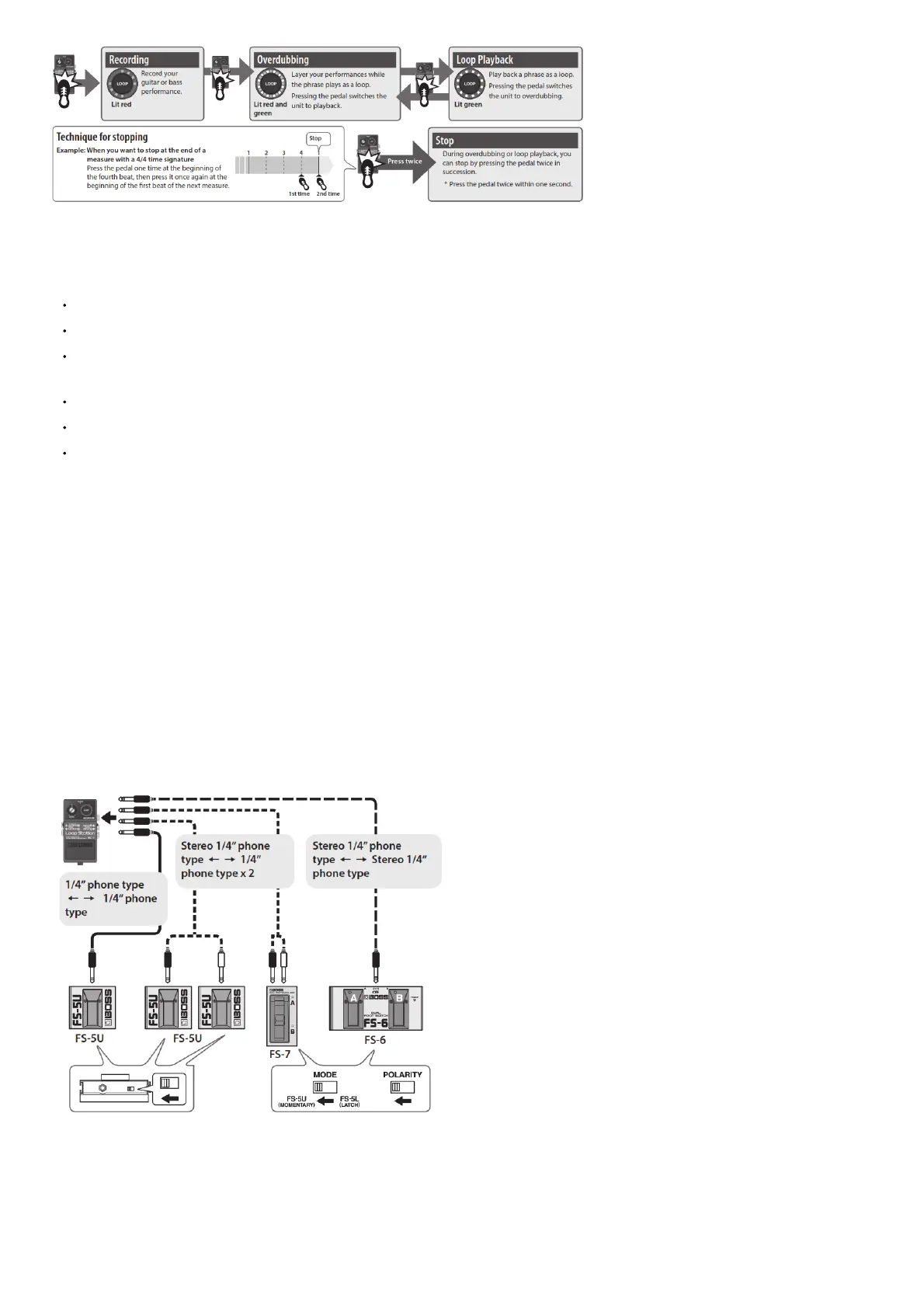
• If a footswitch is connected to the STOP/UNDO jack, you can stop by pressing the footswitch just once.
• The recorded phrase is saved even if you turn off the power.
NOTE
The minimum recording time for a loop phrase is approximately 0.25 seconds. If you press the pedal within approximately 0.25 seconds after you start recording, the recording will
continue until the phrase is at least approximately 0.25 seconds long.
The maximum recording time for a loop phrase is approximately 12 minutes (stereo). If you exceed the maximum recording time, recording or overdubbing is interrupted, and operation
changes to loop playback.
Roland assumes no liability concerning the restoration of any stored content that has been lost.
NOTE
The minimum recording time for a loop phrase is approximately 0.25 seconds. If you press the pedal within approximately 0.25 seconds after you start recording, the recording will
continue until the phrase is at least approximately 0.25 seconds long.
The maximum recording time for a loop phrase is approximately 12 minutes (stereo). If you exceed the maximum recording time, recording or overdubbing is interrupted, and operation
changes to loop playback.
Roland assumes no liability concerning the restoration of any stored content that has been lost.
Deleting a Phrase
The recorded phrase is erased if you hold down the pedal for two seconds or longer while stopped.
During erasure, the LOOP indicator (red) blinks rapidly.
* Never turn off the power while the LOOP indicator (red) is blinking rapidly. The recorded data might be lost if you do so.
* The phrase plays while you hold down the pedal. If you want to erase the phrase without playing it, use an external footswitch to stop the phrase.
Canceling an Overdub (Undo/Redo)
You can undo/redo by holding down the pedal for two seconds or longer during overdubbing or playback.
Operation Explanation
Undo Cancels the last recording or overdub.
Redo
To bring back the canceled sound, hold down the pedal once again for two seconds or longer during
playback.
* Redo is possible only during overdubbing or playback.
During undo/redo, the LOOP indicator (green) blinks rapidly.
Connecting to an External Footswitch
Connect your footswitch to the STOP/UNDO jack as shown in the illustration, and set its POLARITY switch.
* The FS-5L cannot be used.
Footswitch Operation
FS-5U
Stop
During recording/overdubbing/playback, Press the footswitch to stop. Erase the
phrase Hold down the footswitch two seconds or longer to erase the phrase.
FS-5U/FS-7 pedal connected
to the stereo L side
FS-6’s pedal B
FS-5U/FS-7 pedal connected
to the stereo R side
Undo/Redo You can undo/redo by pressing the footswitch.
FS-6’s pedal A


 To Next Page