Basic Operation Guide
5
Deutsch
Français Italiano Español
Português
Nederlands
EnglishEnglish
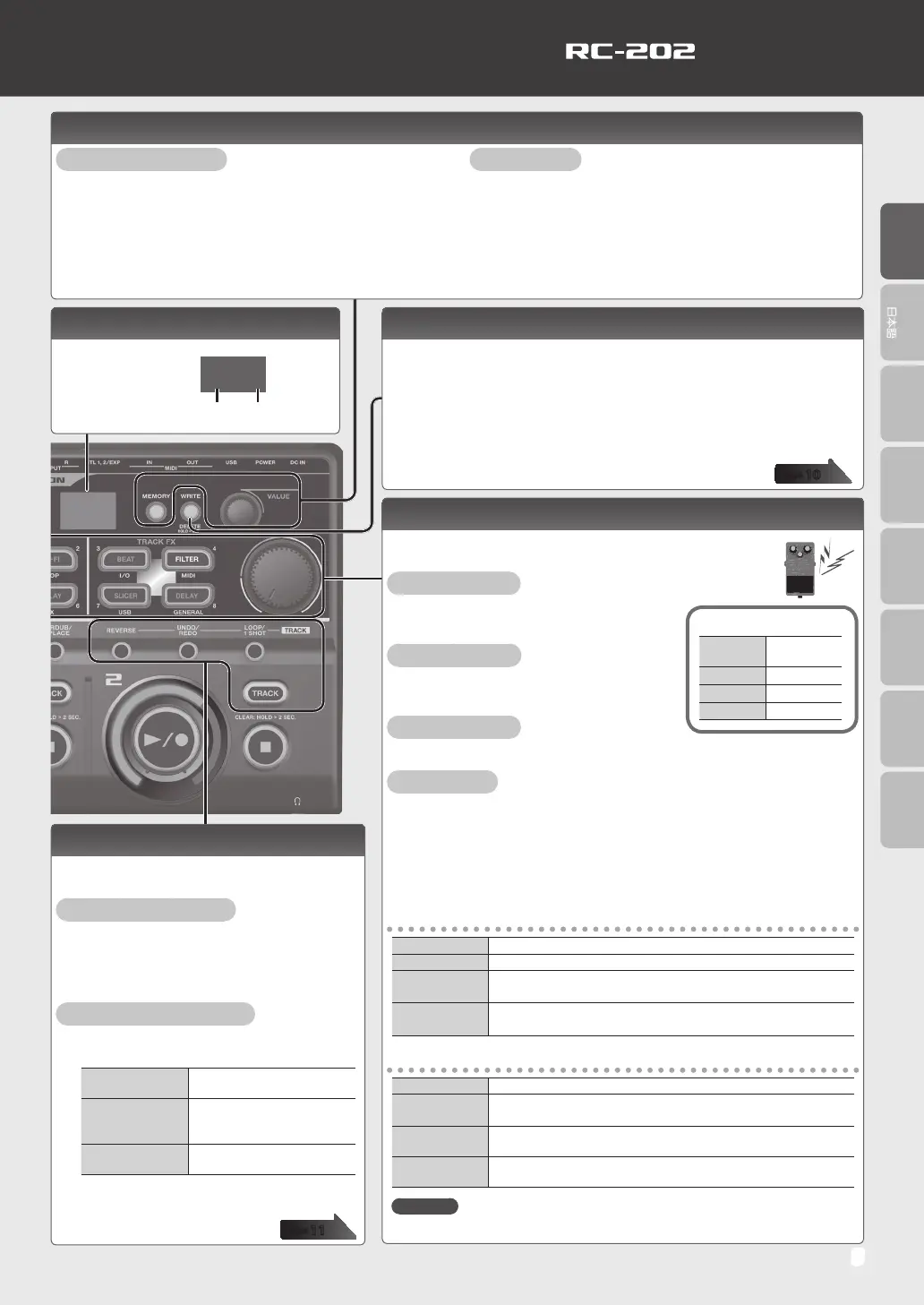
Track Settings
Here you can specify the playback level and playback
method of the tracks.
Adjusting the Playback Level
1. Press the [TRACK] button.
2. Turn the [VALUE] knob to adjust the playback
level.
Specifying the Playback Method
1. Press the button of the function that you
want to set.
[REVERSE] button
Species either conventional
playback or reverse playback.
[UNDO/REDO]
button
Here’s how to cancel
recording/overdubbing for
a track.
[LOOP/1 SHOT]
button
Species either normal loop
playback or one-shot playback.
2. Press the [TRACK] button to switch the
setting.
Display
This shows various
information
according to the
operation you’re
performing.
1-1
Startup screen (Play screen)
Phrase memory
number
Bank
number
Selecting a Phrase Memory and Bank
Selecting a Phrase Memory
1. Press the [MEMORY] button.
2. Use the [P. SHIFT] (1)–[DELAY] (8) buttons to select a
phrase memory.
Alternatively,
In the Play screen, turn the [VALUE] knob to select a phrase
memory.
Selecting a Bank
1. Press the [MEMORY] button.
2. Turn the [VALUE] knob to select a bank.
3. Use the [P. SHIFT] (1)–[DELAY] (8) buttons to select a
phrase memory.
Alternatively,
In the Play screen, select a bank by turning the [VALUE] knob
while pressing it.
Saving a Phrase Memory
If you select a dierent phrase memory or turn o the power after recording or
editing the settings, the recorded content or edited settings will be lost. If you want
to keep the data, you must save it.
1. Press the [WRITE] button.
2. Use the [P. SHIFT] (1)–[DELAY] (8) buttons to select the save-destination
phrase memory.
3. Press the [WRITE] button to save the phrase memory.
Input FX, Track FX
You can apply eects to the audio input and to the sound of the
tracks, respectively.
Turning an Eect On
Press the [P. SHIFT]–[DELAY] button to make
it light.
Turning an Eect O
Press the lit [P. SHIFT]–[DELAY] button to make
it go dark.
Controlling an Eect
Turn the [INPUT FX] / [TRACK FX] knob.
Editing an Eect
1. Press the [P. SHIFT]–[DELAY] button to make it blink.
2. Turn the [VALUE] knob to select the type.
3. Press the [VALUE] knob to select the parameter; then turn the [VALUE]
knob to adjust the value.
4. Press the [SETUP] (EXIT) button to return to the Play screen.
Input FX
P. SHIFT This eect lets you change the pitch.
LO-FI
This eect intentionally degrades the sound to create a distinctive character.
RING MOD
Gives a metallic character to the sound, creating the impression that
the sound is going out of focus.
DELAY
Adds a delayed sound to the direct sound, giving the sound greater
depth or creating special eects.
Track FX
BEAT The track plays repeatedly in synchronization with the beat.
FILTER
A lter modies the brightness or thickness of the sound by cutting a
specic frequency range.
SLICER
Repeatedly cuts the sound, transforming a conventional sound to
create the impression of a rhythmic backing.
DELAY
Adds a delayed sound to the direct sound, giving the sound greater
depth or creating special eects.
Reference
For more about the parameters, refer to “Parameter Guide” (PDF).
Eect button indications
Blinking
purple
Editing
Lit purple On (selected)
Lit red On
Unlit O
page
10
page
11


 To Next Page