Basic Operation Guide
6
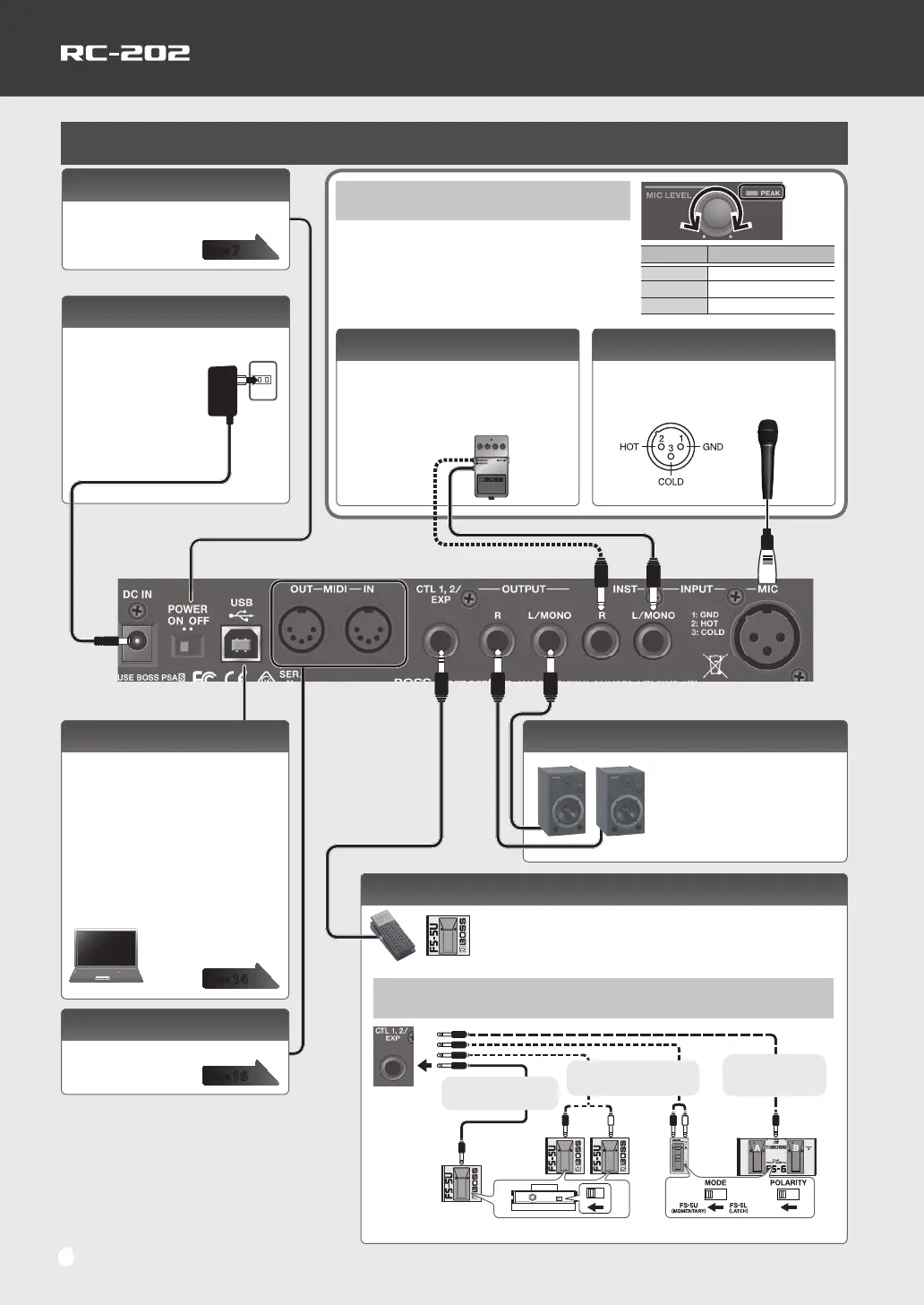
Adjusting the Input Level
Adjust the [MIC LEVEL] knob so that the PEAK indicator
occasionally lights orange when the volume is loudest.
To adjust the input level of a device that’s connected
to the INPUT INST jacks or the AUX IN jack, adjust the
controls of the connected device.
Connections
* To prevent malfunction and equipment failure,
always turn down the volume, and turn o all the
units before making any connections.
* Use only the specied expression pedal (Roland
EV-5, FV-500H/L; sold separately). By connecting
any other expression pedals, you risk causing
malfunction and/or damage to the unit.
OUTPUT jacks
Connect these jacks to your amp
or monitor speakers.
If your system is monaural, use
only the L jack. Sound that was
input in stereo will also be output
monaurally.
If you connect an expression pedal (Roland EV-5, FV-500H/L;
sold separately) or footswitch (FS-5U, FS-7, FS-6; sold
separately), you can use it to control a variety of parameters.
For details, refer to “Bank Settings” (p. 12).
Connecting to External Pedals
FS-7
FS-5U
1/4” phone type
10
1/4” phone type
Stereo 1/4” phone
type
10
Stereo
1/4” phone type
FS-6FS-5U
Stereo 1/4” phone type
10
1/4” phone type x 2
* If you use a mono cable to connect a single FS-5U, it will be CTL 1.
Color Input level
Green
Low
Orange
Appropriate
Red
Excessive
DC IN jack
Connect the included AC adaptor
here.
* Use only the included
AC adaptor. Using any
other adaptor may
cause overheating and
malfunction.
USB port
You can use a commercially
available USB cable to connect the
RC-202 to your computer, and use the
computer to read/write RC-202 tracks
(WAV les).
You can also use the RC-202 to
play sound from your computer via
USB AUDIO, and use USB MIDI to
synchronize the tempo with a DAW
that’s running on your computer.
INPUT INST jacks
Connect your eect unit here.
Use the L jack and R jack when
connecting a stereo-output eects
unit. Use only the L jack if you’re using a
monaural source.
MIDI connectors
For connecting MIDI device.
INPUT MIC jack
Connect your microphone here.
&“Phantom Power Setting” (p. 7)
* INPUT MIC jack pin wiring
[POWER] switch
This turns the power on/o.
CTL 1, 2/EXP jack
page
7
page
14
page
16


 To Next Page