3
Getting Ready
Connecting the Equipment
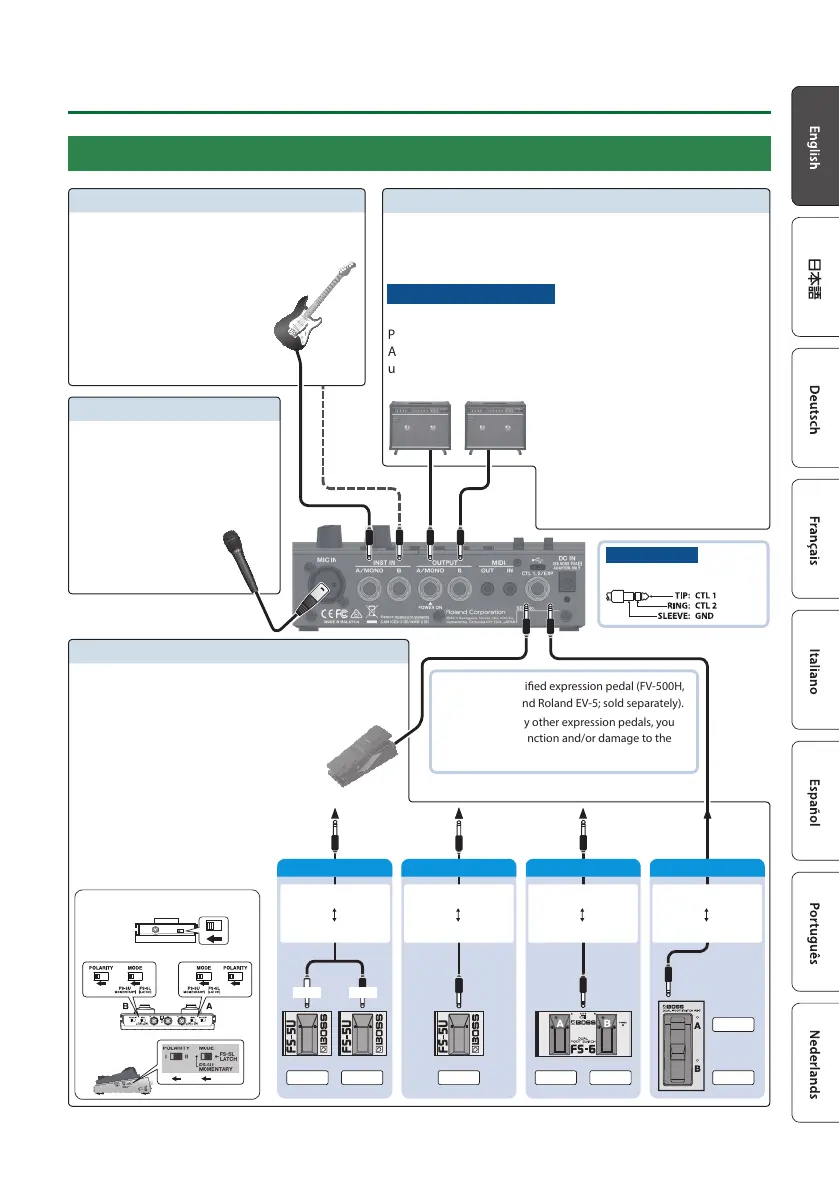
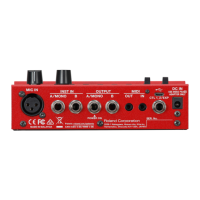
OUTPUT jacks (A/MONO, B)
To use this as EXP jack
Connect an expression pedal.
To use this as CTL 1, 2 jack
Connect a footswitch.
Use only the specied expression pedal (FV-500H,
FV-500L, EV-30, and Roland EV-5; sold separately).
By connecting any other expression pedals, you
risk causing malfunction and/or damage to the
unit.
FS-6
FS-7
CTL 2
FS-5U x 1
FS-5U
FS-6
Mode/Polarity switch
FS-7
1/4” phone type
1/4” phone type
Stereo 1/4” phone type
Stereo 1/4” phone type
Stereo 1/4” phone type
Stereo 1/4” phone type
CTL 1CTL 2 CTL 1CTL 1
CTL 1, 2/EXP jack
You can connect separately sold expression pedal or
footswitches to this jack, and use the expression pedal
or footswitches to control a variety of functions.
INST IN jacks (A/MONO, B)
Connect your electric guitar/bass or eect unit
to these jacks.
Use the A/MONO jack and B
jack when connecting a stereo-
output eects unit. Use only
the A/MONO jack if you’re
using a mono source.
Connect these jacks to your amp or monitor speakers.
If you’re using a mono setup, use only the A/MONO jack.
Even sound that is input in stereo is output in mono.
Turning the power on/o
The OUTPUT A/MONO jack doubles as the power switch.
Power to the unit is turned on when you plug into the OUTPUT
A/MONO jack; the power is turned o when the cable is
unplugged.
When powering up:
Turn on the power to your amp last.
When powering down:
Turn o the power to your amp rst.
MIC IN connector
Connect your microphone here.
If you’re using a condenser mic
that requires phantom power, turn
on this unit’s phantom
power (p. 17).
Pin assignment
CTL 1, 2/EXP jack
RINGTIP
Stereo 1/4” phone type
1/4” phone type x 2
CTL 1 CTL 2
FS-5U x 2


 To Next Page