2
Getting Ready
Installing the Batteries
Install four alkaline batteries (AA, LR6) in the battery compartment located on the bottom of the unit.
* When turning the unit over, be careful so as to protect the buttons and knobs from damage. Also, handle the unit
carefully; do not drop it.
* If you handle batteries improperly, you risk explosion and uid leakage. Make sure that you carefully observe all of
the items related to batteries that are listed in “USING THE UNIT SAFELY” and “IMPORTANT NOTES” (separate sheet
“USING THE UNIT SAFELY” and owner’s manual (p. 27)).
* “BATTERY LOW” will appear on the display if the batteries are low. Replace them with new ones.
Attaching the Rubber Feet
You can attach the rubber feet (included) if necessary.
Attach them in the locations shown in the illustration.
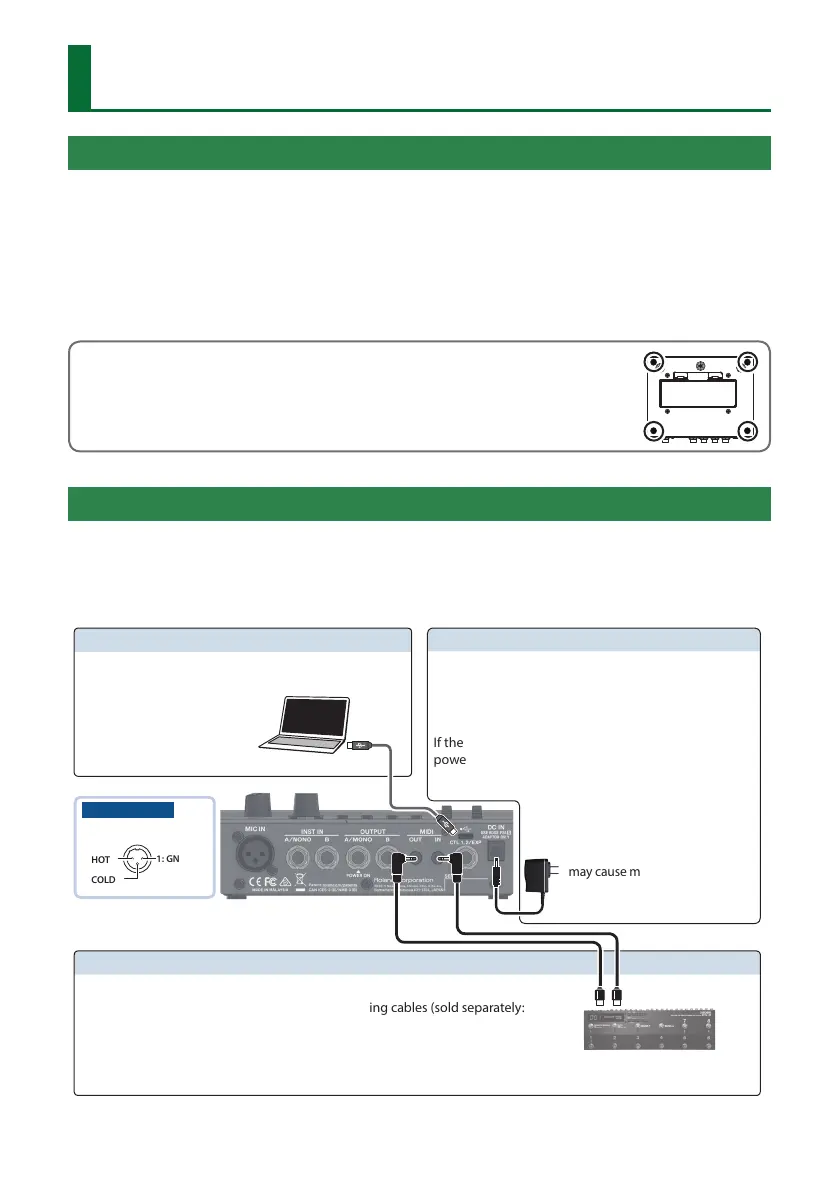
Connecting the Equipment
* To prevent malfunction and equipment failure, always turn down the volume, and turn o all the units before making
any connections.
* Before turning the unit on/o, always be sure to turn the volume down. Even with the volume turned down, you
might hear some sound when switching the unit on/o. However, this is normal and does not indicate a malfunction.
Pin assignment
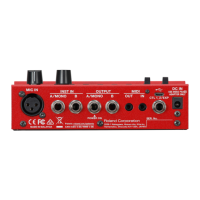
MIC IN connector
1: GND
2: HOT
3: COLD
O (USB ) port
You can connect your computer here and use it
to back up or recover data (p. 19).
MIDI OUT, MIDI IN connectors
Connect an external MIDI device here.
To make these connections, use TRS/MIDI connecting cables (sold separately:
BMIDI-5-35).
This lets you control an external MIDI device from this unit via MIDI. For
details, refer to p. 20.
Accepts connection of an AC Adaptor (PSA-S series;
sold separately). By using an AC Adaptor, you can play
without being concerned about how much battery
power you have left.
If the AC adaptor is connected while power is on, the
power supply is drawn from the AC adaptor.
DC IN jack
* Use only the specied AC adaptor
(PSA-S series; sold separately),
and connect it to an AC outlet of
the correct voltage. Do not use
any other AC adaptor, since this
may cause malfunction.


 To Next Page