2
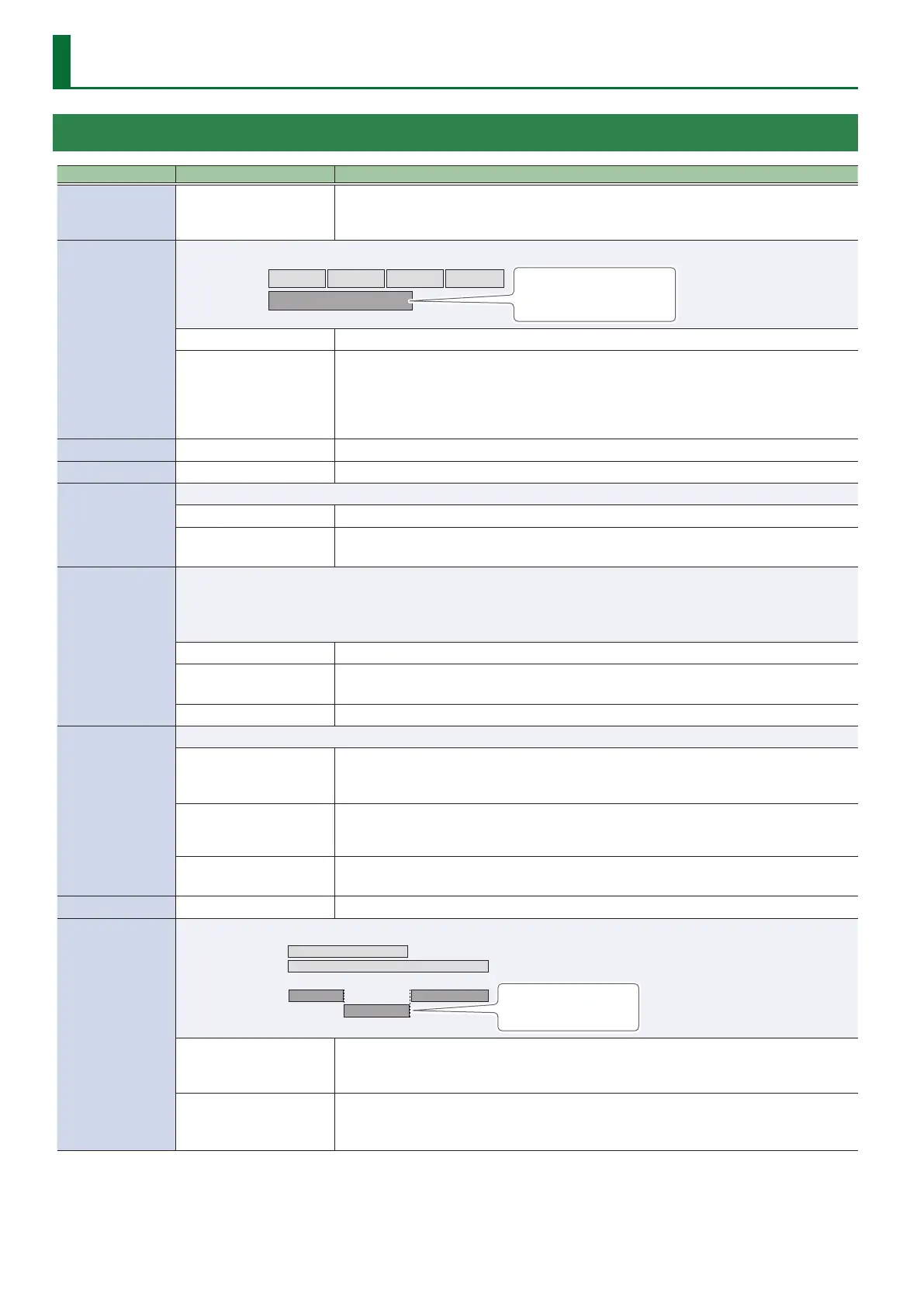
Memory Settings (LOOP)
TRACK 1–6
Parameter Value (Bold: default) Explanation
REVERSE
OFF, ON
Species conventional playback (OFF) or reverse playback (ON).
* When REVERSE is set to “ON,” you won’t be able to switch to overdubbing after a recording
has been completed.
1SHOT
Species whether the track playback will be one-shot (ON) or not one-shot (OFF; conventional loop playback).
Track 2: ON
Track 1: OFF
If 1SHOT is ON, playback will stop
when it reaches the end of the
phrase.
OFF Conventional loop playback.
ON
The phrase will play only once from the beginning to the end of the track, and then stop
automatically (One-Shot Playback).
If you press the [REC/PLAY] switch during playback, playback will begin again from the
beginning of the track (Retrigger Playback). Overdubbing cannot be carried out.
* If you don’t want to use tempo synchronization, set TEMPO SYNC SW (p. 3) “OFF.”
PAN
L50–CENTER–R50 Species the stereo position (pan) of the track.
PLAY LEVEL
0–100–200 Adjusts the playback level of the tracks.
START MODE
Species whether playback starts with a fade-in or immediately when the track plays.
IMMEDIATE Playback starts immediately.
FADE
Playback starts while fading in.
* You can use “FADE TIME” (p. 4) to specify the length of the fade-in.
STOP MODE
Species how the track will stop when you press the [STOP] switch.
5 The [REC/PLAY] switch will blink until playback stops.
5 If you press the [STOP] switch once again before playback stops, playback will stop immediately.
* You can’t overdubbing during the time until playback stops.
IMMEDIATE Playback will stop immediately.
FADE
Playback will fade out and then stop.
* You can use “FADE TIME” (p. 4) to specify the length of the fade-out.
LOOP Playback will continue to the end of the loop, and then stop.
DUB MODE
Species the overdubbing method.
OVERDUB
The new performance is layered onto the prerecorded tracks.
If overdubbing is repeated, the next performance is layered on top of the previous material,
allowing you to create an ensemble in a single track.
REPLACE1
Tracks with existing recordings are overwritten as new tracks are recorded over them.
Overwriting takes places while the previously recorded tracks are played back, allowing you to
achieve a kind of delay eect similar to that obtained from an eects processor.
REPLACE2
Tracks with existing recordings are overwritten as new tracks are recorded over them.
You can record over a track that has already been recorded, without playing that track.
FX
OFF, ON Species whether to apply input/track FX (ON) or not (OFF).
PLAY MODE
Species whether tracks 1 and 2 play back simultaneously.
MULTI: Track 1
Track 2
SINGLE: Track 1
Track 2
Stops when the other track
starts playing.
MULTI
Play back all tracks.
* To ensure that playback always takes place from the beginning of the phrase, you need to
set LOOP SYNC (p. 3) to “OFF.”
SINGLE
Play back only a single track.
The currently-playing track stops when the other track starts playing.
* If SINGL CHNGE is set to “LOOP END,” the track will change at the end of the loop.


 To Next Page