2
Connecting the Equipment
* To prevent malfunction and equipment failure, always turn
down the volume, and turn o all the units before making any
connections.
CTL 4, 5 jacks only (for the GA-FC)
INPUT
SEND
RETURN
DIRECT
CTL 2, 3
EXP 1
EFX REFX L
CTL 4, 5
EXP 2
GA-FC
There are many other ways to connect the SDE-3000EVH.
For details, refer to “Connecting an Amp and Conguring the Input/
Output Settings” (p. 12).
GND LIFT CABLE
You may hear a humming noise when more than one amp is
connected to this unit.
To disconnect the ground from the OUTPUT jacks, use the ground lift
cable included with this unit.
For details, refer to “Dealing with Hum Noise” (p. 11).
Turning the Power On
* Before turning the unit on/o, always be sure to turn the volume
down. Even with the volume turned down, you might hear some
sound when switching the unit on/o. However, this is normal and
does not indicate a malfunction.
1. Connect the AC adaptor to the DC IN jack.
This turns the power of the SDE-3000EVH on.
DC IN
AC adaptor
2. Turn on any connected devices rst, and then turn on
your guitar amp.
* Do this in reverse order when turning o the power.
* Unsaved data is lost when the power turns o. You must save any
data in advance that you want to keep.
* The bank and memory number that you were using when you
turned the power o are stored in memory, and are recalled when
you turn the unit back on.
Getting Ready
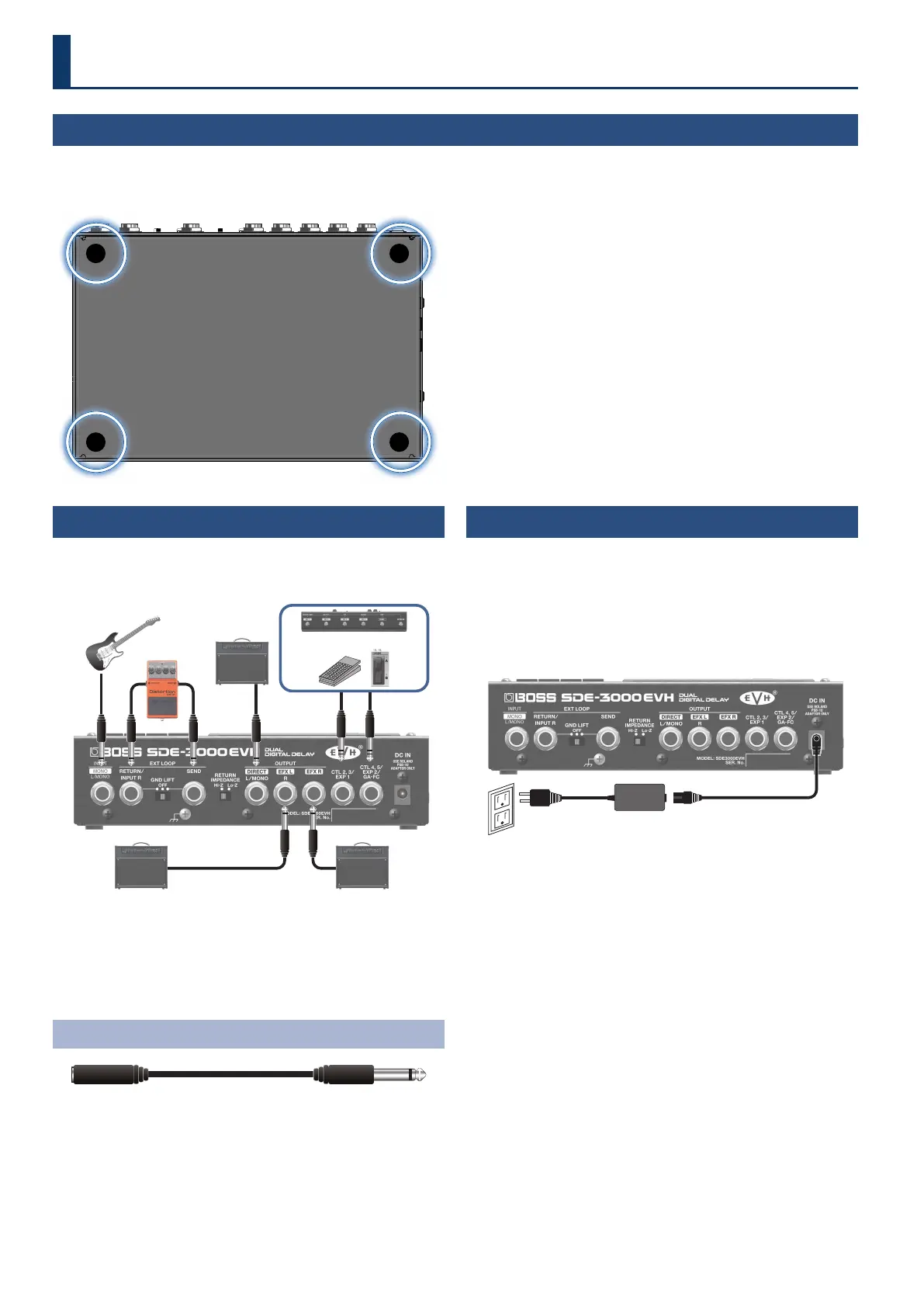
Attaching the Rubber Feet
You can attach the rubber feet (included) if necessary.
Attach them in the locations shown in the illustration.
* Using the unit without rubber feet may damage the oor.
* When turning the unit over, be careful so as to protect the buttons
and knobs from damage. Also, handle the unit carefully; do not
drop it.


 To Next Page