1-4
Getting Started
Getting Started
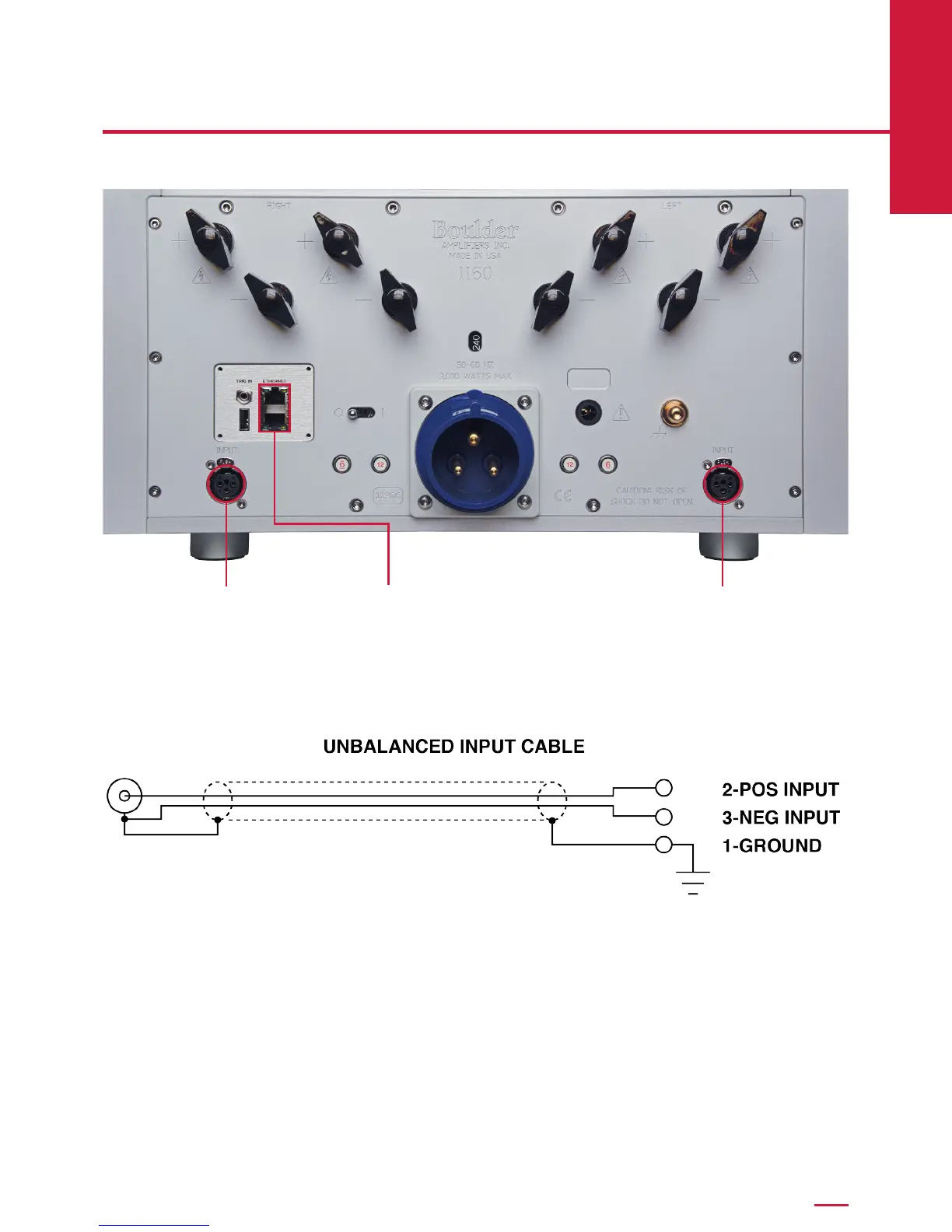
Connecting to a Network
In order for the 1160 to download software updates as necessary, it will
need to be connected to a network with an active Internet connection.
Connect a network cable between the 1160 and a network router or switch.
Use either Ethernet connector on the rear panel of the 1160; it does not
matter which one you use.
Connecting to a Balanced Source
To fully realize the sonic potential of your 1160 Stereo Power Amplier,
always use balanced connections. Balanced cables minimize interference
from magnetic and RF sources.
Connect the cables from your source or preamplier outputs to the input
connections provided on the rear panel of the 1160.
Connecting to an Unbalanced Source
Although the inputs are of the 3-pin XLR-type, an unbalanced source is
easily accommodated by using a special cable. This cable has an RCA-
type connector on the source end and a 3-pin XLR connector on the 1160
Stereo Power Amplier end.
The negative input (pin 3) should be wired to ground only at the RCA
connector. This brings the negative input reference of the 1160 to the
unbalanced source ground, thus reducing loops.
Another option for accommodating unbalanced sources is the Boulder
ABL2 Input Adapter. It converts a balanced input into an unbalanced RCA
input at the rear panel of the 1160. Like the above cable, the negative input
of the 1160 is connected to the ground of the RCA connector. However, the
negative side will then share the shield wire with the chassis ground and
will not have very good hum rejection.
Please contact your authorized Boulder dealer for further information about
the ABL2 Input Adaptor.
EthernetInput Input



 To Next Page