EasyManua.ls Logo

Bounty Hunter Platinum - User Manual

Bounty Hunter Platinum
24 pages
Print Icon
To Next Page IconTo Next Page
Loading...
ACCESSORIES
Gold
Prospecting Kits
FOR COMPLETE DETAILS VISIT WWW.DETECTING.COM1-800-413-4131
Bounty Hunter
®
Carry Bag
Rugged double-stitched construction. – CBAG2
Bounty Hunter
®
Pouch & Digger Combo
Pouch with 2 large pockets & 9” heavy duty digging tool. – TP-KIT-W
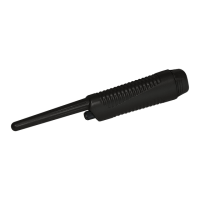
Pinpointer
Pinpoints the exact location of buried metal objects. Audio signal indicator
and vibrator. Runs on 1 -9-Volt Battery. PIN POINTER-W
Bounty Hunter
®
Sand Scoop
Large scoop with filtering holes. Made of strong plastic. – SAND SCOOPBH
Replacement/Accessory Search Coils
8 Concentric Open Face Standard
Replacement Coil – 8COIL-7B13
5 Biaxial Accessory Coil – 5COIL-TEKB
1 0 ” Concentric Replacement Coil – 10COIL-TEKB
1 1 Biaxial Accessory Coil – 11COIL-TEKB
Coil Covers
Protect your coil from abrasion and damage.
8 Concentric Open Face Standard Coil Cover– 8COVER-7
5 Biaxial Coil Cover – 5COVER-CZ3
1 0 ” Concentric Coil Cover – F70COVER
1 1 Biaxial Coil Cover – COVER-11DD
9” Heavy-Duty Digging Tool
Metal blade with comfortable plastic handle and depth gauge – TROWEL-2
Digging Tool
Light and practical wide blade digging tool. – TROWEL-W
Bounty Hunter
®
Baseball Cap
One size fits all, with Bounty Hunter
®
logo.
BHCAP
Bounty Hunter
®
T-Shirt
100% cotton with Bounty Hunter
®
Logo. Sizes: S, M, LG, XL & XXL
BHTSHIRT
PROFESSIONAL METAL DETECTOR
OWNER’S MANUAL
If you do not have prior
experience with a metal
detector, we strongly recommend
that you:
1) Adjust the Sensitivity to a low
setting in the event of false signals.
Always begin use at a reduced sensitivity
level; increase to full sensitivity after you
have become familiar with the detector.
2) Do not use indoors. This detector is for outdoor
use only. Many household appliances emit
electromagnetic energy, which can interfere with the detector. If
conducting an indoor demonstration, turn the sensitivity down and
keep the searchcoil away from appliances such as computers,
televisions and microwave ovens. If your detector beeps
erratically, turn off appliances and lights.
Also keep the searchcoil away from objects containing metal, such
as floors and walls.
3) Use a 9-volt ALKALINE battery only.
Do not use Heavy Duty Batteries.
MPLT14 Rev.4 040814
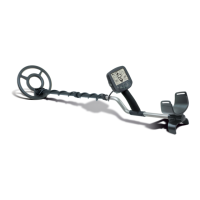
Some models come Standard
with the High Performance 11”
DD Searchcoil.

Other manuals for Bounty Hunter Platinum

Questions and Answers

  • J
    johnsonchristinaJul 27, 2025
    What to do if my Bounty Hunter Platinum Metal Detector has no power or sound?
    • M
      Michael BrockJul 27, 2025
      If your Bounty Hunter Metal Detector has no power and produces no sounds, it could be due to a dead battery or a loose connection. Try replacing the battery and checking the connections to ensure they are secure.
  • R
    Richard LucasAug 3, 2025
    Why does my Bounty Hunter Platinum chatter or beep erratically?
    • V
      vincentwhiteAug 3, 2025
      Your Bounty Hunter Metal Detector may chatter or beep erratically due to several reasons. It could be caused by using the detector indoors, being near power lines, using two detectors too close together (less than 20 feet apart), a highly oxidized buried object, or environmental electromagnetic interference. To resolve this, use the detector outdoors only, move away from power lines, keep detectors at least 20 feet apart, only dig up repeatable signals, or reduce the sensitivity until the erratic signals cease.
  • G
    georgechanAug 10, 2025
    Why does my Bounty Hunter Platinum Metal Detector emit constant low tones?
    • J
      Jorge ArnoldAug 10, 2025
      A constant low tone or constant repeating tones from your Bounty Hunter Metal Detector typically indicates a discharged or incorrect type of battery. Replace the battery, ensuring you use only a 9V alkaline battery.
  • M
    Martin McdonaldAug 17, 2025
    What to do if my Bounty Hunter Platinum LCD doesn't lock on to one Target-ID or emits multiple tones?
    • T
      taylorjohnAug 17, 2025
      If the LCD on your Bounty Hunter Metal Detector doesn't lock onto one Target-ID or the detector emits multiple tones, it could be due to multiple targets being present or a highly oxidized target. Try moving the coil slowly at different angles or reducing the sensitivity.

Summary

Getting Started Recommendations

Metal Detector Assembly Guide

Battery Information and Management

Battery Requirements and Life

Specifies 9-volt ALKALINE batteries and their expected operational life.

Quick Start Operational Demonstration

Operating the Metal Detector

Powering Up and Basic Controls

Instructions for turning on and navigating basic controls.

Menu Selections and Sensitivity

Details accessing and adjusting menu items like Sensitivity.

Metal Detector Mode Selections

Discrimination and All Metal Modes

Explains the primary search modes and their characteristics.

Pinpoint and Ground Grab

Covers precise target location and ground balancing calibration.

Interpreting Target Signals

Audio Target Identification

Explains how different tones correspond to different metal types.

2-Digit Target Identification Values

Details the numeric ID values for common metal objects.

Understanding Depth and Target Display

Troubleshooting Common Issues

Detector Performance Problems

Addresses erratic behavior, lack of sound, and target ID issues.

Bounty Hunter Platinum Specifications

General IconGeneral
Frequency6.6 kHz
DiscriminationYes
SensitivityAdjustable
Battery Type9V
Batteries1
DisplayLCD
Depth IndicatorYes
Pinpoint ModeYes
Adjustable LengthYes
Target IDYes
WaterproofSearch coil only
TypeVLF
Intended UseCoin, Relic, Jewelry
Search ModesAll Metal, Discrimination
Audio Tone3-Tone Audio Feedback

Related product manuals