Assembly / Owner’s Manual
25
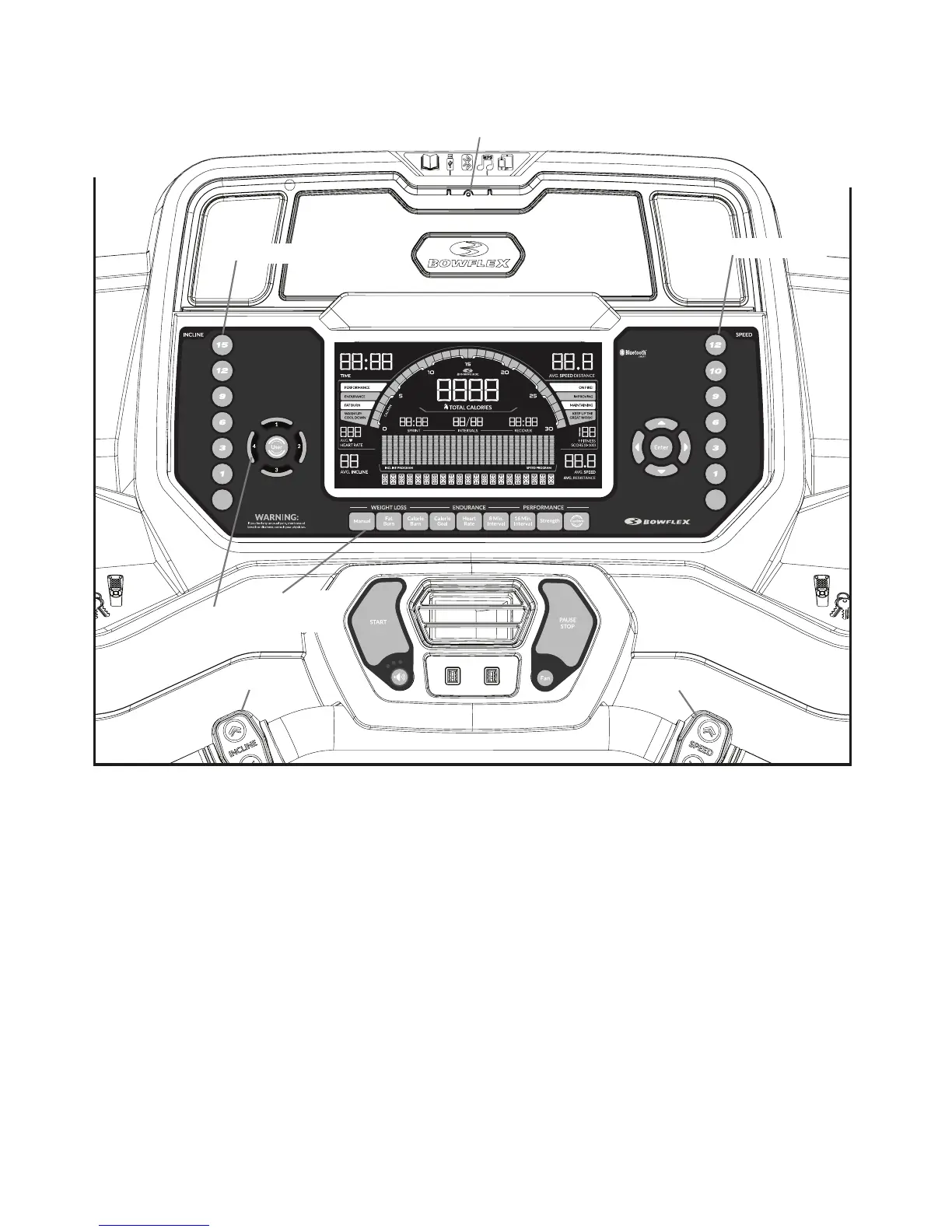
Bluetooth
®
App Connected display
Display shows when the machine is paired with the App.
Pre-Set Incline buttons
Selects an incline setting for the Walking Deck. After pushing a Pre-Set Incline button, push the Conrm Incline button within 12 seconds for the
Walking Deck to be adjusted to the desired incline.
Confirm Incline button
Activates the incline motor to adjust the Walking Deck to the selected Pre-Set Incline setting.
Active User display
The Active User display shows the selected user prole. A user prole is always selected. From a power up, the last User will be the default User.
Note: For more accurate calorie count, be sure to edit your User Prole.
Console
CONFIRM
SPEED
CONFIRM
INCLINE
Program buttons
Active User display
Pre-Set Incline buttons
Pre-Set Speed buttons
Bluetooth
®
App Connected display
Incline Controls
Speed Controls














 To Next Page