Assembly / Owner’s Manual
57
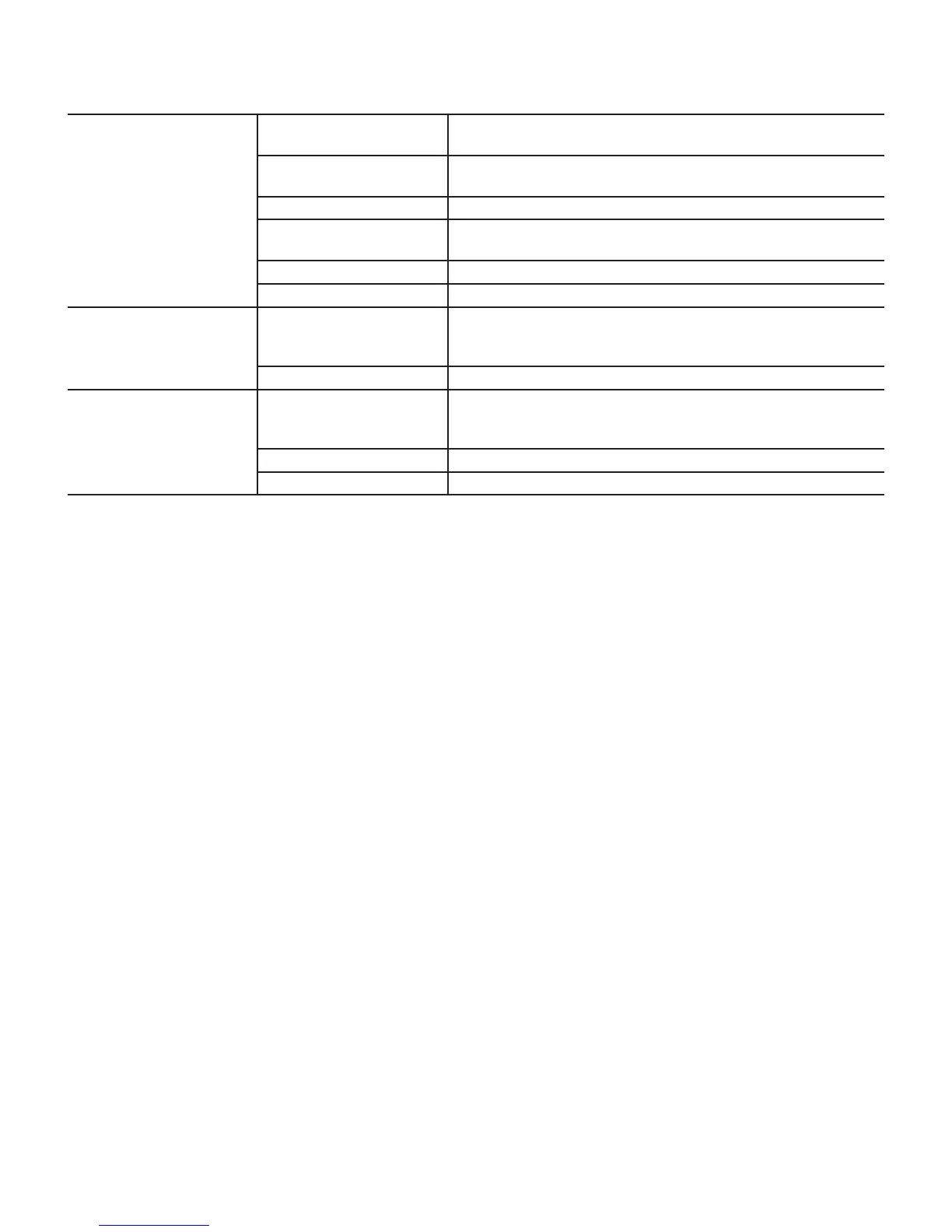
Workout results will not sync
with Bluetooth
®
enabled device
Current console mode Machine must be in Idle Mode to sync. Push the PAUSE/STOP button until
the Power-Up Mode screen is displayed.
Total time of workout A workout must be longer than 1 minute to be saved and posted by the
Console.
Fitness machine Unplug unit from electrical outlet for 5 minutes. Reconnect to outlet.
Bluetooth
®
enabled device Consult your device to be sure that the Bluetooth
®
wireless feature has been
enabled on it.
Fitness App Review Specications of Fitness App and conrm your device is compatible.
Contact appsupport@nautilus.com for further assistance.
Workout results not posting to
Bowex Connect™
Fitness App on Bluetooth
®
enabled device
Workout results transfer from the machine to the App, and then post to the
Bowex Connect™ website. Review account and password for the Bowex
Connect™ website.
Contact appsupport@nautilus.com for further assistance.
Workout results not posting
from Bowex Connect™ to
MyFitnessPal
®
account
Sync accounts From the Menu icon on the Bowex Connect™ website, select the Sync to
MyFitnessPal
®
.
Sync fails Review account and password for MyFitnessPal
®
.
Contact appsupport@nautilus.com for further assistance.














 To Next Page