36
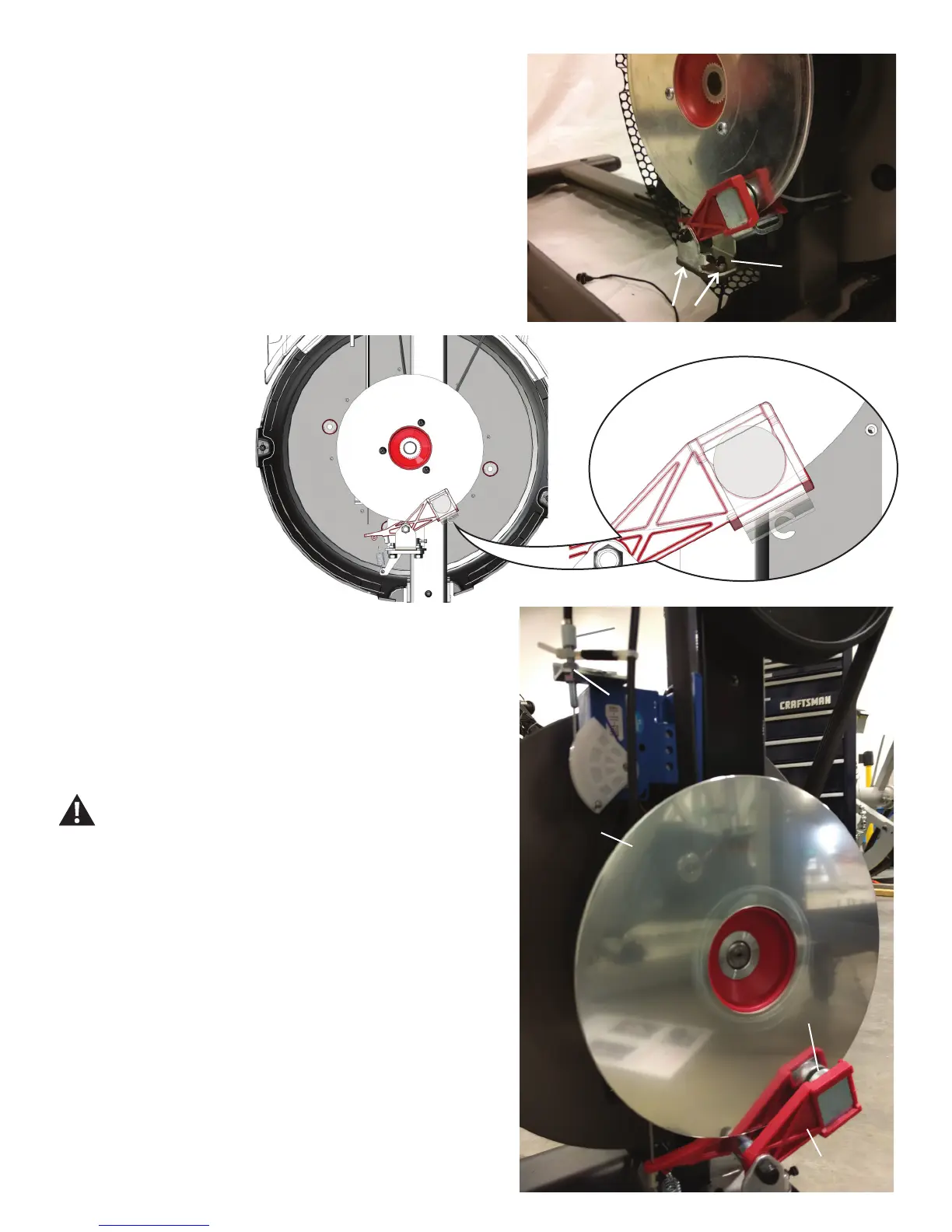
11. Using a 10mm hex wrench, remove the screws that connect the
Brake Assembly and remove it.
12. Attach the new Brake Assembly, but do not fully tighten the
hardware.
13. Attach the Brake Disc.
14. Reattach the Brake Spring and the Brake Cable to the Brake Arm,
and adjust to the tape marker.
15. At the maximum resistance
setting, the outer edge of the
Brake Magnet should line up with
the outer edge of the Brake Disc.
16. If the Brake Assembly needs to be adjusted, use a 8mm open ended
wrench to loosen the Brake Cable Securing Nut. Turn the Adjustment Bar-
rel by hand until the magnet is placed correctly.
17. Carefully rotate the Brake Disc. If the Brake Disc does not rub against
the Brake Magnet, skip to step 20.
Keep ngers out of any pinch opportunities when rotating
the Brake Disc.
Note: The Brake Disc may have a slight “wobble”. This is normal and will
not affect machine function.
Brake Disc
Brake Disc
Brake Assembly
Brake Magnet
Brake Cable Securing Nut
Adjustment Barrel
Brake Assembly













 To Next Page