41
Install DVD Player (Optional Attachment)
Tool:
• Small Phillips Head Screwdriver
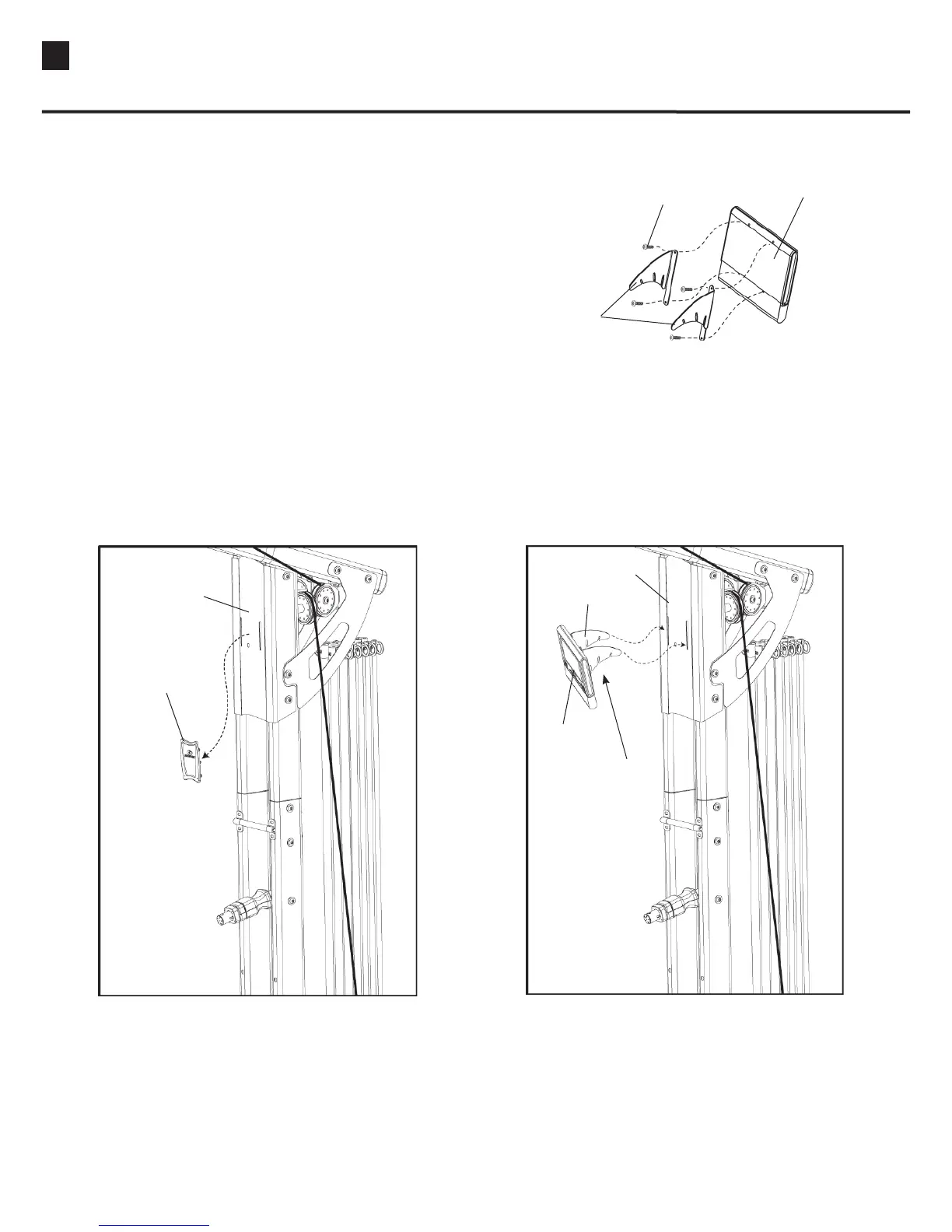
1. Attach the DVD Player to the two DVD Player
Brackets using the four small Phillips Head Screws
provided in the Bracket packaging.
(See Figure A)
2. Remove the Rubber Cover from the Face Plate. (See
Figure B) Insert the DVD Player Bracket into the
slots in the Face Plate.
(See Figure C)
Note: The three slots in the DVD Bracket provide
three possible angles for viewing.
Bracket
DVD Player
Phillips Head Screw
Remove
Rubber Cover
Face Plate
Face Plate
Bracket
Use Slots
To Adjust View
Angle
DVD Player
Installing Your Bowflex Ultimate
®
2 DVD Player


 To Next Page