How to use
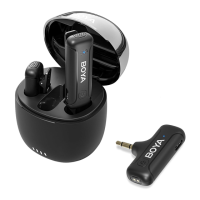
1. The transmitter(s) will be turned on automatically as soon as it is taken out
of the charging case.
2. Plug the Omic RXU into a
USB-C device.
3. Transmitter(s) and receiver will be automatically paired. The indicator of
the transmitter(s) is static blue.
4. Launch a video or audio recording app.
5. Select external microphone, if applicable (app dependent).
6. You are ready to record
Tips:
1. It is recommended to record a sample and play it back to check if the
audio level is acceptable before recording.
2. In order to improve the recording eect in a noisy environment, it is
recommended that press the power button on the transmitter(s) twice at
the same time to enable noise Cancellation.
3. After recording, put the transmitter(s) back into the case for charging.
Note:
Due to 2.4GHz wireless frequency, signal can be easily attenuated. Please try
to avoid obstacles, such as walls and buildings, and avoid close proximity to
devices with 2.4GHz signal, such as high-power Wi-Fi antennas, radios, etc.
06



 To Next Page